Giriş Gerekli
Devam etmek için iOSGods hesabınızla giriş yapın.
Devam etmek için iOSGods hesabınızla giriş yapın.
Bu FR3 çok oyunculu yarış oyunu hilesi sana gerçek zamanlı yarışlarda dünya çapındaki oyunculara karşı hakim olmak için Tanrı Modu sunuyor. Mod IPA güçlü bir hile içeriyor, ancak kritik bir uyarı ile geliyor: kötüye kullanım oyun içi raporlara ve yasaklamalara neden oluyor, özellikle yüksek bir yasaklama oranı vardır, kendi sorumluluğunuzda kullanın.
- Tanrı Modu → Diğer oyunculara karşı yenilmez bir şekilde yarış yap
Kötüye kullanmayın, oyun içinde oyuncular tarafından bildirildiğinizde yasaklanacaksınız
Yüksek yasaklama oranı, kendi sorumluluğunuzda kullanın
Bu uygulama ayrıca, tekrar eden görevleri otomatikleştirmek için Auto Touch, ayarlanabilir oyun hızı için App Speed Manager, Memory Engine ile değer düzenleme ve daha pek çok güçlü iOS oyun aracına erişim sağlayan iGameGod ile birlikte gelir.
Yukarıdaki bağlantılardan FR3 - Multiplayer Games Hack modded IPA indirin. Yükle düğmesine dokunup ekrandaki yönergeleri izleyerek bu iOS uygulama hack'ini iPhone, iPad veya Apple Silicon'a yükleyin.
Daha fazla yardıma mı ihtiyacınız var? Ayrıntılı yanıtlar ve sorun giderme ipuçları için iOSGods Uygulaması Sık Sorulan Sorular sayfamıza bakın.
Join our community of 130 million Fun Run players from all around the world in one of the best online multiplayer games!
Funny Running Game
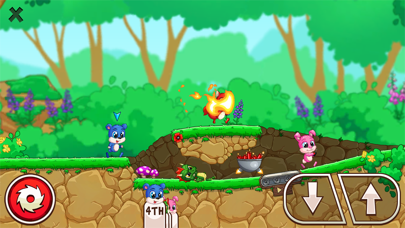
Fun Run 3 Arena takes the legendary gameplay of classic running race games and adds a new dimension of cool! Race against other real players while escaping obstacles. Sabotage your rival runners’ progress to WIN the race in this fun game to play online. No holding back! Slash, crush, and destroy your opponents to the finish line!
Arena Gameplay
Arena is the where eight furries fight against elimination! Only the fastest 3 reach the finish line for amazing rewards and ultimate glory. Be the victorious in this addicting game mode and fulfill your destiny as the one and only ARENA CHAMPION.
Form a Clan & Run with Friends
Run with your clan buddies! Participate in multiplayer games online with friends or total strangers. Find friends online to show them how it’s done! Fun Run 3 is all about playing awesome games with friends – and beating them to the finish line!
Show off your style and be the coolest critter in the forest!
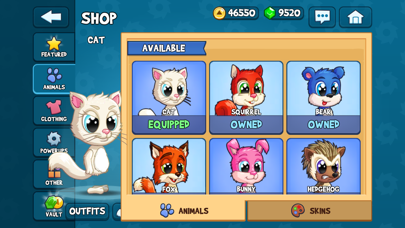
We packed this Fun Run game with hilarious fashionable accessories! Choose from different furry friends and dress them up with cool hats, boots, sunglasses and even more swag to show off your funny games style!
Cool & Fun Features
- Clan Battles in a 2v2 mode!
- 30+ new power-ups!
- Arena - the new 8 player racing game mode!
- Race against friends or random players in real-time!
- Slam & Slide: two new actions to leave the opposition in the dust!
- Customize your avatar with more options than ever!
- Conquer lots of new levels!
- Climb the leaderboards and challenge the best players in the world!
Fun Run 3 Arena is a free online multiplayer game – an internet connection is required.
The Arena awaits! Download Fun Run 3 Arena now and start running! Ready, Set, GO!
- Jailbreak'siz/normal ya da jailbreak'li iPhone veya iPad.
- Sideloadly veya alternatifleri.
- iTunes yüklü Windows/macOS/Linux çalıştıran bir bilgisayar.
ADIM 1: Yukarıdaki bağlantıdan önceden hacklenmiş .IPA dosyasını bilgisayarınıza indirin. iOSGods App üzerinden indirmek için video örneği de içeren iOSGods App IPA İndirme Kılavuzu bölümümüze göz atın.
ADIM 2: Sideloadly indirin ve Windows veya Mac'inize kurun.
ADIM 3: Bilgisayarınızda Sideloadly'yi açın, iOS cihazınızı bağlayın ve cihaz adınız Sideloadly'de görünene kadar bekleyin.
ADIM 4: iCihazınız tanındıktan sonra, indirdiğiniz modlu .IPA dosyasını sürükleyip Sideloadly uygulamasına bırakın.
ADIM 5: Apple Account e-posta adresinizi girin ve ardından "Start" düğmesine basın. Sonrasında sizden şifreniz istenecektir. Gerekli bilgileri girin.
ADIM 6: Sideloadly'nin hacklenmiş IPA'yı sideload edip yüklemesini bekleyin. Yükleme sırasında bir sorun olursa lütfen aşağıdaki notu okuyun.
ADIM 7: Yükleme tamamlandıktan ve uygulamayı Ana Ekranınızda gördükten sonra Ayarlar → Genel → Profiller / VPN ve Cihaz Yönetimi bölümüne gitmelisiniz. Burada 6. adımda girdiğiniz e-postaya dokunun ve ardından "[email protected]'a Güven" seçeneğine dokunun.
ADIM 8: Şimdi Ana Ekranınıza gidin ve yeni yüklediğiniz uygulamayı açın; her şey sorunsuz çalışmalıdır. Oyun içindeki hack açılır penceresinde uygulamaya özel ek talimatları takip etmeniz gerekebilir.
NOT: iOS/iPadOS 16 ve sonrasında Geliştirici Modu'nu etkinleştirmeniz gerekir. Ücretsiz Apple Developer hesapları için bu işlemi her 7 günde bir tekrarlamanız gerekir. Sorularınız veya sorunlarınız varsa konunun Sideloadly SSS bölümünü okuyun.