ต้องเข้าสู่ระบบ
เข้าสู่ระบบด้วยบัญชี iOSGods เพื่อดำเนินการต่อ
เข้าสู่ระบบด้วยบัญชี iOSGods เพื่อดำเนินการต่อ
แฮกเกมแข่งรถมัลติเพลเยอร์สำหรับ FR3 - Multiplayer Games Hack นี้ให้คุณมี โหมดพระเจ้า เพื่อครอบงำการแข่งขันแบบเรียลไทม์กับผู้เล่นทั่วโลก Mod IPA มีเคล็ดลับที่ทรงพลังหนึ่งอย่าง แต่มาพร้อมกับคำเตือนที่สำคัญ การใช้งานอย่างมากเกินไปจะทำให้เกิดรายงานในเกมและแบน โดยมีอัตราแบนที่สูงมาก ใช้ได้ตามความเสี่ยงของคุณเอง
- โหมดพระเจ้า → แข่งขันอย่างไม่มีตัวตนกับผู้เล่นคนอื่น
อย่าใช้งานอย่างมากเกินไป เมื่อผู้เล่นรายงานคุณในเกม คุณจะถูกแบน
อัตราแบนสูง ใช้ได้ตามความเสี่ยงของคุณเอง
แอปนี้ยังมาพร้อมกับ iGameGod ซึ่งช่วยให้คุณเข้าถึง Auto Touch สำหรับการทำงานซ้ำ ๆ โดยอัตโนมัติ, App Speed Manager สำหรับปรับความเร็วของเกม, การแก้ไขค่าด้วย Memory Engine และเครื่องมือสำหรับเกม iOS ที่ทรงพลังอื่น ๆ อีกมากมาย
ดาวน์โหลด FR3 - Multiplayer Games Hack modded IPA จากลิงก์ด้านบน แตะปุ่มติดตั้งและทำตามคำแนะนำบนหน้าจอเพื่อติดตั้งแฮ็กแอป iOS นี้บน iPhone, iPad หรือ Apple Silicon
ต้องการความช่วยเหลือเพิ่มเติม? ดู คำถามที่พบบ่อยของแอป iOSGods สำหรับคำตอบโดยละเอียดและเคล็ดลับการแก้ไขปัญหา
Join our community of 130 million Fun Run players from all around the world in one of the best online multiplayer games!
Funny Running Game
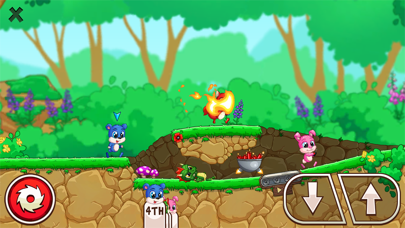
Fun Run 3 Arena takes the legendary gameplay of classic running race games and adds a new dimension of cool! Race against other real players while escaping obstacles. Sabotage your rival runners’ progress to WIN the race in this fun game to play online. No holding back! Slash, crush, and destroy your opponents to the finish line!
Arena Gameplay
Arena is the where eight furries fight against elimination! Only the fastest 3 reach the finish line for amazing rewards and ultimate glory. Be the victorious in this addicting game mode and fulfill your destiny as the one and only ARENA CHAMPION.
Form a Clan & Run with Friends
Run with your clan buddies! Participate in multiplayer games online with friends or total strangers. Find friends online to show them how it’s done! Fun Run 3 is all about playing awesome games with friends – and beating them to the finish line!
Show off your style and be the coolest critter in the forest!
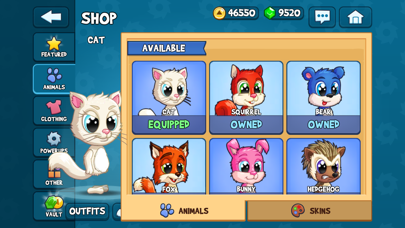
We packed this Fun Run game with hilarious fashionable accessories! Choose from different furry friends and dress them up with cool hats, boots, sunglasses and even more swag to show off your funny games style!
Cool & Fun Features
- Clan Battles in a 2v2 mode!
- 30+ new power-ups!
- Arena - the new 8 player racing game mode!
- Race against friends or random players in real-time!
- Slam & Slide: two new actions to leave the opposition in the dust!
- Customize your avatar with more options than ever!
- Conquer lots of new levels!
- Climb the leaderboards and challenge the best players in the world!
Fun Run 3 Arena is a free online multiplayer game – an internet connection is required.
The Arena awaits! Download Fun Run 3 Arena now and start running! Ready, Set, GO!
- iPhone หรือ iPad ที่ไม่ได้เจลเบรก/ไม่ได้เจลเบรก หรือเจลเบรกแล้ว
- Sideloadly หรือทางเลือกอื่น
- คอมพิวเตอร์ที่ใช้ Windows/macOS/Linux และติดตั้ง iTunes ไว้
ขั้นตอนที่ 1: ดาวน์โหลดไฟล์ .IPA ที่แฮกไว้ล่วงหน้าจากลิงก์ด้านบนลงในคอมพิวเตอร์ของคุณ หากต้องการดาวน์โหลดจากแอป iOSGods โปรดดู วิธีดาวน์โหลด IPA ในแอป iOSGods ซึ่งมีตัวอย่างวิดีโอประกอบ
ขั้นตอนที่ 2: ดาวน์โหลด Sideloadly แล้วติดตั้งบน Windows หรือ Mac ของคุณ
ขั้นตอนที่ 3: เปิด Sideloadly บนคอมพิวเตอร์ เชื่อมต่ออุปกรณ์ iOS แล้วรอจนกว่าชื่ออุปกรณ์ของคุณจะปรากฏใน Sideloadly
ขั้นตอนที่ 4: เมื่อ iDevice ของคุณถูกตรวจพบแล้ว ให้ลากไฟล์ .IPA ที่ม็อดมาวางลงในโปรแกรม Sideloadly
ขั้นตอนที่ 5: กรอกอีเมล Apple Account ของคุณ จากนั้นกด "Start" ระบบจะถามรหัสผ่าน กรอกข้อมูลที่จำเป็นให้เรียบร้อย
ขั้นตอนที่ 6: รอจนกว่า Sideloadly จะ sideload/ติดตั้งไฟล์ IPA ที่แฮกเสร็จ หากเกิดปัญหาระหว่างติดตั้ง โปรดอ่านหมายเหตุด้านล่าง
ขั้นตอนที่ 7: เมื่อการติดตั้งเสร็จสิ้นและเห็นแอปบนหน้าจอหลักแล้ว ให้ไปที่ การตั้งค่า → ทั่วไป → โปรไฟล์ / VPN และการจัดการอุปกรณ์ จากนั้นแตะที่อีเมลที่คุณกรอกในขั้นตอนที่ 6 แล้วแตะ "เชื่อถือ [email protected]"
ขั้นตอนที่ 8: จากนั้นไปที่หน้าจอหลักและเปิดแอปที่ติดตั้งใหม่ ทุกอย่างควรทำงานได้ปกติ คุณอาจต้องทำตามคำแนะนำเพิ่มเติมเฉพาะแอปในป๊อปอัปของม็อดในเกม
หมายเหตุ: สำหรับ iOS/iPadOS 16 ขึ้นไป คุณต้อง เปิดโหมดนักพัฒนา (Developer Mode) สำหรับบัญชี Apple Developer แบบฟรี คุณต้องทำขั้นตอนนี้ซ้ำทุก 7 วัน หากมีคำถามหรือพบปัญหา โปรดอ่าน หัวข้อ FAQ ของ Sideloadly ในกระทู้