Login necessário
Entre com sua conta iOSGods para continuar.
Entre com sua conta iOSGods para continuar.
Este hack de jogo de corrida multijogador para FR3 oferece Modo Deus para dominar corridas em tempo real contra jogadores em todo o mundo. O Mod IPA inclui um truque poderoso, mas vem com um aviso crítico: o abuso ativa relatórios no jogo e banimentos, com uma taxa de banimento notavelmente alta, use por sua conta e risco.
- Modo Deus → Corra invencivelmente contra outros jogadores
Não abuse, quando jogadores o denunciarem no jogo você será banido
Taxa de banimento alta, use por sua conta e risco
Este app também vem com iGameGod, oferecendo acesso ao Auto Touch para automatizar tarefas repetitivas, App Speed Manager para ajustar a velocidade do jogo, edição de valores com Memory Engine e outras ferramentas avançadas para jogos iOS.
Baixe FR3 - Multiplayer Games Hack modded IPA dos links acima. Toque no botão de instalação e siga as instruções para instalar este hack iOS no seu iPhone, iPad ou Apple Silicon.
Precisa de mais ajuda? Confira nossas Perguntas frequentes sobre o app iOSGods para respostas detalhadas e dicas de solução de problemas.
Junte-se à nossa comunidade de 100 milhões de jogadores de Fun Run em todo o mundo num dos melhores jogos gratuitos de multijogadores online! Prepare-se para os jogos de corrida com muita diversão – compita contra os seus adversários peludos!
***Fun Run está de volta***
Estamos de volta para o terceiro capítulo da saga Fun Run - FUN RUN 3 ARENA - com mais da maldade e caos que adorou no Fun Run e Fun Run 2.
***Jogo de corrida ridiculamente engraçado***
Fun Run 3 Arena leva a jogabilidade lendária dos jogos de corrida clássicos e junta-lhe uma nova dimensão cool! Corra contra outros jogadores reais, enquanto escapa aos obstáculos. Sabote o progresso da corrida dos seus rivais para GANHAR a corrida neste jogo divertido para jogar online gratuitamente. Esmague e destrua os seus adversários na linha de chegada!
***Experiência de jogo Arena***
Arena é onde oito animais peludos lutam contra a eliminação! Apenas os 3 mais rápidos alcançam a linha de chegada para ganhar recompensas incríveis e a glória final. Cumpra o seu destino como o primeiro e único CAMPEÃO ARENA.
***Forme um Clã e Corra com os seus Amigos***
Corra com os seus amigos do clã! Participe em jogos de multijogadores online com amigos ou desconhecidos. Fun Run 3 é sobre jogar jogos impressionantes com amigos - e ganhar-lhes na linha de chegada!
***Exiba o seu estilo e seja o bicho mais fixe da floresta!***
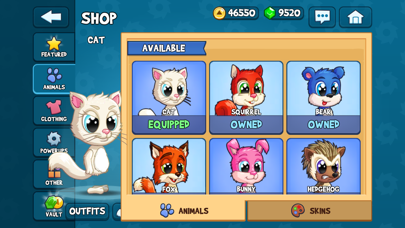
Enchemos este jogo Fun Run gratuito com acessórios de moda hilariantes! Escolha entre diferentes amigos peludos e vista-os com chapéus de moda, botas e óculos de sol, para se exibir no seu jogo divertido!
Características divertidas e cool
- Batalhas de clãs em modo 2v2!
- 30+ potenciadores novos!
- Arena - o novo jogo de corrida no modo 8 jogadores!
- Corrida online contra amigos ou jogadores aleatórios em tempo real!
- Slam & Slide: duas novas ações incríveis para vencer o adversário!
- Personalize o seu avatar com mais opções do que nunca!
- Conquiste muitos novos níveis!
- Suba as tabelas de liderança e desafie os melhores jogadores do mundo!
Fun Run 3 Arena é um jogo de multijogadores online e gratuito - é necessária uma ligação à Internet
A Arena espera por si! Transfira Fun Run 3 Arena agora mesmo e comece a correr! Partida, Largada, VAI!
- iPhone ou iPad sem jailbreak/jailed ou com jailbreak.
- Sideloadly ou alternativas.
- Computador com Windows/macOS/Linux e iTunes instalado.
PASSO 1: Baixe o arquivo .IPA pré-hackeado do link acima para o seu computador. Para baixar pelo iOSGods App, veja nosso Tutorial de download de IPA do iOSGods App, que inclui um exemplo em vídeo.
PASSO 2: Baixe o Sideloadly e instale-o no seu Windows ou Mac.
PASSO 3: Abra o Sideloadly no seu computador, conecte seu dispositivo iOS e aguarde até que o nome do dispositivo apareça no Sideloadly.
PASSO 4: Assim que seu iDevice for reconhecido, arraste o arquivo .IPA modificado que você baixou e solte-o no aplicativo Sideloadly.
PASSO 5: Digite o e-mail da sua Apple Account e pressione “Start”. Em seguida, será solicitada a sua senha. Prossiga e forneça as informações solicitadas.
PASSO 6: Aguarde o Sideloadly finalizar o sideload/instalação do IPA hackeado. Se houver problemas durante a instalação, leia a observação abaixo.
PASSO 7: Quando a instalação estiver concluída e você vir o app na Tela de Início, será necessário acessar Ajustes → Geral → Perfis / Gerenciamento de VPN e Dispositivo. Lá, toque no e-mail que você inseriu no passo 6 e, em seguida, toque em “Confiar em [email protected]”.
PASSO 8: Agora vá para a Tela de Início e abra o app recém-instalado; tudo deve funcionar normalmente. Você pode precisar seguir instruções adicionais específicas no popup do hack dentro do jogo.
OBSERVAÇÃO: No iOS/iPadOS 16 e versões posteriores, você deve ativar o Modo de Desenvolvedor. Para contas Apple Developer gratuitas, será necessário repetir este processo a cada 7 dias. Se tiver dúvidas ou problemas, leia nossa seção de FAQ do Sideloadly no tópico.