Accesso richiesto
Accedi con il tuo account iOSGods per continuare.
Accedi con il tuo account iOSGods per continuare.
Crea splendidi design tipografici con Typorama, un editor di testo su foto che trasforma le tue parole e immagini in bellissimi layout in pochi secondi. Questa app iOS modificata sblocca le funzioni premium, dandoti accesso a tutti i caratteri, sfondi e strumenti di design senza limitazioni. Non è necessaria alcuna esperienza di design, basta scegliere uno sfondo, digitare il testo e lasciare che l'app generi automaticamente tipografia di qualità professionale.
- Premium Sbloccato → accedi a tutti i caratteri, sfondi e funzioni di design
Questa app include anche iGameGod, che ti offre accesso ad Auto Touch per automatizzare attività ripetitive, App Speed Manager per regolare la velocità di gioco, modifica dei valori con Memory Engine e altri potenti strumenti per giochi iOS.
Scarica Typorama: Text on Photo Editor Modded modded IPA dai link sopra. Tocca il pulsante di installazione e segui le istruzioni per installare questo hack iOS sul tuo iPhone, iPad o Mac con Apple Silicon.
Hai bisogno di altro aiuto? Consulta le nostre Domande frequenti sull'app iOSGods per risposte dettagliate e consigli per la risoluzione dei problemi.
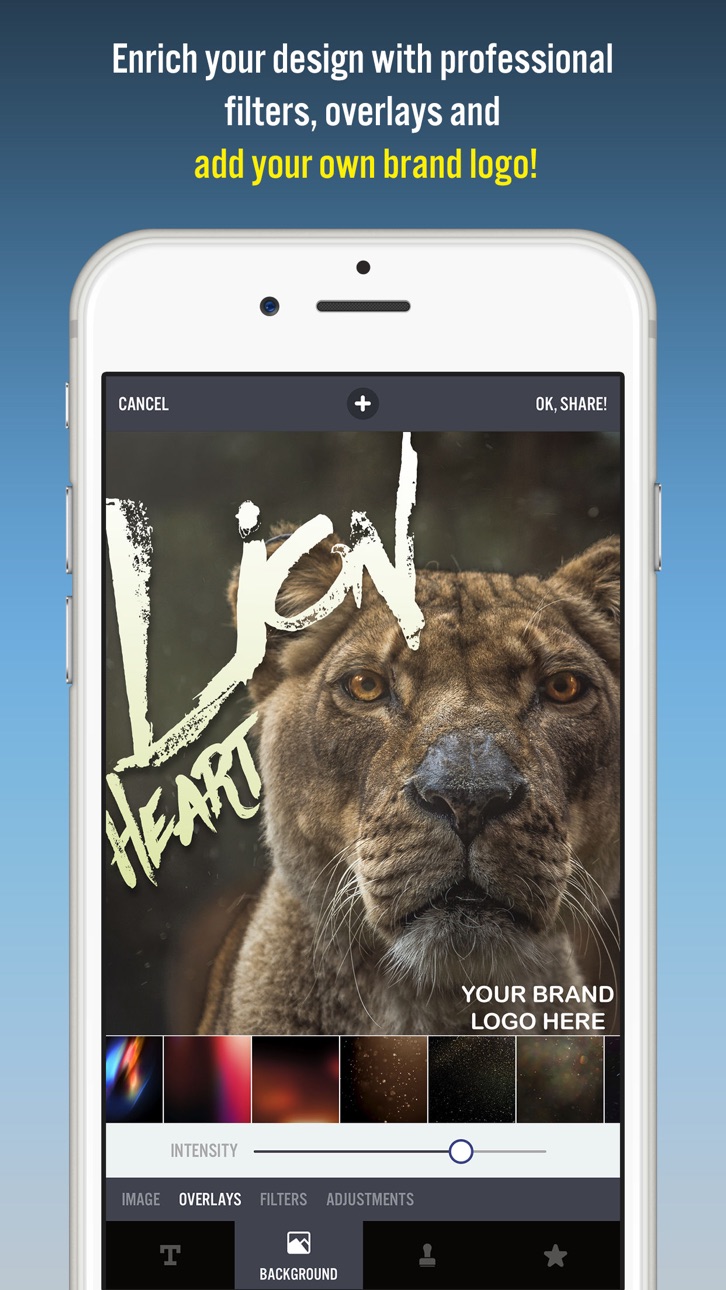
Typorama lets you create amazing visuals by "automagically" transforming your text and photos into beautiful typographic designs. No design skills needed!
Just choose a background, type in your words and your creative typography is ready!
Typorama saves you tons of work by automatically creating complex text layouts with different fonts and typefaces. By just a few taps, you instantly get your text beautifully laid out on a background of your choice. This would take hours if you were using Photoshop or a similar photo editor. (The text designs are not templates and they are generated randomly as you choose different styles).
Use Typorama to:
- Make beautiful typographic text layouts
- Create Instagram, Facebook, Twitter posts with stylish text designs
- Create flyers and posters for your events or organization
- Make headers for your blog or wallpapers for your iPhone
- Promote your brand online or turn your designs into physical goods and sell for profits, full commercial use with all included images and fonts allowed!
- Enrich your family photos adding creative text styles and share your love
Features:
- More than 50 different, randomly generating typographic text styles
- More than a hundred different fonts and typefaces from the world's top designers
- Badges, ribbons, curved text and artistic ornaments enriching your designs
- Ability to 3D distort, apply gradient colors, shadows to your text
- Ability to gradually delete parts of text, useful for placing your text designs behind other elements in your photos
- Professional photo filters, overlays and adjustment tools to polish your photo backgrounds
- Hundreds of pre-installed quotes to inspire you
- Fun color combinations for your words
- Thousands of ready-to-use stock photography from Pixabay and Unsplash
- 2048 x 2048 high resolution super crisp output
- Advanced crop options to create the perfect size pictures for social media posts, wallpapers, posters, flyers and postcards.
- Ability to design your own watermark / logo and add it to your creations. Once you add it, it automatically gets added to all of your future creations, great for promoting your brand on social media!
- Easily share your creation on your favorite social networks or send it to your friends via instant messengers
- Use your designs commercially for promoting your brand online or via printed posters, flyers or any kind of physical products you like.
Typorama is featured as:
- "Best New App and Best Apps of April 2015" by Apple
- "Best Apps of the Week" by the TIME magazine
- "Honorable App of the Week" by AppAdvice
We're excited to see how you'll be using Typorama!
====================
Typorama PRO Upgrade FAQ
With Typorama PRO you'll have unlimited access to all the premium content and features.
Payment will be charged to iTunes Account at confirmation of purchase. Your subscription automatically renews unless auto-renew is turned off at least 24-hours before the end of the current period. Your account will be charged for renewal within 24-hours prior to the end of the current period with the same cost you've started your subscription.
To cancel or manage your subscription, navigate to manage your Apple ID in your device's settings. Sign in to the iTunes / App Store, tap Typorama, and turn off the automatic renewal for the subscription. Disabling the automatic renewal must be done 24-hours before the end of the subscription period to avoid being charged. Due to Apple’s policy, immediate cancellation of subscriptions isn’t possible.
To restore your upgrade to Typorama PRO on a new device, go to the INFO screen, tap the “Restore Previous Purchases” option and your subscription / previous purchases will become active free of charge.
More info: http://www.apperto.com/typorama/faq/
Screenshot © rispettivi proprietari · App Store


iOSGods non è affiliata, approvata né sponsorizzata da Apple Inc., Google LLC o dagli sviluppatori delle app elencate qui. Apple, iOS e App Store sono marchi di Apple Inc. Android e Google Play sono marchi di Google LLC. Tutti gli altri nomi delle app, icone, immagini e marchi appartengono ai rispettivi proprietari.

- iPhone o iPad non jailbroken/jailed oppure jailbroken.
- Sideloadly o alternative.
- Computer con Windows/macOS/Linux con iTunes installato.
PASSO 1: Scarica il file .IPA pre-modificato dal link sopra sul tuo computer. Per scaricarlo dall'iOSGods App, consulta il nostro Tutorial download IPA dell'iOSGods App, che include un esempio video.
PASSO 2: Scarica Sideloadly e installalo sul tuo Windows o Mac.
PASSO 3: Apri Sideloadly sul tuo computer, collega il tuo dispositivo iOS e attendi finché il nome del dispositivo non appare in Sideloadly.
PASSO 4: Una volta riconosciuto il tuo iDevice, trascina il file .IPA moddato che hai scaricato e rilascialo nell'applicazione Sideloadly.
PASSO 5: Inserisci l'email del tuo Apple Account, poi premi “Start”. Ti verrà quindi chiesto di inserire la password. Procedi e fornisci le informazioni richieste.
PASSO 6: Attendi che Sideloadly completi il sideload/installazione dell'IPA modificata. Se ci sono problemi durante l'installazione, leggi la nota qui sotto.
PASSO 7: Una volta completata l'installazione e vista l'app sulla schermata Home, dovrai andare in Impostazioni → Generali → Profili / Gestione VPN e dispositivi. Una volta lì, tocca l'email inserita al passo 6 e poi tocca “Autorizza [email protected]”.
PASSO 8: Ora vai sulla schermata Home e apri l'app appena installata: tutto dovrebbe funzionare correttamente. Potrebbe essere necessario seguire ulteriori istruzioni specifiche all'interno del popup dell'hack nel gioco.
NOTA: Per iOS/iPadOS 16 e versioni successive, devi attivare la Modalità sviluppatore. Per gli account Apple Developer gratuiti, dovrai ripetere questa procedura ogni 7 giorni. Se hai domande o problemi, leggi la nostra sezione FAQ Sideloadly del topic.
Game Name iOS Mod IPA is an action adventure game enhanced with powerful gameplay boosts and quality-of-life improvements. Win battles faster, earn rewards quicker, and enjoy uninterrupted play without ads.
- Unlimited Gold - spend freely to unlock premium content
- Damage Multiplier - deal significantly more damage in combat
- Defense Multiplier - take less damage and survive longer
- Reward Multiplier - earn more loot from every battle
- Max Level - instantly reach the highest player rank
- No Ads - play without interruptions or advertisements
This app also comes with iGameGod, giving you access to Auto Touch to automate repetitive tasks, App Speed Manager for adjustable gameplay speed, Memory Engine value editing, and more powerful iOS game tools.
Scarica Game Name Mod IPA dai link sopra. Tocca il pulsante di installazione e segui le istruzioni per installare questo hack iOS sul tuo iPhone, iPad o Mac con Apple Silicon.
Hai bisogno di altro aiuto Consulta le nostre Domande frequenti sull'app iOSGods per risposte dettagliate e consigli per la risoluzione dei problemi.
----------------------------------------------------------
--------------------------------------------------