로그인 필요
계속하려면 iOSGods 계정으로 로그인하세요.
계속하려면 iOSGods 계정으로 로그인하세요.
Typorama: Text on Photo Editor Modded로 멋진 타이포그래피 디자인을 만들어보세요. 이 텍스트 온 포토 에디터는 당신의 단어와 이미지를 몇 초 만에 아름다운 레이아웃으로 변환합니다. 이 수정된 iOS 앱은 프리미엄 기능을 잠금 해제하여 제한 없이 모든 폰트, 배경, 디자인 도구에 접근할 수 있게 해줍니다. 디자인 경험이 필요 없습니다. 배경을 선택하고 텍스트를 입력한 후 앱이 전문가 수준의 타이포그래피를 자동으로 생성하도록 하면 됩니다.
- 프리미엄 잠금 해제 → 모든 폰트, 배경, 디자인 기능에 접근 가능
이 앱에는 iGameGod도 포함되어 있어 반복 작업을 자동화하는 Auto Touch, 게임 속도를 조절할 수 있는 App Speed Manager, Memory Engine 값 편집 등 강력한 iOS 게임 도구를 사용할 수 있습니다.
위의 링크에서 Typorama: Text on Photo Editor Modded modded IPA을 다운로드합니다. 설치 버튼을 누르고 화면 안내에 따라 iPhone, iPad 또는 Apple Silicon에 이 iOS 앱 해킹을 설치합니다.
더 많은 도움이 필요하신가요? 자세한 답변과 문제 해결 팁은 iOSGods 앱 자주 묻는 질문을 확인하세요.
Typorama lets you create amazing visuals by "automagically" transforming your text and photos into beautiful typographic designs. No design skills needed!
Just choose a background, type in your words and your creative typography is ready!
Typorama saves you tons of work by automatically creating complex text layouts with different fonts and typefaces. By just a few taps, you instantly get your text beautifully laid out on a background of your choice. This would take hours if you were using Photoshop or a similar photo editor. (The text designs are not templates and they are generated randomly as you choose different styles).
Use Typorama to:
- Make beautiful typographic text layouts
- Create Instagram, Facebook, Twitter posts with stylish text designs
- Create flyers and posters for your events or organization
- Make headers for your blog or wallpapers for your iPhone
- Promote your brand online or turn your designs into physical goods and sell for profits, full commercial use with all included images and fonts allowed!
- Enrich your family photos adding creative text styles and share your love
Features:
- More than 50 different, randomly generating typographic text styles
- More than a hundred different fonts and typefaces from the world's top designers
- Badges, ribbons, curved text and artistic ornaments enriching your designs
- Ability to 3D distort, apply gradient colors, shadows to your text
- Ability to gradually delete parts of text, useful for placing your text designs behind other elements in your photos
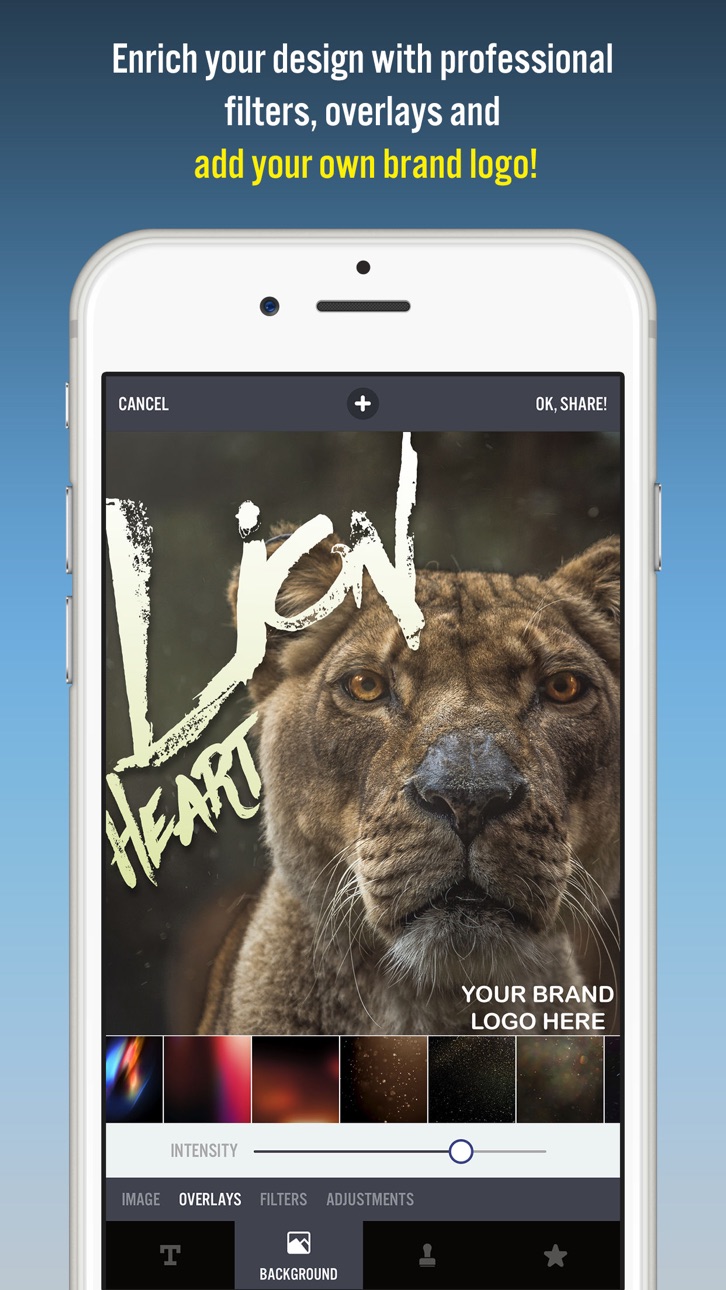
- Professional photo filters, overlays and adjustment tools to polish your photo backgrounds
- Hundreds of pre-installed quotes to inspire you
- Fun color combinations for your words
- Thousands of ready-to-use stock photography from Pixabay and Unsplash
- 2048 x 2048 high resolution super crisp output
- Advanced crop options to create the perfect size pictures for social media posts, wallpapers, posters, flyers and postcards.
- Ability to design your own watermark / logo and add it to your creations. Once you add it, it automatically gets added to all of your future creations, great for promoting your brand on social media!
- Easily share your creation on your favorite social networks or send it to your friends via instant messengers
- Use your designs commercially for promoting your brand online or via printed posters, flyers or any kind of physical products you like.
Typorama is featured as:
- "Best New App and Best Apps of April 2015" by Apple
- "Best Apps of the Week" by the TIME magazine
- "Honorable App of the Week" by AppAdvice
We're excited to see how you'll be using Typorama!
====================
Typorama PRO Upgrade FAQ
With Typorama PRO you'll have unlimited access to all the premium content and features.
Payment will be charged to iTunes Account at confirmation of purchase. Your subscription automatically renews unless auto-renew is turned off at least 24-hours before the end of the current period. Your account will be charged for renewal within 24-hours prior to the end of the current period with the same cost you've started your subscription.
To cancel or manage your subscription, navigate to manage your Apple ID in your device's settings. Sign in to the iTunes / App Store, tap Typorama, and turn off the automatic renewal for the subscription. Disabling the automatic renewal must be done 24-hours before the end of the subscription period to avoid being charged. Due to Apple’s policy, immediate cancellation of subscriptions isn’t possible.
To restore your upgrade to Typorama PRO on a new device, go to the INFO screen, tap the “Restore Previous Purchases” option and your subscription / previous purchases will become active free of charge.
More info: http://www.apperto.com/typorama/faq/
스크린샷 © 각 소유자 · App Store


iOSGods는 Apple Inc., Google LLC 및 여기에 등록된 앱의 개발사와 제휴 관계가 없으며, 승인이나 후원을 받지 않았습니다. Apple, iOS, App Store는 Apple Inc.의 상표입니다. Android와 Google Play는 Google LLC의 상표입니다. 그 외 모든 앱 이름, 아이콘, 이미지 및 상표는 각 소유자의 재산입니다.

- 탈옥/제일 또는 탈옥된 iPhone 또는 iPad가 필요합니다.
- Sideloadly 또는 대체 도구가 필요합니다.
- iTunes가 설치된 Windows/macOS/Linux 컴퓨터가 필요합니다.
1단계: 위 링크에서 미리 해킹된 .IPA 파일을 컴퓨터에 다운로드합니다. iOSGods App에서 다운로드하려면 동영상 예시가 포함된 iOSGods App IPA 다운로드 튜토리얼를 참고하십시오.
2단계: Sideloadly를 다운로드하여 Windows 또는 Mac에 설치합니다.
3단계: 컴퓨터에서 Sideloadly를 실행하고 iOS 기기를 연결한 후, Sideloadly에 기기 이름이 표시될 때까지 기다립니다.
4단계: iDevice가 인식되면, 다운로드한 모드된 .IPA 파일을 Sideloadly 애플리케이션에 끌어다 놓습니다.
5단계: Apple Account 이메일을 입력한 후 “Start”를 누릅니다. 그러면 비밀번호를 입력하라는 메시지가 표시됩니다. 요청된 정보를 제공해 주십시오.
6단계: Sideloadly가 해킹된 IPA의 사이드로드/설치를 완료할 때까지 기다리십시오. 설치 중 문제가 발생하면 아래 참고 사항을 읽어 주십시오.
7단계: 설치가 완료되어 홈 화면에서 앱이 보이면 설정 → 일반 → 프로파일 / VPN 및 기기 관리 경로로 이동해야 합니다. 그곳에서 6단계에서 입력한 이메일을 탭한 다음 “[email protected] 신뢰”를 탭하십시오.
8단계: 이제 홈 화면으로 돌아가 새로 설치된 앱을 열면 모든 것이 정상적으로 작동할 것입니다. 게임 내 해킹 팝업에서 앱별 추가 안내를 따라야 할 수도 있습니다.
참고: iOS/iPadOS 16 이상에서는 개발자 모드를 활성화해야 합니다. 무료 Apple Developer 계정의 경우 이 과정을 7일마다 반복해야 합니다. 질문이나 문제가 있는 경우 해당 토픽의 Sideloadly FAQ 섹션를 읽어보십시오.
Game Name iOS Mod IPA is an action adventure game enhanced with powerful gameplay boosts and quality-of-life improvements. Win battles faster, earn rewards quicker, and enjoy uninterrupted play without ads.
- Unlimited Gold - spend freely to unlock premium content
- Damage Multiplier - deal significantly more damage in combat
- Defense Multiplier - take less damage and survive longer
- Reward Multiplier - earn more loot from every battle
- Max Level - instantly reach the highest player rank
- No Ads - play without interruptions or advertisements
This app also comes with iGameGod, giving you access to Auto Touch to automate repetitive tasks, App Speed Manager for adjustable gameplay speed, Memory Engine value editing, and more powerful iOS game tools.
위의 링크에서 Game Name Mod IPA을 다운로드합니다. 설치 버튼을 누르고 화면 안내에 따라 iPhone, iPad 또는 Apple Silicon에 이 iOS 앱 해킹을 설치합니다.
더 많은 도움이 필요하신가요 자세한 답변과 문제 해결 팁은 iOSGods 앱 자주 묻는 질문을 확인하세요.
----------------------------------------------------------
--------------------------------------------------