Login necessário
Entre com sua conta iOSGods para continuar.
Entre com sua conta iOSGods para continuar.
Crie designs tipográficos impressionantes com Typorama: Text on Photo Editor Modded, um editor de texto em foto que transforma suas palavras e imagens em layouts lindos em segundos. Este app iOS modificado desbloqueia recursos premium, oferecendo acesso a todas as fontes, fundos e ferramentas de design sem restrições. Nenhuma experiência em design necessária, basta escolher um fundo, digitar seu texto e deixar o app gerar tipografia de qualidade profissional automaticamente.
- Premium Desbloqueado → acesso a todas as fontes, fundos e recursos de design
Este app também vem com iGameGod, oferecendo acesso ao Auto Touch para automatizar tarefas repetitivas, App Speed Manager para ajustar a velocidade do jogo, edição de valores com Memory Engine e outras ferramentas avançadas para jogos iOS.
Baixe Typorama: Text on Photo Editor Modded modded IPA dos links acima. Toque no botão de instalação e siga as instruções para instalar este hack iOS no seu iPhone, iPad ou Apple Silicon.
Precisa de mais ajuda? Confira nossas Perguntas frequentes sobre o app iOSGods para respostas detalhadas e dicas de solução de problemas.
Typorama permite que você crie visuais incríveis "automagicamente" transformando seu texto e fotos em belos designs tipográficos. Não são necessárias habilidades de design!
Basta escolher um plano de fundo, digitar suas palavras e sua tipografia criativa está pronta!
Typorama economiza muito trabalho criando automaticamente layouts de texto complexos com diferentes fontes e tipos de letra. Com apenas alguns toques, você obtém instantaneamente seu texto lindamente disposto em um plano de fundo de sua escolha. Isso levaria horas se você estivesse usando o Photoshop ou um editor de fotos semelhante. (Os designs de texto não são modelos e são gerados aleatoriamente conforme você escolhe estilos diferentes).
Use Typorama para:
- Faça belos layouts de texto tipográfico
- Crie postagens no Instagram, Facebook, Twitter com designs de texto elegantes
- Crie folhetos e cartazes para seus eventos ou organização
- Faça cabeçalhos para o seu blog ou papéis de parede para o seu iPhone
- Promova sua marca on-line ou transforme seus designs em bens físicos e venda com lucro, uso comercial completo com todas as imagens e fontes incluídas!
- Enriqueça suas fotos de família adicionando estilos de texto criativos e compartilhe seu amor
Recursos:
- Mais de 50 estilos de texto tipográficos diferentes, gerados aleatoriamente
- Mais de uma centena de fontes e tipos de letra diferentes dos principais designers do mundo
- Emblemas, fitas, texto curvo e ornamentos artísticos enriquecendo seus projetos
- Capacidade de distorcer 3D, aplicar cores gradientes, sombras ao seu texto
- Capacidade de excluir gradualmente partes do texto, útil para colocar seus designs de texto atrás de outros elementos em suas fotos
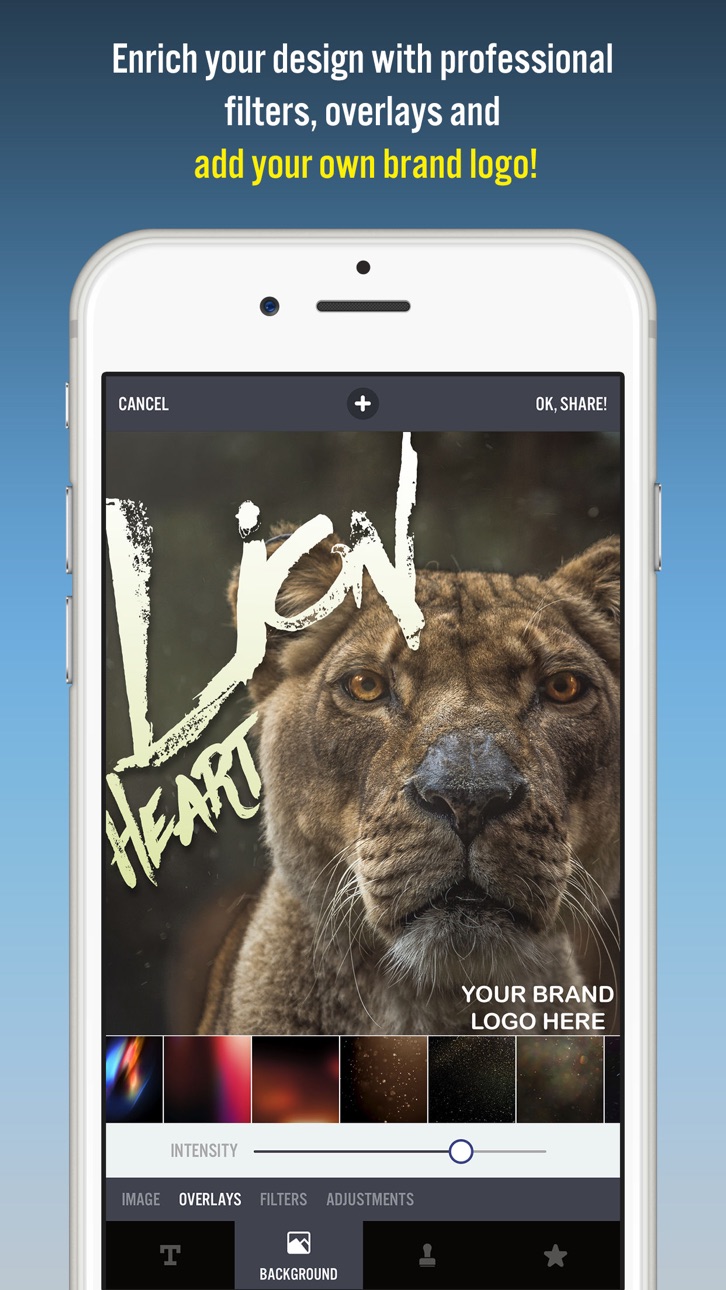
- Filtros de fotos profissionais, sobreposições e ferramentas de ajuste para aprimorar seus fundos de fotos
- Centenas de citações pré-instaladas para inspirar você
- Combinações de cores divertidas para suas palavras
- Milhares de fotografias prontas para uso do Pixabay e Unsplash
- Saída super nítida de alta resolução de 2048 x 2048
- Opções avançadas de corte para criar imagens de tamanho perfeito para postagens de mídia social, papéis de parede, pôsteres, folhetos e cartões postais.
- Capacidade de criar sua própria marca d'água / logotipo e adicioná-la às suas criações. Depois de adicioná-lo, ele será adicionado automaticamente a todas as suas criações futuras, ótimo para promover sua marca nas mídias sociais!
- Compartilhe facilmente sua criação em suas redes sociais favoritas ou envie para seus amigos por meio de mensagens instantâneas
- Use seus designs comercialmente para promover sua marca online ou através de pôsteres impressos, panfletos ou qualquer tipo de produto físico que você goste.
Typorama é caracterizado como:
- "Melhor novo aplicativo e melhores aplicativos de abril de 2015" pela Apple
- "Melhores Apps da Semana" pela revista TIME
- "Aplicativo Honorável da Semana" por AppAdvice
Estamos ansiosos para ver como você usará o Typorama!
Política de Privacidade: http://www.apperto.com/privacy/
Termos de uso: http://www.apperto.com/terms/
Capturas © respectivos proprietários · App Store


A iOSGods não é afiliada, endossada nem patrocinada pela Apple Inc., pela Google LLC ou pelos desenvolvedores dos apps listados aqui. Apple, iOS e App Store são marcas da Apple Inc. Android e Google Play são marcas da Google LLC. Todos os demais nomes de apps, ícones, imagens e marcas pertencem aos seus respectivos proprietários.

- iPhone ou iPad sem jailbreak/jailed ou com jailbreak.
- Sideloadly ou alternativas.
- Computador com Windows/macOS/Linux e iTunes instalado.
PASSO 1: Baixe o arquivo .IPA pré-hackeado do link acima para o seu computador. Para baixar pelo iOSGods App, veja nosso Tutorial de download de IPA do iOSGods App, que inclui um exemplo em vídeo.
PASSO 2: Baixe o Sideloadly e instale-o no seu Windows ou Mac.
PASSO 3: Abra o Sideloadly no seu computador, conecte seu dispositivo iOS e aguarde até que o nome do dispositivo apareça no Sideloadly.
PASSO 4: Assim que seu iDevice for reconhecido, arraste o arquivo .IPA modificado que você baixou e solte-o no aplicativo Sideloadly.
PASSO 5: Digite o e-mail da sua Apple Account e pressione “Start”. Em seguida, será solicitada a sua senha. Prossiga e forneça as informações solicitadas.
PASSO 6: Aguarde o Sideloadly finalizar o sideload/instalação do IPA hackeado. Se houver problemas durante a instalação, leia a observação abaixo.
PASSO 7: Quando a instalação estiver concluída e você vir o app na Tela de Início, será necessário acessar Ajustes → Geral → Perfis / Gerenciamento de VPN e Dispositivo. Lá, toque no e-mail que você inseriu no passo 6 e, em seguida, toque em “Confiar em [email protected]”.
PASSO 8: Agora vá para a Tela de Início e abra o app recém-instalado; tudo deve funcionar normalmente. Você pode precisar seguir instruções adicionais específicas no popup do hack dentro do jogo.
OBSERVAÇÃO: No iOS/iPadOS 16 e versões posteriores, você deve ativar o Modo de Desenvolvedor. Para contas Apple Developer gratuitas, será necessário repetir este processo a cada 7 dias. Se tiver dúvidas ou problemas, leia nossa seção de FAQ do Sideloadly no tópico.
Game Name iOS Mod IPA is an action adventure game enhanced with powerful gameplay boosts and quality-of-life improvements. Win battles faster, earn rewards quicker, and enjoy uninterrupted play without ads.
- Unlimited Gold - spend freely to unlock premium content
- Damage Multiplier - deal significantly more damage in combat
- Defense Multiplier - take less damage and survive longer
- Reward Multiplier - earn more loot from every battle
- Max Level - instantly reach the highest player rank
- No Ads - play without interruptions or advertisements
This app also comes with iGameGod, giving you access to Auto Touch to automate repetitive tasks, App Speed Manager for adjustable gameplay speed, Memory Engine value editing, and more powerful iOS game tools.
Baixe Game Name Mod IPA dos links acima. Toque no botão de instalação e siga as instruções para instalar este hack iOS no seu iPhone, iPad ou Apple Silicon.
Precisa de mais ajuda Confira nossas Perguntas frequentes sobre o app iOSGods para respostas detalhadas e dicas de solução de problemas.
----------------------------------------------------------
--------------------------------------------------