ログインが必要
iOSGodsアカウントでサインインして続けてください。

Hack Features:
- Weak Enemies - Enemies Have Low HP , DEF & ATK
This hack works on the latest x64 or ARM64 iDevices: iPhone 5s, 6, 6 Plus, 6s, 6s Plus, 7, 7 Plus, 8, 8 Plus, X, Xr, Xs, Xs Max, SE, iPod Touch 6G, iPad Air, Air 2, Pro & iPad Mini 2, 3, 4 and later.
Pokémon Quest Hack modded IPAを上のリンクからダウンロードします。インストールボタンをタップし、画面の指示に従ってiPhone、iPad、Apple SiliconにこのiOSアプリハックをインストールします。
さらにヘルプが必要ですか? 詳しい回答とトラブルシューティングはiOSGodsアプリ よくある質問をご覧ください。
Pokémon Quest—a rambunctious expedition RPG featuring cube-shaped Pokémon!
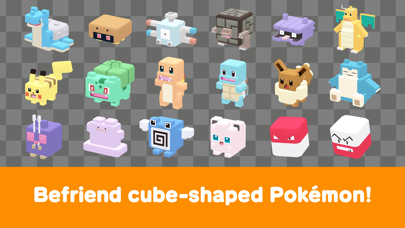
• The Pokémon you know and love have turned into...cubes?! Head out in search of treasure with your cube-shaped Pokémon buddies on Tumblecube Island—a land where everything is a cube! Your goal is to find the awesome goodies said to be hidden on the island ! The Pokémon you know and love from Pokémon Red and Pokémon Blue appear in this game.
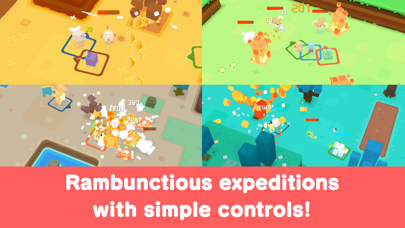
• Battle by tapping! The simple controls make for lively and fun battles! Danger is lurking, so you’ll need the help of your Pokémon buddies on your expeditions on the island. When wild Pokémon appear, your Pokémon will battle ferociously and knock them out one after another!
• Befriend Pokémon to make your own unique team!
You can use the items you get from your expeditions to befriend more Pokémon or make your Pokémon stronger. Make more buddies to create a team that’s all your own, and head out on more expeditions!
• Spruce up your base camp with cute decorations!
Your base camp is your home for this adventure, and you can spruce it up however you like with cute and fun decorations! These decorations can also make your expeditions on the island more beneficial.
■ Notes
・ Terms of Use
Please read the Terms of Use before using this application.
・ Saved data
Your play data for this game will only be saved on your local device. You can only store saved data on the server by using the backup function within the application. We recommend that players back up their data often.
・ Compatible operating systems
iOS: iOS9 or higher
Note: This application may not function properly on iPhone 5 and other devices that are not compatible with iOS 11.
Note: This application may not function properly on some devices due to individual differences in customers' operating systems or methods of use.
・ Connection environment
A poor internet connection when communicating with the server from within the game, such as when you're buying items from the shop, can lead to your data becoming corrupted or lost. Please make sure you are in a location with good reception when using features that rely on an internet connection.
If communication is lost momentarily, you may be able to resume play in some cases by trying again a short time later. Please note that we're unable to assist you if you experience problems due to communication errors.
・ Before making purchases
Please make sure that you can use the free-of-charge features of this product with no issues on your device before you make purchases. Certain devices and/or configurations may also cause the application to fail to work.
・ For inquiries
Please visit support.pokemon.com to report issues about Pokémon Quest.
- 脱獄/Jailed済みまたは脱獄済みのiPhoneまたはiPad。
- Sideloadlyまたは代替手段。
- iTunesがインストールされているWindows/macOS/Linuxを実行しているコンピュータ。
ステップ1: 上のリンクから事前にハックされた.IPAファイルをコンピュータにダウンロードします。iOSGodsアプリからダウンロードする方法は、ビデオ例付きのiOSGodsアプリIPAダウンロードチュートリアルをご覧ください。
ステップ2: SideloadlyをダウンロードしてWindowsまたはMacにインストールします。
ステップ3: コンピュータでSideloadlyを開き、iOSデバイスを接続して、デバイス名がSideloadlyに表示されるまで待ちます。
ステップ4: iDeviceが認識されたら、ダウンロードしたModされた.IPAファイルをSideloadlyアプリにドラッグ&ドロップします。
ステップ5: Apple Accountのメールアドレスを入力し、「Start」を押します。次にパスワードの入力を求められます。必要な情報を入力してください。
ステップ6: Sideloadlyがハックされたipaのサイドロード/インストールを完了するのを待ちます。インストール中に問題が発生した場合は、以下の注意事項をお読みください。
ステップ7: インストールが完了し、ホーム画面にアプリが表示されたら、設定 → 一般 → プロファイル / VPNとデバイス管理に移動する必要があります。そこで、ステップ6で入力したメールをタップし、「Trust [email protected]」をタップします。
ステップ8: ホーム画面に戻り、新しくインストールされたアプリを開けば、すべて正常に動作するはずです。ゲーム内のハックのポップアップで、アプリごとの追加指示に従う必要がある場合があります。
注意: iOS/iPadOS 16以降では、デベロッパモードを有効にするが必要です。無料のApple Developerアカウントの場合、このプロセスを7日ごとに繰り返す必要があります。質問や問題がある場合は、トピックのSideloadly FAQセクションをお読みください。