Требуется вход
Войдите в учётную запись iOSGods, чтобы продолжить.

Hack Features:
- Weak Enemies - Enemies Have Low HP , DEF & ATK
This hack works on the latest x64 or ARM64 iDevices: iPhone 5s, 6, 6 Plus, 6s, 6s Plus, 7, 7 Plus, 8, 8 Plus, X, Xr, Xs, Xs Max, SE, iPod Touch 6G, iPad Air, Air 2, Pro & iPad Mini 2, 3, 4 and later.
Скачайте Pokémon Quest Hack modded IPA по ссылкам выше. Нажмите кнопку установки и следуйте инструкциям, чтобы установить этот хак iOS на iPhone, iPad или Mac с Apple Silicon.
Нужна помощь? Посмотрите наши Часто задаваемые вопросы по приложению iOSGods, чтобы получить подробные ответы и советы по устранению неполадок.
Pokémon Quest—a rambunctious expedition RPG featuring cube-shaped Pokémon!
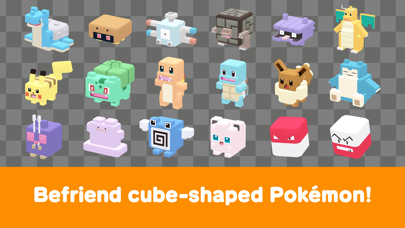
• The Pokémon you know and love have turned into...cubes?! Head out in search of treasure with your cube-shaped Pokémon buddies on Tumblecube Island—a land where everything is a cube! Your goal is to find the awesome goodies said to be hidden on the island ! The Pokémon you know and love from Pokémon Red and Pokémon Blue appear in this game.
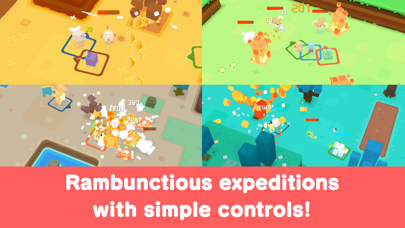
• Battle by tapping! The simple controls make for lively and fun battles! Danger is lurking, so you’ll need the help of your Pokémon buddies on your expeditions on the island. When wild Pokémon appear, your Pokémon will battle ferociously and knock them out one after another!
• Befriend Pokémon to make your own unique team!
You can use the items you get from your expeditions to befriend more Pokémon or make your Pokémon stronger. Make more buddies to create a team that’s all your own, and head out on more expeditions!
• Spruce up your base camp with cute decorations!
Your base camp is your home for this adventure, and you can spruce it up however you like with cute and fun decorations! These decorations can also make your expeditions on the island more beneficial.
■ Notes
・ Terms of Use
Please read the Terms of Use before using this application.
・ Saved data
Your play data for this game will only be saved on your local device. You can only store saved data on the server by using the backup function within the application. We recommend that players back up their data often.
・ Compatible operating systems
iOS: iOS9 or higher
Note: This application may not function properly on iPhone 5 and other devices that are not compatible with iOS 11.
Note: This application may not function properly on some devices due to individual differences in customers' operating systems or methods of use.
・ Connection environment
A poor internet connection when communicating with the server from within the game, such as when you're buying items from the shop, can lead to your data becoming corrupted or lost. Please make sure you are in a location with good reception when using features that rely on an internet connection.
If communication is lost momentarily, you may be able to resume play in some cases by trying again a short time later. Please note that we're unable to assist you if you experience problems due to communication errors.
・ Before making purchases
Please make sure that you can use the free-of-charge features of this product with no issues on your device before you make purchases. Certain devices and/or configurations may also cause the application to fail to work.
・ For inquiries
Please visit support.pokemon.com to report issues about Pokémon Quest.
- iPhone или iPad без джейлбрейка/в обычном режиме или с джейлбрейком.
- Sideloadly или альтернативы.
- Компьютер с Windows/macOS/Linux и установленным iTunes.
ШАГ 1: Скачайте предварительно взломанный файл .IPA по ссылке выше на свой компьютер. Чтобы скачать его из приложения iOSGods, посмотрите наш Туториал по скачиванию IPA в приложении iOSGods, в котором есть видеопример.
ШАГ 2: Скачайте Sideloadly и установите его на Windows или Mac.
ШАГ 3: Откройте Sideloadly на компьютере, подключите iOS-устройство и дождитесь, пока его имя появится в Sideloadly.
ШАГ 4: Когда устройство будет распознано, перетащите скачанный модифицированный файл .IPA в окно Sideloadly.
ШАГ 5: Введите адрес электронной почты вашего Apple Account, затем нажмите «Start». После этого вас попросят ввести пароль. Укажите необходимые данные.
ШАГ 6: Дождитесь, пока Sideloadly завершит sideload/установку взломанного IPA. При возникновении проблем во время установки ознакомьтесь с примечанием ниже.
ШАГ 7: После завершения установки и появления приложения на главном экране перейдите в Настройки → Основные → Профили / VPN и управление устройством. Там нажмите на email, который вы ввели на шаге 6, а затем нажмите «Доверять [email protected]».
ШАГ 8: Теперь перейдите на главный экран и откройте установленное приложение — всё должно работать. Возможно, потребуется выполнить дополнительные инструкции в попапе мода внутри игры.
ПРИМЕЧАНИЕ: На iOS/iPadOS 16 и новее необходимо включить режим разработчика. Для бесплатных учётных записей Apple Developer этот процесс нужно повторять каждые 7 дней. Если возникнут вопросы или проблемы, ознакомьтесь с нашим разделом FAQ по Sideloadly в теме.