로그인 필요
계속하려면 iOSGods 계정으로 로그인하세요.
계속하려면 iOSGods 계정으로 로그인하세요.
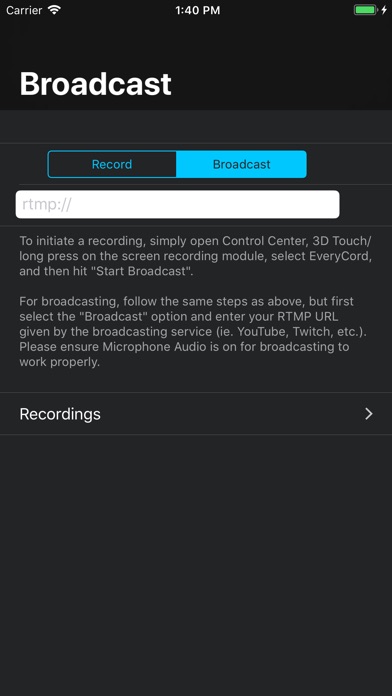
EveryCord, Record & Broadcast를 사용하여 iOS 화면 전체를 풀 HD와 60 FPS로 녹화하세요. 이 강력한 화면 녹화 Mod IPA는 게임, 앱, 라이브 순간을 기기에서 직접 캡처합니다. 이 Hack은 프리미엄 스트리밍 기능을 잠금 해제하여 제한 없이 YouTube, Twitch, RTMP 호환 서비스로 라이브 방송할 수 있게 해줍니다. 녹화의 모든 측면을 사용자 정의하고 모든 앱에서 작동하는 원활한 기기 전체 캡처를 즐기세요.
이 앱에는 iGameGod도 포함되어 있어 반복 작업을 자동화하는 Auto Touch, 게임 속도를 조절할 수 있는 App Speed Manager, Memory Engine 값 편집 등 강력한 iOS 게임 도구를 사용할 수 있습니다.
위의 링크에서 EveryCord – Record & Broadcast modded IPA을 다운로드합니다. 설치 버튼을 누르고 화면 안내에 따라 iPhone, iPad 또는 Apple Silicon에 이 iOS 앱 해킹을 설치합니다.
더 많은 도움이 필요하신가요? 자세한 답변과 문제 해결 팁은 iOSGods 앱 자주 묻는 질문을 확인하세요.
EveryCord (formerly iRec): Your All-in-One Screen Recording Solution
Born as iRec during the early days of iOS 7, EveryCord has evolved into a comprehensive screen recording powerhouse. It’s not just about capturing what's on your screen; it's about redefining how you engage with digital moments, be they gaming sessions, calls, or fleeting Snapchats.
Unparalleled Screen Recording: EveryCord makes screen recording on iOS devices seamless. Whether you're chronicling a detailed tutorial, capturing an unexpected moment on Snapchat, or documenting a video call, EveryCord ensures that every pixel is recorded in pristine clarity.
Gaming Chronicles: Dive into your favorite games and let EveryCord handle the recording. Relive your epic gameplays, critical victories, and heart-wrenching defeats, all in high definition. Whether you're battling foes, constructing empires, or solving intricate puzzles, EveryCord is your silent scribe.
Live Broadcasting: Amplify your voice and share real-time experiences with your audience. Livestream to platforms like YouTube and Twitch directly from your device, bridging the gap between you and your followers without missing a beat.
Call Capturing: Never let important details from calls slip away. With EveryCord, you can record both audio and video calls, ensuring that every sentiment, instruction, or cherished memory is safely stored.
Snapchat and Social Media: In the ever-ephemeral world of Snapchat, moments come and go in a blink. EveryCord grants you the ability to record these snippets, so they're yours to revisit whenever you wish.
Emerging as a groundbreaking solution for iOS screen recording, EveryCord (previously iRec) has continually expanded its features to cater to a diverse set of needs. It's not just an app; it's a commitment to capturing moments as they unfold, in all their digital glory.
- 탈옥/제일 또는 탈옥된 iPhone 또는 iPad가 필요합니다.
- Sideloadly 또는 대체 도구가 필요합니다.
- iTunes가 설치된 Windows/macOS/Linux 컴퓨터가 필요합니다.
1단계: 위 링크에서 미리 해킹된 .IPA 파일을 컴퓨터에 다운로드합니다. iOSGods App에서 다운로드하려면 동영상 예시가 포함된 iOSGods App IPA 다운로드 튜토리얼를 참고하십시오.
2단계: Sideloadly를 다운로드하여 Windows 또는 Mac에 설치합니다.
3단계: 컴퓨터에서 Sideloadly를 실행하고 iOS 기기를 연결한 후, Sideloadly에 기기 이름이 표시될 때까지 기다립니다.
4단계: iDevice가 인식되면, 다운로드한 모드된 .IPA 파일을 Sideloadly 애플리케이션에 끌어다 놓습니다.
5단계: Apple Account 이메일을 입력한 후 “Start”를 누릅니다. 그러면 비밀번호를 입력하라는 메시지가 표시됩니다. 요청된 정보를 제공해 주십시오.
6단계: Sideloadly가 해킹된 IPA의 사이드로드/설치를 완료할 때까지 기다리십시오. 설치 중 문제가 발생하면 아래 참고 사항을 읽어 주십시오.
7단계: 설치가 완료되어 홈 화면에서 앱이 보이면 설정 → 일반 → 프로파일 / VPN 및 기기 관리 경로로 이동해야 합니다. 그곳에서 6단계에서 입력한 이메일을 탭한 다음 “[email protected] 신뢰”를 탭하십시오.
8단계: 이제 홈 화면으로 돌아가 새로 설치된 앱을 열면 모든 것이 정상적으로 작동할 것입니다. 게임 내 해킹 팝업에서 앱별 추가 안내를 따라야 할 수도 있습니다.
참고: iOS/iPadOS 16 이상에서는 개발자 모드를 활성화해야 합니다. 무료 Apple Developer 계정의 경우 이 과정을 7일마다 반복해야 합니다. 질문이나 문제가 있는 경우 해당 토픽의 Sideloadly FAQ 섹션를 읽어보십시오.