تسجيل الدخول مطلوب
سجّل الدخول بحساب iOSGods للمتابعة.

Hack Features:
- Weak Enemies - Enemies Have Low HP , DEF & ATK
This hack works on the latest x64 or ARM64 iDevices: iPhone 5s, 6, 6 Plus, 6s, 6s Plus, 7, 7 Plus, 8, 8 Plus, X, Xr, Xs, Xs Max, SE, iPod Touch 6G, iPad Air, Air 2, Pro & iPad Mini 2, 3, 4 and later.
قم بتنزيل Pokémon Quest Hack modded IPA من الروابط أعلاه. اضغط على زر التثبيت واتبع التعليمات لتثبيت هذا التعديل لـ iOS على iPhone أو iPad أو Apple Silicon.
هل تحتاج إلى مزيد من المساعدة؟ راجع الأسئلة الشائعة لتطبيق iOSGods للحصول على إجابات مفصلة ونصائح لاستكشاف الأخطاء.
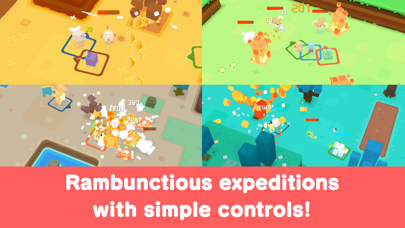
Pokémon Quest—a rambunctious expedition RPG featuring cube-shaped Pokémon!
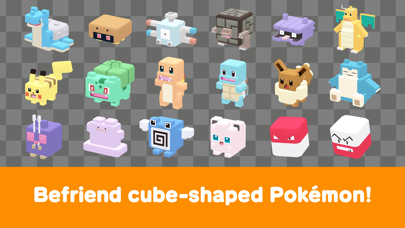
• The Pokémon you know and love have turned into...cubes?! Head out in search of treasure with your cube-shaped Pokémon buddies on Tumblecube Island—a land where everything is a cube! Your goal is to find the awesome goodies said to be hidden on the island ! The Pokémon you know and love from Pokémon Red and Pokémon Blue appear in this game.
• Battle by tapping! The simple controls make for lively and fun battles! Danger is lurking, so you’ll need the help of your Pokémon buddies on your expeditions on the island. When wild Pokémon appear, your Pokémon will battle ferociously and knock them out one after another!
• Befriend Pokémon to make your own unique team!
You can use the items you get from your expeditions to befriend more Pokémon or make your Pokémon stronger. Make more buddies to create a team that’s all your own, and head out on more expeditions!
• Spruce up your base camp with cute decorations!
Your base camp is your home for this adventure, and you can spruce it up however you like with cute and fun decorations! These decorations can also make your expeditions on the island more beneficial.
■ Notes
・ Terms of Use
Please read the Terms of Use before using this application.
・ Saved data
Your play data for this game will only be saved on your local device. You can only store saved data on the server by using the backup function within the application. We recommend that players back up their data often.
・ Compatible operating systems
iOS: iOS9 or higher
Note: This application may not function properly on iPhone 5 and other devices that are not compatible with iOS 11.
Note: This application may not function properly on some devices due to individual differences in customers' operating systems or methods of use.
・ Connection environment
A poor internet connection when communicating with the server from within the game, such as when you're buying items from the shop, can lead to your data becoming corrupted or lost. Please make sure you are in a location with good reception when using features that rely on an internet connection.
If communication is lost momentarily, you may be able to resume play in some cases by trying again a short time later. Please note that we're unable to assist you if you experience problems due to communication errors.
・ Before making purchases
Please make sure that you can use the free-of-charge features of this product with no issues on your device before you make purchases. Certain devices and/or configurations may also cause the application to fail to work.
・ For inquiries
Please visit support.pokemon.com to report issues about Pokémon Quest.
- iPhone أو iPad بجيلبريك أو بدون جيلبريك.
- Sideloadly أو بدائلها.
- كمبيوتر يعمل بنظام Windows/macOS/Linux مع تثبيت iTunes.
الخطوة 1: قم بتنزيل ملف .IPA المعدّل مسبقًا من الرابط أعلاه إلى الكمبيوتر الخاص بك. للتنزيل من تطبيق iOSGods App، اطلع على دليل تنزيل IPA من تطبيق iOSGods App الذي يتضمن مثالًا بالفيديو.
الخطوة 2: قم بتنزيل Sideloadly وتثبيته على جهاز Windows أو Mac.
الخطوة 3: افتح Sideloadly على الكمبيوتر، ووصّل جهاز iOS الخاص بك، وانتظر حتى يظهر اسم جهازك داخل Sideloadly.
الخطوة 4: بمجرد التعرّف على جهاز iDevice الخاص بك، اسحب ملف .IPA المعدّل الذي قمت بتنزيله وأفلِته داخل تطبيق Sideloadly.
الخطوة 5: أدخل البريد الإلكتروني لحساب Apple Account الخاص بك، ثم اضغط على «Start». سيُطلب منك بعد ذلك إدخال كلمة المرور. تابع وأدخل المعلومات المطلوبة.
الخطوة 6: انتظر حتى ينتهي Sideloadly من تحميل/تثبيت ملف IPA المعدّل. في حال واجهت أي مشاكل أثناء التثبيت، يرجى قراءة الملاحظة أدناه.
الخطوة 7: بعد اكتمال التثبيت ورؤية التطبيق على الشاشة الرئيسية، انتقل إلى Settings → General → Profiles / VPN & Device Management. ثم اضغط على البريد الإلكتروني الذي أدخلته في الخطوة 6، ثم اضغط على «الوثوق بـ [email protected]».
الخطوة 8: الآن انتقل إلى الشاشة الرئيسية وافتح التطبيق الذي تم تثبيته للتو وسيعمل كل شيء بشكل صحيح. قد تحتاج إلى اتباع تعليمات إضافية خاصة بكل تطبيق داخل النافذة المنبثقة للتعديل أثناء اللعب.
ملاحظة: بدءًا من iOS/iPadOS 16 وما بعده، يجب تفعيل وضع المطور (Developer Mode). بالنسبة لحسابات Apple Developer المجانية، ستحتاج إلى تكرار هذه العملية كل 7 أيام. إذا كانت لديك أي أسئلة أو مشاكل، يرجى قراءة قسم الأسئلة الشائعة حول Sideloadly في الموضوع.