Потрібен вхід
Увійдіть у свій обліковий запис iOSGods, щоб продовжити.
Увійдіть у свій обліковий запис iOSGods, щоб продовжити.

This adventure puzzle game follows a brother and sister through a dreamlike journey home, and this Mod IPA unlocks the full game for free. Lost in Play combines thoughtfully crafted puzzles, colorful characters, and an uplifting story across enchanted forests, goblin villages, and magical challenges. With this hack, you can experience the complete adventure without in-app purchases.
- Free iAP for Full Game Purchase (Enable inside iOSGods Menu first) → unlock the entire game at no cost
Цей застосунок також постачається з iGameGod, який надає доступ до Auto Touch для автоматизації повторюваних дій, App Speed Manager для регулювання швидкості гри, редагування значень за допомогою Memory Engine та інших потужних інструментів для iOS-ігор.
Завантажте Lost in Play Hack modded IPA за посиланнями вище. Натисніть кнопку встановлення та дотримуйтесь інструкцій, щоб встановити цей хак iOS на iPhone, iPad або Apple Silicon.
Потрібна додаткова допомога? Перегляньте наш Поширені запитання про застосунок iOSGods для детальних відповідей та порад з усунення несправностей.
Help a brother and sister on an uplifting epic adventure to find their way home. Solving puzzles, escaping a horned beast and meeting quirky goblins are just part of the journey!
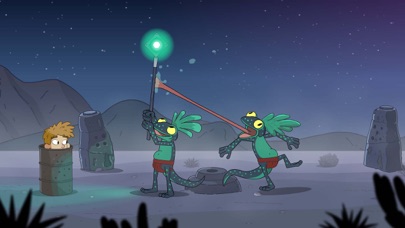
Lost in Play is a journey through childhood imagination with thoughtfully crafted puzzles and colorful characters. Play as a brother and sister duo on an adventure to find their way back home. Between reality and fantasy, the siblings explore the enchanted forest of a horned beast, start a rebellion in a goblin village, and help a team of frogs free a sword from a stone.
PUZZLES & MYSTERY
The bizarre and dreamlike world of Lost in Play is filled with mystery, unique puzzles, and mini-games. Challenge a pirate seagull to a game of clicking crabs, serve magical tea to a royal toad, and collect pieces to build a flying machine. Be a part of this modern point & click game that will reward your curiosity and leave you excited for the next piece of story.
IMAGINATION COMES TO LIFE
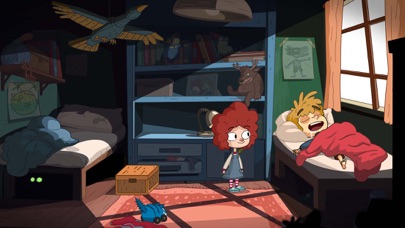
From what seems like a normal morning at home to a typical afternoon at the park, you'll soon find yourself on a whirlwind quest as you sneak into a goblin castle, explore ancient ruins, and soar atop a giant stork. Lost in Play takes you on a nostalgic roller-coaster!
AN INTERACTIVE CARTOON
With a hand-crafted style similar to animated shows from childhood, Lost in Play is a story meant for all. Whether you’re seeking wholesome delight or just a good time, the family can enjoy this story together.
GAME FEATURES
* A mysterious animated puzzle adventure.
* Filled with magical and magnificent creatures.
* Created with families in mind. Have your children watch you play!
* No dialogue. Everything is communicated visually in a universal way.
* Inspired by nostalgic TV shows.
* Play cards with goblins, build a dragon, and teach a sheep how to fly.
* Includes 30+ unique puzzles and mini-games.
* Catch a derpy chicken. Maybe.
- iPhone або iPad без джейлбрейку/у заводському стані або з джейлбрейком.
- Sideloadly або альтернативи.
- Комп'ютер під керуванням Windows/macOS/Linux із встановленим iTunes.
КРОК 1: Завантажте попередньо зламаний .IPA-файл за посиланням вище на свій комп'ютер. Щоб завантажити з iOSGods App, перегляньте наш Посібник із завантаження IPA в iOSGods App, який містить відеоприклад.
КРОК 2: Завантажте Sideloadly і встановіть його на своєму Windows або Mac.
КРОК 3: Відкрийте Sideloadly на комп'ютері, підключіть свій iOS-пристрій і зачекайте, поки назва пристрою з'явиться у Sideloadly.
КРОК 4: Коли ваш iDevice буде розпізнано, перетягніть завантажений модифікований .IPA-файл і відпустіть його в застосунок Sideloadly.
КРОК 5: Введіть електронну пошту вашого Apple Account, потім натисніть «Start». Після цього вас попросять ввести пароль. Введіть необхідні дані.
КРОК 6: Зачекайте, доки Sideloadly завершить sideload/встановлення зламаного IPA. Якщо під час встановлення виникнуть проблеми, прочитайте примітку нижче.
КРОК 7: Коли встановлення завершено й ви побачите застосунок на головному екрані, перейдіть до Налаштування → Загальні → Профілі / VPN і керування пристроєм. Там натисніть на електронну пошту, яку ви ввели на кроці 6, а потім натисніть «Довіряти [email protected]».
КРОК 8: Тепер перейдіть на головний екран і відкрийте щойно встановлений застосунок — усе має працювати належним чином. Можливо, доведеться виконати додаткові інструкції для конкретного застосунку в спливаючому вікні хака в грі.
ПРИМІТКА: У iOS/iPadOS 16 і пізніших версіях потрібно увімкнути режим розробника. Для безкоштовних облікових записів Apple Developer цей процес доведеться повторювати кожні 7 днів. Якщо у вас є запитання або проблеми, прочитайте наш розділ FAQ зі Sideloadly у темі.






![[Seven Deadly Sins] 七つの大罪 光と闇の交戦 : グラクロ iOS Mod IPA](https://is1-ssl.mzstatic.com/image/thumb/Purple221/v4/4e/03/9a/4e039aff-8bc1-b305-fac3-58e9f9b98e5f/AppIcon-1x_U007emarketing-0-8-0-85-220-0.png/100x100bb.jpg)


