ต้องเข้าสู่ระบบ
เข้าสู่ระบบด้วยบัญชี iOSGods เพื่อดำเนินการต่อ
เข้าสู่ระบบด้วยบัญชี iOSGods เพื่อดำเนินการต่อ

This adventure puzzle game follows a brother and sister through a dreamlike journey home, and this Mod IPA unlocks the full game for free. Lost in Play combines thoughtfully crafted puzzles, colorful characters, and an uplifting story across enchanted forests, goblin villages, and magical challenges. With this hack, you can experience the complete adventure without in-app purchases.
- Free iAP for Full Game Purchase (Enable inside iOSGods Menu first) → unlock the entire game at no cost
แอปนี้ยังมาพร้อมกับ iGameGod ซึ่งช่วยให้คุณเข้าถึง Auto Touch สำหรับการทำงานซ้ำ ๆ โดยอัตโนมัติ, App Speed Manager สำหรับปรับความเร็วของเกม, การแก้ไขค่าด้วย Memory Engine และเครื่องมือสำหรับเกม iOS ที่ทรงพลังอื่น ๆ อีกมากมาย
ดาวน์โหลด Lost in Play Hack modded IPA จากลิงก์ด้านบน แตะปุ่มติดตั้งและทำตามคำแนะนำบนหน้าจอเพื่อติดตั้งแฮ็กแอป iOS นี้บน iPhone, iPad หรือ Apple Silicon
ต้องการความช่วยเหลือเพิ่มเติม? ดู คำถามที่พบบ่อยของแอป iOSGods สำหรับคำตอบโดยละเอียดและเคล็ดลับการแก้ไขปัญหา
Help a brother and sister on an uplifting epic adventure to find their way home. Solving puzzles, escaping a horned beast and meeting quirky goblins are just part of the journey!
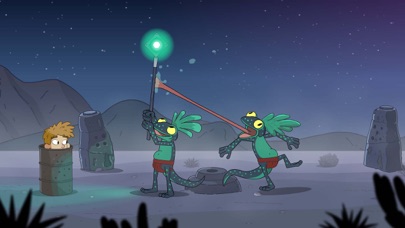
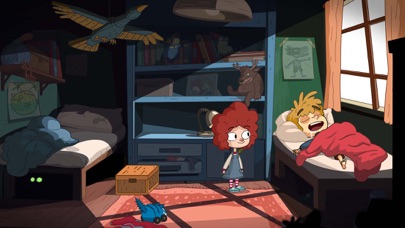
Lost in Play is a journey through childhood imagination with thoughtfully crafted puzzles and colorful characters. Play as a brother and sister duo on an adventure to find their way back home. Between reality and fantasy, the siblings explore the enchanted forest of a horned beast, start a rebellion in a goblin village, and help a team of frogs free a sword from a stone.
PUZZLES & MYSTERY
The bizarre and dreamlike world of Lost in Play is filled with mystery, unique puzzles, and mini-games. Challenge a pirate seagull to a game of clicking crabs, serve magical tea to a royal toad, and collect pieces to build a flying machine. Be a part of this modern point & click game that will reward your curiosity and leave you excited for the next piece of story.
IMAGINATION COMES TO LIFE
From what seems like a normal morning at home to a typical afternoon at the park, you'll soon find yourself on a whirlwind quest as you sneak into a goblin castle, explore ancient ruins, and soar atop a giant stork. Lost in Play takes you on a nostalgic roller-coaster!
AN INTERACTIVE CARTOON
With a hand-crafted style similar to animated shows from childhood, Lost in Play is a story meant for all. Whether you’re seeking wholesome delight or just a good time, the family can enjoy this story together.
GAME FEATURES
* A mysterious animated puzzle adventure.
* Filled with magical and magnificent creatures.
* Created with families in mind. Have your children watch you play!
* No dialogue. Everything is communicated visually in a universal way.
* Inspired by nostalgic TV shows.
* Play cards with goblins, build a dragon, and teach a sheep how to fly.
* Includes 30+ unique puzzles and mini-games.
* Catch a derpy chicken. Maybe.
- iPhone หรือ iPad ที่ไม่ได้เจลเบรก/ไม่ได้เจลเบรก หรือเจลเบรกแล้ว
- Sideloadly หรือทางเลือกอื่น
- คอมพิวเตอร์ที่ใช้ Windows/macOS/Linux และติดตั้ง iTunes ไว้
ขั้นตอนที่ 1: ดาวน์โหลดไฟล์ .IPA ที่แฮกไว้ล่วงหน้าจากลิงก์ด้านบนลงในคอมพิวเตอร์ของคุณ หากต้องการดาวน์โหลดจากแอป iOSGods โปรดดู วิธีดาวน์โหลด IPA ในแอป iOSGods ซึ่งมีตัวอย่างวิดีโอประกอบ
ขั้นตอนที่ 2: ดาวน์โหลด Sideloadly แล้วติดตั้งบน Windows หรือ Mac ของคุณ
ขั้นตอนที่ 3: เปิด Sideloadly บนคอมพิวเตอร์ เชื่อมต่ออุปกรณ์ iOS แล้วรอจนกว่าชื่ออุปกรณ์ของคุณจะปรากฏใน Sideloadly
ขั้นตอนที่ 4: เมื่อ iDevice ของคุณถูกตรวจพบแล้ว ให้ลากไฟล์ .IPA ที่ม็อดมาวางลงในโปรแกรม Sideloadly
ขั้นตอนที่ 5: กรอกอีเมล Apple Account ของคุณ จากนั้นกด "Start" ระบบจะถามรหัสผ่าน กรอกข้อมูลที่จำเป็นให้เรียบร้อย
ขั้นตอนที่ 6: รอจนกว่า Sideloadly จะ sideload/ติดตั้งไฟล์ IPA ที่แฮกเสร็จ หากเกิดปัญหาระหว่างติดตั้ง โปรดอ่านหมายเหตุด้านล่าง
ขั้นตอนที่ 7: เมื่อการติดตั้งเสร็จสิ้นและเห็นแอปบนหน้าจอหลักแล้ว ให้ไปที่ การตั้งค่า → ทั่วไป → โปรไฟล์ / VPN และการจัดการอุปกรณ์ จากนั้นแตะที่อีเมลที่คุณกรอกในขั้นตอนที่ 6 แล้วแตะ "เชื่อถือ [email protected]"
ขั้นตอนที่ 8: จากนั้นไปที่หน้าจอหลักและเปิดแอปที่ติดตั้งใหม่ ทุกอย่างควรทำงานได้ปกติ คุณอาจต้องทำตามคำแนะนำเพิ่มเติมเฉพาะแอปในป๊อปอัปของม็อดในเกม
หมายเหตุ: สำหรับ iOS/iPadOS 16 ขึ้นไป คุณต้อง เปิดโหมดนักพัฒนา (Developer Mode) สำหรับบัญชี Apple Developer แบบฟรี คุณต้องทำขั้นตอนนี้ซ้ำทุก 7 วัน หากมีคำถามหรือพบปัญหา โปรดอ่าน หัวข้อ FAQ ของ Sideloadly ในกระทู้






![[Seven Deadly Sins] 七つの大罪 光と闇の交戦 : グラクロ iOS Mod IPA](https://is1-ssl.mzstatic.com/image/thumb/Purple221/v4/4e/03/9a/4e039aff-8bc1-b305-fac3-58e9f9b98e5f/AppIcon-1x_U007emarketing-0-8-0-85-220-0.png/100x100bb.jpg)


