Login Diperlukan
Masuk dengan akun iOSGods kamu untuk melanjutkan.
Masuk dengan akun iOSGods kamu untuk melanjutkan.
This adventure puzzle game follows a brother and sister through a dreamlike journey home, and this Mod IPA unlocks the full game for free. Lost in Play combines thoughtfully crafted puzzles, colorful characters, and an uplifting story across enchanted forests, goblin villages, and magical challenges. With this hack, you can experience the complete adventure without in-app purchases.
- Free iAP for Full Game Purchase (Enable inside iOSGods Menu first) → unlock the entire game at no cost
Aplikasi ini juga dilengkapi dengan iGameGod, yang memberi Anda akses ke Auto Touch untuk mengotomatiskan tugas berulang, App Speed Manager untuk mengatur kecepatan permainan, pengeditan nilai Memory Engine, dan alat permainan iOS lainnya yang lebih canggih.
Unduh Lost in Play Hack modded IPA dari tautan di atas. Ketuk tombol pasang dan ikuti petunjuk di layar untuk memasang hack iOS ini di iPhone, iPad, atau Apple Silicon.
Butuh bantuan lebih lanjut? Lihat Pertanyaan yang Sering Diajukan untuk Aplikasi iOSGods kami untuk jawaban dan tips lengkap.
Help a brother and sister on an uplifting epic adventure to find their way home. Solving puzzles, escaping a horned beast and meeting quirky goblins are just part of the journey!
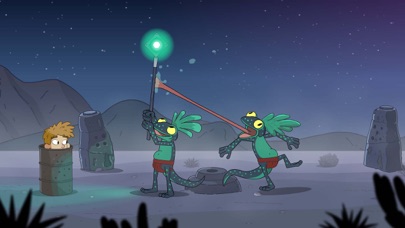
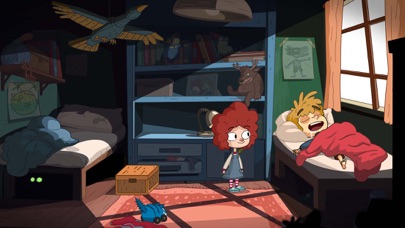
Lost in Play is a journey through childhood imagination with thoughtfully crafted puzzles and colorful characters. Play as a brother and sister duo on an adventure to find their way back home. Between reality and fantasy, the siblings explore the enchanted forest of a horned beast, start a rebellion in a goblin village, and help a team of frogs free a sword from a stone.
PUZZLES & MYSTERY
The bizarre and dreamlike world of Lost in Play is filled with mystery, unique puzzles, and mini-games. Challenge a pirate seagull to a game of clicking crabs, serve magical tea to a royal toad, and collect pieces to build a flying machine. Be a part of this modern point & click game that will reward your curiosity and leave you excited for the next piece of story.
IMAGINATION COMES TO LIFE
From what seems like a normal morning at home to a typical afternoon at the park, you'll soon find yourself on a whirlwind quest as you sneak into a goblin castle, explore ancient ruins, and soar atop a giant stork. Lost in Play takes you on a nostalgic roller-coaster!
AN INTERACTIVE CARTOON
With a hand-crafted style similar to animated shows from childhood, Lost in Play is a story meant for all. Whether you’re seeking wholesome delight or just a good time, the family can enjoy this story together.
GAME FEATURES
* A mysterious animated puzzle adventure.
* Filled with magical and magnificent creatures.
* Created with families in mind. Have your children watch you play!
* No dialogue. Everything is communicated visually in a universal way.
* Inspired by nostalgic TV shows.
* Play cards with goblins, build a dragon, and teach a sheep how to fly.
* Includes 30+ unique puzzles and mini-games.
* Catch a derpy chicken. Maybe.

- iPhone atau iPad tanpa Jailbreak atau dengan Jailbreak.
- Sideloadly atau alternatifnya.
- Komputer dengan Windows/macOS/Linux dan iTunes terpasang.
LANGKAH 1: Unduh file .IPA yang sudah di-hack dari tautan di atas ke komputer Anda. Untuk mengunduhnya dari iOSGods App, silakan lihat Tutorial Mengunduh IPA dari iOSGods App kami yang dilengkapi contoh video.
LANGKAH 2: Unduh Sideloadly dan pasang di Windows atau Mac Anda.
LANGKAH 3: Buka Sideloadly di komputer Anda, sambungkan perangkat iOS Anda, dan tunggu hingga nama perangkat Anda muncul di Sideloadly.
LANGKAH 4: Setelah iDevice Anda terdeteksi, seret file .IPA yang sudah dimodifikasi dan lepaskan ke dalam aplikasi Sideloadly.
LANGKAH 5: Masukkan email Apple Account Anda, lalu tekan "Start". Anda kemudian akan diminta memasukkan kata sandi. Silakan isi informasi yang diminta.
LANGKAH 6: Tunggu hingga Sideloadly selesai melakukan sideloading/pemasangan IPA yang di-hack. Jika terjadi masalah saat pemasangan, silakan baca catatan di bawah ini.
LANGKAH 7: Setelah pemasangan selesai dan Anda melihat aplikasi di Layar Beranda, Anda perlu masuk ke Pengaturan → Umum → Profil / VPN & Manajemen Perangkat. Setelah itu, ketuk email yang Anda masukkan pada langkah 6, lalu ketuk "Percayai [email protected]".
LANGKAH 8: Sekarang buka Layar Beranda dan jalankan aplikasi yang baru saja dipasang; semuanya seharusnya berjalan normal. Anda mungkin perlu mengikuti petunjuk tambahan per aplikasi yang muncul di popup hack di dalam game.
CATATAN: Pada iOS/iPadOS 16 dan yang lebih baru, Anda harus mengaktifkan Mode Pengembang. Untuk akun Apple Developer gratis, Anda perlu mengulangi proses ini setiap 7 hari. Jika Anda memiliki pertanyaan atau masalah, silakan baca bagian FAQ Sideloadly di topik tersebut kami.






![[Seven Deadly Sins] 七つの大罪 光と闇の交戦 : グラクロ iOS Mod IPA](https://is1-ssl.mzstatic.com/image/thumb/Purple221/v4/4e/03/9a/4e039aff-8bc1-b305-fac3-58e9f9b98e5f/AppIcon-1x_U007emarketing-0-8-0-85-220-0.png/100x100bb.jpg)


