Потрібен вхід
Увійдіть у свій обліковий запис iOSGods, щоб продовжити.
Увійдіть у свій обліковий запис iOSGods, щоб продовжити.
Train the Brain - Coordination Hack, це колекція головоломок, яка розвиває координацію рук та очей через цікаві, сімейні вправи для всіх віків. Ця модифікована версія для iOS видаляє всю рекламу, дозволяючи вам повністю зосередитися на завданнях для тренування мозку без перешкод.
- Без реклами → безперервна гра
Цей застосунок також постачається з iGameGod, який надає доступ до Auto Touch для автоматизації повторюваних дій, App Speed Manager для регулювання швидкості гри, редагування значень за допомогою Memory Engine та інших потужних інструментів для iOS-ігор.
Завантажте Train the Brain - Coordination Hack modded IPA за посиланнями вище. Натисніть кнопку встановлення та дотримуйтесь інструкцій, щоб встановити цей хак iOS на iPhone, iPad або Apple Silicon.
Потрібна додаткова допомога? Перегляньте наш Поширені запитання про застосунок iOSGods для детальних відповідей та порад з усунення несправностей.
We present this collection of coordination games to develop and stimulate
the hand-eye movement ability. Fun coordination exercises for the whole family to stimulate the mind in a playful way. This game is suitable for all kinds of people, from the youngest to the elderly and senior players.
TYPES OF GAMES
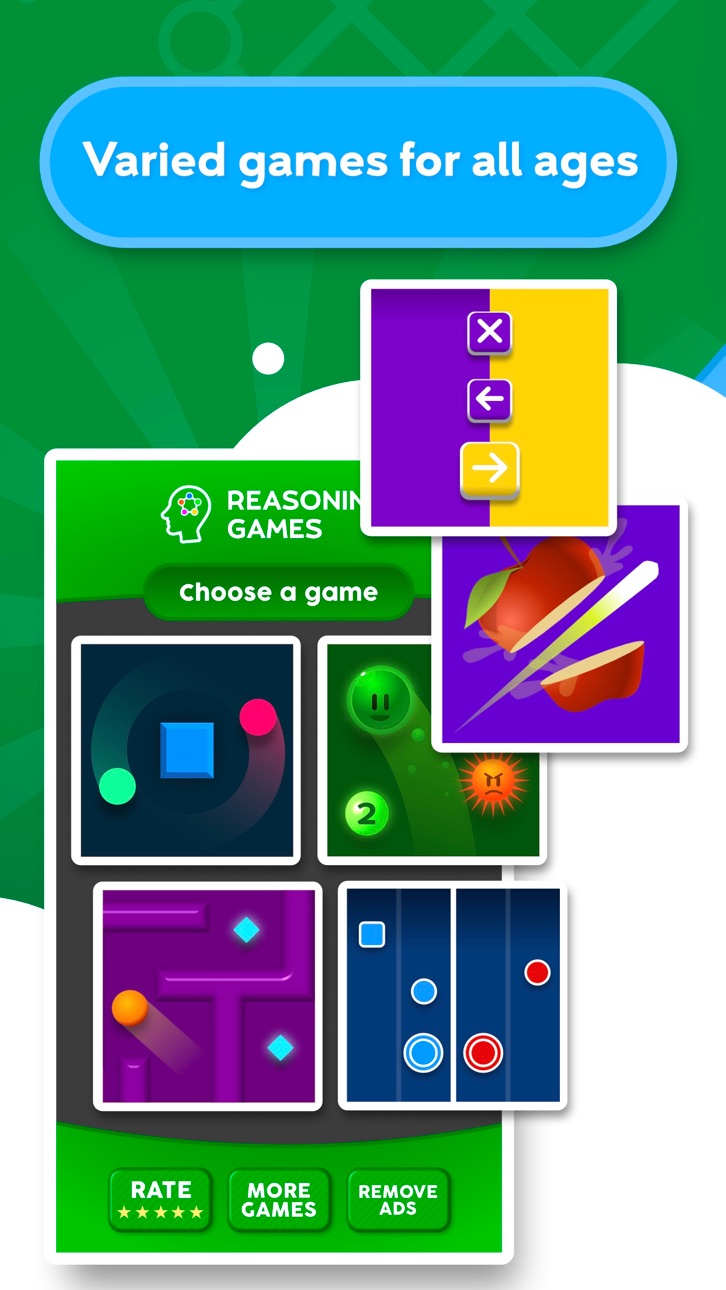
- Bimanual coordination of elements
- Selection of correct items
- Solve mazes using the gyroscope
- Decide between right and left side
- Avoid colliding with pieces
- Make series of numbers avoiding objects
In addition to coordination, these games help to stimulate other areas such as visual perception, psychomotor skills, attention or speed of processing.
APP FEATURES
- Fun daily brain training
- Available in 6 languages: Spanish, Italian, French, English, Portuguese and German.
- Easy and intuitive interface
- Different levels for all ages
- Constant updates with new games
GAMES TO STIMULATE COORDINATION
Coordination is one of the essential cognitive functions in our daily life. The development of coordination skills helps maintain a healthy mind and a healthy life.
Eye-hand coordination is the cognitive ability that allows us to perform tasks simultaneously using the eyes and hands. It is also defined as oculomotor coordination, oculo-manual, or visuomotor. These coordination games help to synchronize the action of the hand muscles to precise an appropriate speed and intensity of movement.
The different games of this app work different aspects of coordination such as accuracy, synchronization of both hands and fingers, fine motor, spatial orientation, the reaction speed or reflexes.
This app is a part of the collection of puzzles developed in collaboration with doctors and experts in neuropsychology for the cognitive stimulation of memory, attention, visuospatial function or reasoning, among others.
ABOUT TELLMEWOW
Tellmewow is a mobile game development company specialized in easy adaptation and basic usability which makes their games ideal for the elderly or young people who simply want to play an occasional games without major complications.
If you have any suggestions for improvement or want to stay tuned about upcoming games, follow us on our social networks.
@tellmewow
Знімки екрана © їхніх власників · App Store



iOSGods не пов’язана з Apple Inc., Google LLC або розробниками перелічених тут застосунків, не схвалена та не спонсорується ними. Apple, iOS і App Store — торгові марки Apple Inc. Android і Google Play — торгові марки Google LLC. Усі інші назви застосунків, іконки, зображення й торгові марки належать їхнім власникам.
- iPhone або iPad без джейлбрейку/у заводському стані або з джейлбрейком.
- Sideloadly або альтернативи.
- Комп'ютер під керуванням Windows/macOS/Linux із встановленим iTunes.
КРОК 1: Завантажте попередньо зламаний .IPA-файл за посиланням вище на свій комп'ютер. Щоб завантажити з iOSGods App, перегляньте наш Посібник із завантаження IPA в iOSGods App, який містить відеоприклад.
КРОК 2: Завантажте Sideloadly і встановіть його на своєму Windows або Mac.
КРОК 3: Відкрийте Sideloadly на комп'ютері, підключіть свій iOS-пристрій і зачекайте, поки назва пристрою з'явиться у Sideloadly.
КРОК 4: Коли ваш iDevice буде розпізнано, перетягніть завантажений модифікований .IPA-файл і відпустіть його в застосунок Sideloadly.
КРОК 5: Введіть електронну пошту вашого Apple Account, потім натисніть «Start». Після цього вас попросять ввести пароль. Введіть необхідні дані.
КРОК 6: Зачекайте, доки Sideloadly завершить sideload/встановлення зламаного IPA. Якщо під час встановлення виникнуть проблеми, прочитайте примітку нижче.
КРОК 7: Коли встановлення завершено й ви побачите застосунок на головному екрані, перейдіть до Налаштування → Загальні → Профілі / VPN і керування пристроєм. Там натисніть на електронну пошту, яку ви ввели на кроці 6, а потім натисніть «Довіряти [email protected]».
КРОК 8: Тепер перейдіть на головний екран і відкрийте щойно встановлений застосунок — усе має працювати належним чином. Можливо, доведеться виконати додаткові інструкції для конкретного застосунку в спливаючому вікні хака в грі.
ПРИМІТКА: У iOS/iPadOS 16 і пізніших версіях потрібно увімкнути режим розробника. Для безкоштовних облікових записів Apple Developer цей процес доведеться повторювати кожні 7 днів. Якщо у вас є запитання або проблеми, прочитайте наш розділ FAQ зі Sideloadly у темі.
Game Name iOS Mod IPA is an action adventure game enhanced with powerful gameplay boosts and quality-of-life improvements. Win battles faster, earn rewards quicker, and enjoy uninterrupted play without ads.
- Unlimited Gold - spend freely to unlock premium content
- Damage Multiplier - deal significantly more damage in combat
- Defense Multiplier - take less damage and survive longer
- Reward Multiplier - earn more loot from every battle
- Max Level - instantly reach the highest player rank
- No Ads - play without interruptions or advertisements
This app also comes with iGameGod, giving you access to Auto Touch to automate repetitive tasks, App Speed Manager for adjustable gameplay speed, Memory Engine value editing, and more powerful iOS game tools.
Завантажте Game Name Mod IPA за посиланнями вище. Натисніть кнопку встановлення та дотримуйтесь інструкцій, щоб встановити цей хак iOS на iPhone, iPad або Apple Silicon.
Потрібна додаткова допомога Перегляньте наш Поширені запитання про застосунок iOSGods для детальних відповідей та порад з усунення несправностей.
----------------------------------------------------------
--------------------------------------------------