ログインが必要
iOSGodsアカウントでサインインして続けてください。
iOSGodsアカウントでサインインして続けてください。
Train the Brain - Coordination Hack は、楽しくて家族向けのエクササイズを通じて、あらゆる年齢の人の手と目の協調性を高めるパズルゲーム集です。このModified iOS版はすべての広告を削除し、中断なく脳トレーニングチャレンジに集中できます。
- 広告なし → 中断のないゲームプレイ
このアプリにはiGameGodも搭載されており、繰り返し作業を自動化するAuto Touch、ゲーム速度を調整できるApp Speed Manager、Memory Engineによる値の編集など、強力なiOSゲーム用ツールをご利用いただけます。
Train the Brain - Coordination Hack modded IPAを上のリンクからダウンロードします。インストールボタンをタップし、画面の指示に従ってiPhone、iPad、Apple SiliconにこのiOSアプリハックをインストールします。
さらにヘルプが必要ですか? 詳しい回答とトラブルシューティングはiOSGodsアプリ よくある質問をご覧ください。
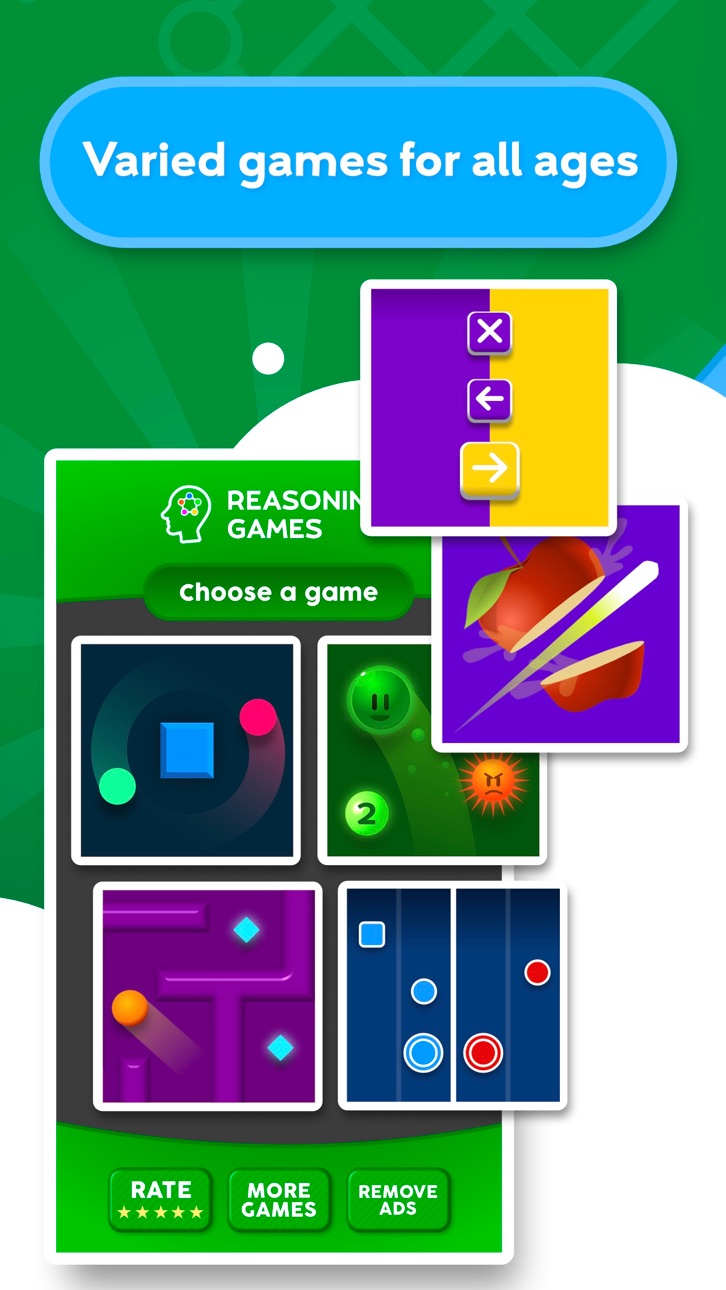
手と目の協調動作を刺激、向上させる調整力ゲームを集めました。
家族全員で楽しく調整力を鍛えて知性を刺激しましょう。子供から大人、高齢の方まで全年齢に適しています。
ゲームの種類
- 両手協調運動
- 正しいアイテムを選択
- 画面を傾けて迷路を脱出
- 左右正しい方向を選択
- 物体との衝突を回避
- 物体を避けながら連続した数字を完成させる
これらのゲームでは、調整力の他に視覚、精神運動、注意力、処理速度などの刺激を促します。
アプリの特徴
- 毎日楽しい脳トレ
- 8か国語対応西語、伊語、仏語、英語、葡語、日本語、韓国語、ドイツ語。
- 簡単で直感的なインターフェース
- 異なるレベルで全年齢に対応
- 頻繁なアップデートで新ゲームを追加
調整力を刺激するゲーム
調整力は、日常生活において不可欠な認知機能の一つです。調整力を向上させることで健康な精神と生活を維持できます。
手と目の協調運動は、目と手を同時に使う動作を行うときに働く認知機能です。眼球協調運動、眼球マニュアル運動、視覚運動とも呼ばれます。これらの調整力ゲームを遊ぶことで、手の筋肉を適当な速度と強度で働かせる効果を得られます。
各ゲームは、正確性、手と目の同期、微細運動、空間定位、反射神経などの異なる特徴を持ち、調整力を鍛えることができます。
本アプリは医師や神経心理学の専門家の協力のもと作成されたパズルコレクションの一つです。とりわけ記憶力、注意力、視覚機能、または論理的思考の認知刺激を目的としています。
TELLMEWOWとは
Tellmewowは、年配の方からお子様まで、簡単に適応できて、使いやすく、複雑な操作なしで、たまに遊びたいといったニーズに特化したモバイルゲーム制作会社です。
改良の提案がある場合や、ゲームの最新情報を知りたい場合は、当社のソーシャルメディアをフォローしてください。
@tellmewow
スクリーンショット © 各権利者 · App Store



iOSGods は Apple Inc.、Google LLC、および掲載アプリの開発者と提携しておらず、承認や協賛も受けていません。Apple、iOS、App Store は Apple Inc. の商標です。Android および Google Play は Google LLC の商標です。その他のアプリ名、アイコン、画像、商標はすべて各権利者に帰属します。

- 脱獄/Jailed済みまたは脱獄済みのiPhoneまたはiPad。
- Sideloadlyまたは代替手段。
- iTunesがインストールされているWindows/macOS/Linuxを実行しているコンピュータ。
ステップ1: 上のリンクから事前にハックされた.IPAファイルをコンピュータにダウンロードします。iOSGodsアプリからダウンロードする方法は、ビデオ例付きのiOSGodsアプリIPAダウンロードチュートリアルをご覧ください。
ステップ2: SideloadlyをダウンロードしてWindowsまたはMacにインストールします。
ステップ3: コンピュータでSideloadlyを開き、iOSデバイスを接続して、デバイス名がSideloadlyに表示されるまで待ちます。
ステップ4: iDeviceが認識されたら、ダウンロードしたModされた.IPAファイルをSideloadlyアプリにドラッグ&ドロップします。
ステップ5: Apple Accountのメールアドレスを入力し、「Start」を押します。次にパスワードの入力を求められます。必要な情報を入力してください。
ステップ6: Sideloadlyがハックされたipaのサイドロード/インストールを完了するのを待ちます。インストール中に問題が発生した場合は、以下の注意事項をお読みください。
ステップ7: インストールが完了し、ホーム画面にアプリが表示されたら、設定 → 一般 → プロファイル / VPNとデバイス管理に移動する必要があります。そこで、ステップ6で入力したメールをタップし、「Trust [email protected]」をタップします。
ステップ8: ホーム画面に戻り、新しくインストールされたアプリを開けば、すべて正常に動作するはずです。ゲーム内のハックのポップアップで、アプリごとの追加指示に従う必要がある場合があります。
注意: iOS/iPadOS 16以降では、デベロッパモードを有効にするが必要です。無料のApple Developerアカウントの場合、このプロセスを7日ごとに繰り返す必要があります。質問や問題がある場合は、トピックのSideloadly FAQセクションをお読みください。
Game Name iOS Mod IPA is an action adventure game enhanced with powerful gameplay boosts and quality-of-life improvements. Win battles faster, earn rewards quicker, and enjoy uninterrupted play without ads.
- Unlimited Gold - spend freely to unlock premium content
- Damage Multiplier - deal significantly more damage in combat
- Defense Multiplier - take less damage and survive longer
- Reward Multiplier - earn more loot from every battle
- Max Level - instantly reach the highest player rank
- No Ads - play without interruptions or advertisements
This app also comes with iGameGod, giving you access to Auto Touch to automate repetitive tasks, App Speed Manager for adjustable gameplay speed, Memory Engine value editing, and more powerful iOS game tools.
Game Name Mod IPAを上のリンクからダウンロードします。インストールボタンをタップし、画面の指示に従ってiPhone、iPad、Apple SiliconにこのiOSアプリハックをインストールします。
さらにヘルプが必要ですか 詳しい回答とトラブルシューティングはiOSGodsアプリ よくある質問をご覧ください。
----------------------------------------------------------
--------------------------------------------------