ต้องเข้าสู่ระบบ
เข้าสู่ระบบด้วยบัญชี iOSGods เพื่อดำเนินการต่อ
เข้าสู่ระบบด้วยบัญชี iOSGods เพื่อดำเนินการต่อ
ครอบงำ Pokémon Shuffle Mobile ด้วย Mod IPA hack ฟรีนี้ที่ลบข้อจำกัดปริศนาทั้งหมดและรับประกันชัยชนะ เพลิดเพลินไปกับการเคลื่อนไหวไม่จำกัด, ความสำเร็จ S-rank อัตโนมัติ, Mega Evolution ถาวร, และไม่มีความกดดันเวลาขณะที่คุณผ่านทุกด่านได้อย่างง่ายดายในขณะที่ได้รับเหรียญ 3,000 เหรียญต่อการชนะ
- Unlimited Moves → แก้ปริศนาโดยไม่ต้องกังวลว่าจะหมดการกระทำ
- Always S Rank → ได้คะแนนสูงสุดในทุกระดับ
- Always Mega → เก็บ Mega Evolution ให้ทำงานตลอดการต่อสู้
- No Time Limit → เล่นตามความเร็วของคุณเองโดยไม่มีความกดดัน
- 3,000 Coins each time → ได้เหรียญสูงสุดต่อการสำเร็จด่าน
x64 หรือ ARM64 iDevices: iPhone 5s, 6, 6 Plus, 6s, 6s Plus, 7, 7 Plus, 8, 8 Plus, X, Xr, Xs, Xs Max, SE, iPod Touch 6G, iPad Air, Air 2, Pro และ iPad Mini 2, 3, 4 และรุ่นใหม่กว่า
แอปนี้ยังมาพร้อมกับ iGameGod ซึ่งช่วยให้คุณเข้าถึง Auto Touch สำหรับการทำงานซ้ำ ๆ โดยอัตโนมัติ, App Speed Manager สำหรับปรับความเร็วของเกม, การแก้ไขค่าด้วย Memory Engine และเครื่องมือสำหรับเกม iOS ที่ทรงพลังอื่น ๆ อีกมากมาย
ดาวน์โหลด Pokémon Shuffle Mobile Hack modded IPA จากลิงก์ด้านบน แตะปุ่มติดตั้งและทำตามคำแนะนำบนหน้าจอเพื่อติดตั้งแฮ็กแอป iOS นี้บน iPhone, iPad หรือ Apple Silicon
ต้องการความช่วยเหลือเพิ่มเติม? ดู คำถามที่พบบ่อยของแอป iOSGods สำหรับคำตอบโดยละเอียดและเคล็ดลับการแก้ไขปัญหา
Pokémon Shuffle is a whole new puzzle game! Line up three or more Pokémon vertically or horizontally to battle against wild Pokémon.
■ Introduction
- A whole new puzzle game where you solve puzzles to battle Pokémon
Pokémon Shuffle Mobile is a puzzle game where you line up three or more Pokémon vertically or horizontally to battle against wild Pokémon.
You can play it casually—but battling, collecting, and leveling up Pokémon can also provide hours of fun.
- Lots of stages and lots of Pokémon
On top of the Pokémon available at the initial release of Pokémon Shuffle Mobile, additional stages and Pokémon are planned, but this game already has a lot to offer! Both puzzle beginners and experts will have fun with Pokémon Shuffle Mobile’s various levels of challenges.
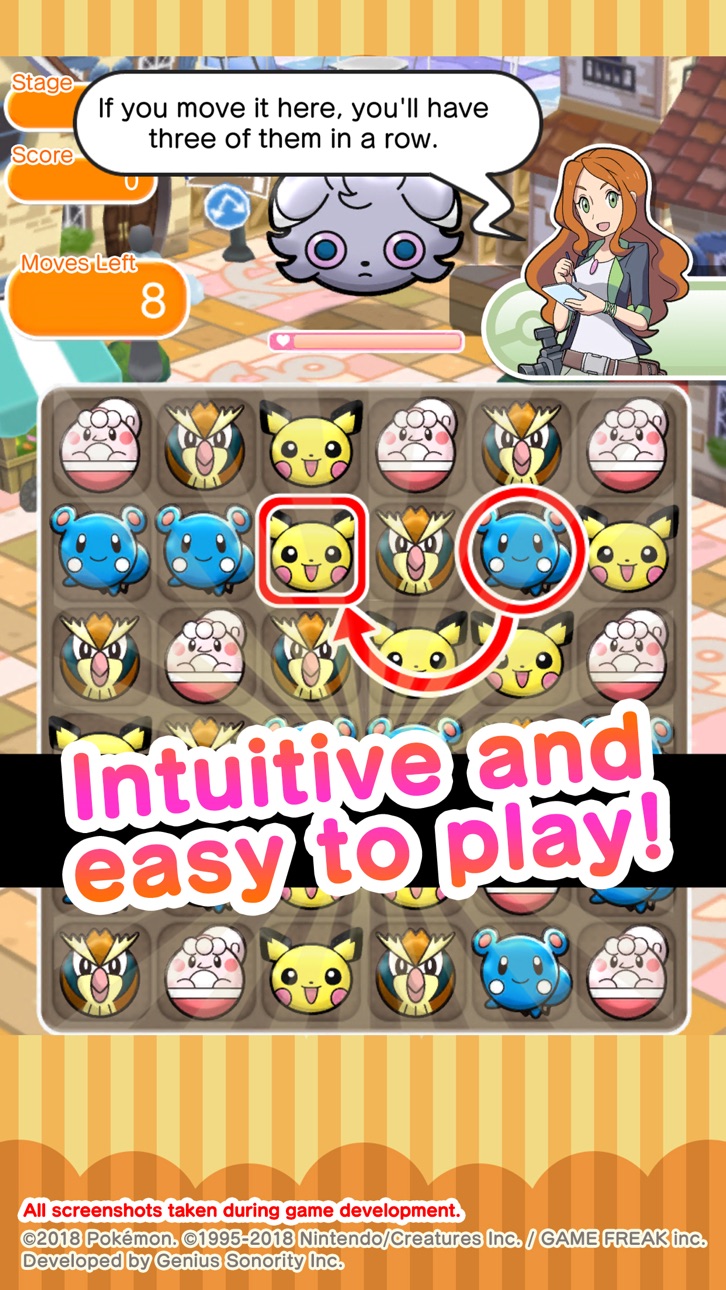
- Intuitive and easy game play
All you have to do in Pokémon Shuffle Mobile is select a Pokémon and its destination in the puzzle area to cause combos automatically—anyone can play it!
Its simple gameplay blends with challenging strategic aspects to appeal to a full spectrum of players from beginners to experts.
■ Notes
- Terms of Use
Please read the Terms of Use before using this application.
- Device settings
You may not be able to launch this application, depending on your device’s settings and/or how it is used. In order to maintain fairness among players, some functions may become inaccessible if certain operations (such as jailbreaking) have been performed.
- Connection environment
If you use this application in locations where reception is poor, your game data may become corrupted or lost.
Please make sure to play this game in locations where reception is good.
If communication is lost momentarily, you may be able to resume play in some cases by pressing the Retry button.
Please note that we are unable to assist you if you experience problems due to communication errors.
- Before making purchases
iOS version 12 or higher is required for this application. Available features may depend on your device’s iOS version.
Please make sure that you can use the free-of-charge features of this product with no issues on your device before you make purchases.
Certain devices and/or configurations may also cause the application to fail to work.
- For inquiries
Please visit support.pokemon.com to report issues about Pokémon Shuffle Mobile.
ภาพหน้าจอ © เจ้าของแต่ละราย · App Store

iOSGods ไม่มีความเกี่ยวข้อง ไม่ได้รับการรับรอง และไม่ได้รับการสนับสนุนจาก Apple Inc., Google LLC หรือผู้พัฒนาแอปที่แสดงไว้ที่นี่ Apple, iOS และ App Store เป็นเครื่องหมายการค้าของ Apple Inc. Android และ Google Play เป็นเครื่องหมายการค้าของ Google LLC ชื่อแอป ไอคอน ภาพ และเครื่องหมายการค้าอื่นทั้งหมดเป็นทรัพย์สินของเจ้าของแต่ละราย

- iPhone หรือ iPad ที่ไม่ได้เจลเบรก/ไม่ได้เจลเบรก หรือเจลเบรกแล้ว
- Sideloadly หรือทางเลือกอื่น
- คอมพิวเตอร์ที่ใช้ Windows/macOS/Linux และติดตั้ง iTunes ไว้
ขั้นตอนที่ 1: ดาวน์โหลดไฟล์ .IPA ที่แฮกไว้ล่วงหน้าจากลิงก์ด้านบนลงในคอมพิวเตอร์ของคุณ หากต้องการดาวน์โหลดจากแอป iOSGods โปรดดู วิธีดาวน์โหลด IPA ในแอป iOSGods ซึ่งมีตัวอย่างวิดีโอประกอบ
ขั้นตอนที่ 2: ดาวน์โหลด Sideloadly แล้วติดตั้งบน Windows หรือ Mac ของคุณ
ขั้นตอนที่ 3: เปิด Sideloadly บนคอมพิวเตอร์ เชื่อมต่ออุปกรณ์ iOS แล้วรอจนกว่าชื่ออุปกรณ์ของคุณจะปรากฏใน Sideloadly
ขั้นตอนที่ 4: เมื่อ iDevice ของคุณถูกตรวจพบแล้ว ให้ลากไฟล์ .IPA ที่ม็อดมาวางลงในโปรแกรม Sideloadly
ขั้นตอนที่ 5: กรอกอีเมล Apple Account ของคุณ จากนั้นกด "Start" ระบบจะถามรหัสผ่าน กรอกข้อมูลที่จำเป็นให้เรียบร้อย
ขั้นตอนที่ 6: รอจนกว่า Sideloadly จะ sideload/ติดตั้งไฟล์ IPA ที่แฮกเสร็จ หากเกิดปัญหาระหว่างติดตั้ง โปรดอ่านหมายเหตุด้านล่าง
ขั้นตอนที่ 7: เมื่อการติดตั้งเสร็จสิ้นและเห็นแอปบนหน้าจอหลักแล้ว ให้ไปที่ การตั้งค่า → ทั่วไป → โปรไฟล์ / VPN และการจัดการอุปกรณ์ จากนั้นแตะที่อีเมลที่คุณกรอกในขั้นตอนที่ 6 แล้วแตะ "เชื่อถือ [email protected]"
ขั้นตอนที่ 8: จากนั้นไปที่หน้าจอหลักและเปิดแอปที่ติดตั้งใหม่ ทุกอย่างควรทำงานได้ปกติ คุณอาจต้องทำตามคำแนะนำเพิ่มเติมเฉพาะแอปในป๊อปอัปของม็อดในเกม
หมายเหตุ: สำหรับ iOS/iPadOS 16 ขึ้นไป คุณต้อง เปิดโหมดนักพัฒนา (Developer Mode) สำหรับบัญชี Apple Developer แบบฟรี คุณต้องทำขั้นตอนนี้ซ้ำทุก 7 วัน หากมีคำถามหรือพบปัญหา โปรดอ่าน หัวข้อ FAQ ของ Sideloadly ในกระทู้
Game Name iOS Mod IPA is an action adventure game enhanced with powerful gameplay boosts and quality-of-life improvements. Win battles faster, earn rewards quicker, and enjoy uninterrupted play without ads.
- Unlimited Gold - spend freely to unlock premium content
- Damage Multiplier - deal significantly more damage in combat
- Defense Multiplier - take less damage and survive longer
- Reward Multiplier - earn more loot from every battle
- Max Level - instantly reach the highest player rank
- No Ads - play without interruptions or advertisements
This app also comes with iGameGod, giving you access to Auto Touch to automate repetitive tasks, App Speed Manager for adjustable gameplay speed, Memory Engine value editing, and more powerful iOS game tools.
ดาวน์โหลด Game Name Mod IPA จากลิงก์ด้านบน แตะปุ่มติดตั้งและทำตามคำแนะนำบนหน้าจอเพื่อติดตั้งแฮ็กแอป iOS นี้บน iPhone, iPad หรือ Apple Silicon
ต้องการความช่วยเหลือเพิ่มเติม ดู คำถามที่พบบ่อยของแอป iOSGods สำหรับคำตอบโดยละเอียดและเคล็ดลับการแก้ไขปัญหา
----------------------------------------------------------
--------------------------------------------------