Inicio de sesión requerido
Inicia sesión con tu cuenta de iOSGods para continuar.
Inicia sesión con tu cuenta de iOSGods para continuar.
Domina Pokémon Shuffle Mobile con este Mod IPA gratuito que elimina todas las limitaciones de puzzles y garantiza la victoria. Disfruta de movimientos ilimitados, logros automáticos de rango S, Mega Evolución permanente y sin presión de tiempo mientras avanzas fácilmente por cada etapa ganando 3,000 monedas por victoria.
- Movimientos Ilimitados → resuelve puzzles sin quedarte sin acciones
- Siempre Rango S → consigue la puntuación más alta en cada nivel
- Siempre Mega → mantén la Mega Evolución activa durante las batallas
- Sin Límite de Tiempo → juega a tu propio ritmo sin presión
- 3,000 Monedas cada vez → gana moneda máxima al completar cada etapa
Dispositivos iDevices x64 o ARM64: iPhone 5s, 6, 6 Plus, 6s, 6s Plus, 7, 7 Plus, 8, 8 Plus, X, Xr, Xs, Xs Max, SE, iPod Touch 6G, iPad Air, Air 2, Pro e iPad Mini 2, 3, 4 y posteriores.
Esta app también incluye iGameGod, que te ofrece acceso a Auto Touch para automatizar tareas repetitivas, App Speed Manager para ajustar la velocidad del juego, edición de valores con Memory Engine y más potentes herramientas para juegos de iOS.
Descarga Pokémon Shuffle Mobile Hack modded IPA desde los enlaces de arriba. Toca el botón de instalación y sigue las instrucciones para instalar este hack iOS en tu iPhone, iPad o Mac con Apple Silicon.
¿Necesitas más ayuda? Consulta nuestras Preguntas frecuentes de la app iOSGods para respuestas detalladas y consejos de solución de problemas.
Introducción
Un juego de puzles completamente nuevo donde tendrás que resolver rompecabezas para enfrentarte a Pokémon
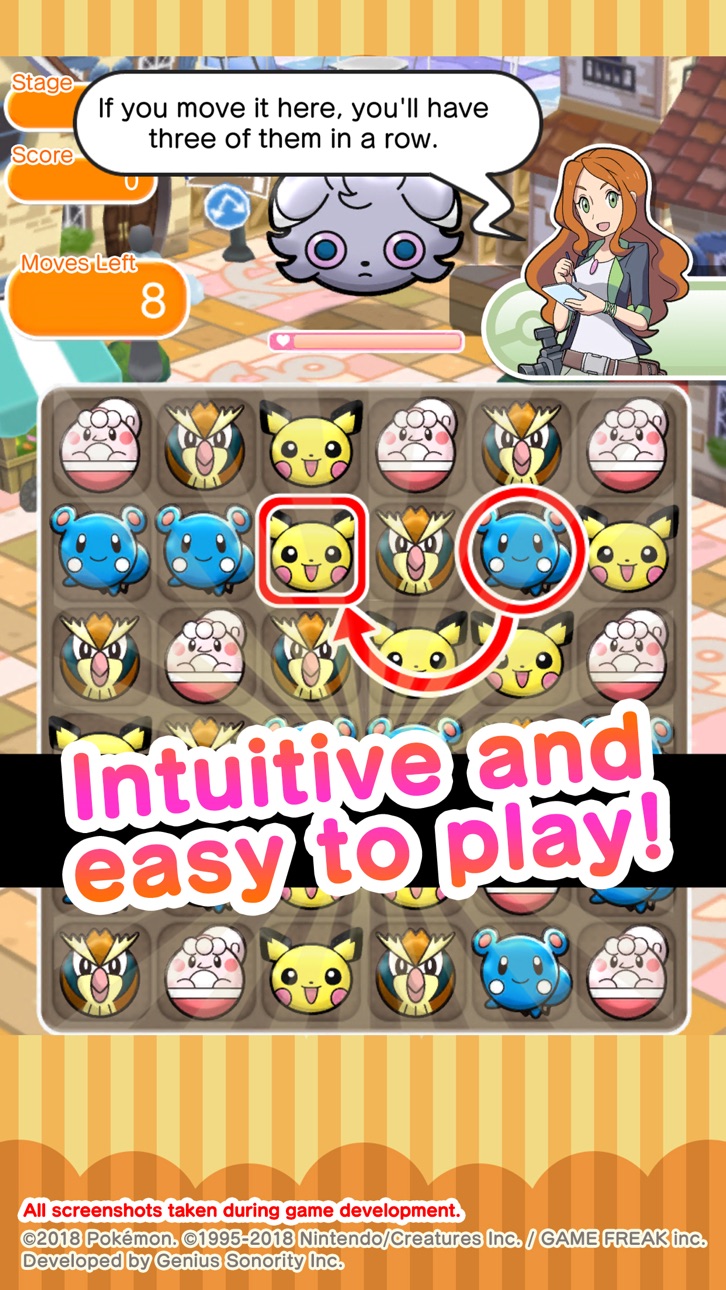
Pokémon Shuffle Mobile es un juego de rompecabezas en el que tendrás que alinear tres o más Pokémon en vertical u horizontal para combatir contra Pokémon salvajes.
Puedes jugar ocasionalmente... pero si lo tuyo es combatir, coleccionar Pokémon y subirlos de nivel, este juego te proporcionará horas y horas de diversión.
¡Multitud de fases y de Pokémon!
Además de las fases disponibles tras el lanzamiento inicial de Pokémon Shuffle Mobile, está previsto añadir fases y Pokémon adicionales, ¡aunque el juego ya tiene mucho que ofrecer desde un primer momento!
Pokémon Shuffle Mobile proporcionará horas y horas de diversión tanto a los principiantes como a los expertos en juegos de puzles gracias a la variedad de sus retos.
Juego sencillo e intuitivo
Lo único que tendrás que hacer en Pokémon Shuffle Mobile es seleccionar un Pokémon y arrastrarlo hasta donde quieras colocarlo en el área de juego para empezar a crear alineaciones de forma automática. ¡Un juego al alcance de todos!
La combinación de juego sencillo con elementos estratégicos más desafiantes está destinada a hacer las delicias de todo tipo de jugadores, desde principiantes hasta expertos.
Notas:
- Condiciones de uso
Lee las condiciones de uso de esta aplicación antes de usarla.
Configuración del dispositivo
Es posible que no se pueda ejecutar la aplicación en este dispositivo en función de los ajustes y del uso que se le dé al mismo. Para mantener la imparcialidad entre los jugadores, puede que algunas funciones no estén disponibles si se han llevado a cabo con el dispositivo determinadas operaciones (como jailbreak, por ejemplo).
Entorno de conexión
Si usas esta aplicación en lugares donde la intensidad de la señal sea débil, es posible que tus datos se pierdan o se dañen.
Asegúrate de jugar en lugares donde la intensidad de la señal sea buena.
Si se interrumpe la conexión temporalmente, podrás reanudar la partida en algunas ocasiones pulsando ""Reintentar"".
Ten en cuenta que no podremos ayudarte si sufres problemas relacionados con errores de conexión.
Antes de efectuar transacciones
Se necesita la versión 12 iOS o posterior para esta aplicación. Las funciones disponibles pueden variar dependiendo de la versión de iOS de tu dispositivo.
Antes de realizar una transacción, asegúrate de que puedes usar sin problemas las funciones sin coste de este producto.
Es posible que la aplicación no funcione en algunos dispositivos o con determinados ajustes.
Para cualquier consulta
Visita support-es.pokemon.com para informarte de cualquier problema referente a Pokémon Shuffle Mobile.
Capturas © sus respectivos dueños · App Store

iOSGods no está afiliado, avalado ni patrocinado por Apple Inc., Google LLC ni por los desarrolladores de las apps que aparecen aquí. Apple, iOS y App Store son marcas comerciales de Apple Inc. Android y Google Play son marcas comerciales de Google LLC. Todos los demás nombres de apps, iconos, imágenes y marcas pertenecen a sus respectivos dueños.

- iPhone o iPad con o sin Jailbreak.
- Sideloadly u otras alternativas.
- Ordenador con Windows/macOS/Linux e iTunes instalado.
PASO 1: Descargue el archivo .IPA pre-modificado desde el enlace de arriba a su ordenador. Para descargarlo desde la iOSGods App, consulte nuestro Tutorial de descarga del IPA desde la iOSGods App, que incluye un ejemplo en vídeo.
PASO 2: Descargue Sideloadly e instálelo en su Windows o Mac.
PASO 3: Abra Sideloadly en su ordenador, conecte su dispositivo iOS y espere hasta que el nombre del dispositivo aparezca en Sideloadly.
PASO 4: Una vez que su iDevice sea reconocido, arrastre el archivo .IPA modificado que descargó y suéltelo en la aplicación Sideloadly.
PASO 5: Introduzca el correo electrónico de su Apple Account y, a continuación, pulse «Start». Le pedirá que introduzca su contraseña. Proporcione la información solicitada.
PASO 6: Espere a que Sideloadly termine de hacer sideload/instalar el IPA modificado. Si surgen problemas durante la instalación, por favor lea la nota a continuación.
PASO 7: Una vez completada la instalación y al ver la app en la pantalla de inicio, deberá ir a Ajustes → General → Perfiles / VPN y Gestión de Dispositivos. Una vez allí, toque el correo electrónico que introdujo en el paso 6 y, después, toque en «Confiar en [email protected]».
PASO 8: Ahora vaya a la pantalla de inicio y abra la app recién instalada; todo debería funcionar correctamente. Es posible que tenga que seguir instrucciones adicionales específicas de cada app dentro del popup del hack en el juego.
NOTA: En iOS/iPadOS 16 y posteriores, debe activar el Modo Desarrollador. Para cuentas gratuitas de Apple Developer, deberá repetir este proceso cada 7 días. Si tiene alguna pregunta o problema, lea nuestra sección de Preguntas Frecuentes de Sideloadly del tema.
Game Name iOS Mod IPA is an action adventure game enhanced with powerful gameplay boosts and quality-of-life improvements. Win battles faster, earn rewards quicker, and enjoy uninterrupted play without ads.
- Unlimited Gold - spend freely to unlock premium content
- Damage Multiplier - deal significantly more damage in combat
- Defense Multiplier - take less damage and survive longer
- Reward Multiplier - earn more loot from every battle
- Max Level - instantly reach the highest player rank
- No Ads - play without interruptions or advertisements
This app also comes with iGameGod, giving you access to Auto Touch to automate repetitive tasks, App Speed Manager for adjustable gameplay speed, Memory Engine value editing, and more powerful iOS game tools.
Descarga Game Name Mod IPA desde los enlaces de arriba. Toca el botón de instalación y sigue las instrucciones para instalar este hack iOS en tu iPhone, iPad o Mac con Apple Silicon.
¿Necesitas más ayuda Consulta nuestras Preguntas frecuentes de la app iOSGods para respuestas detalladas y consejos de solución de problemas.
----------------------------------------------------------
--------------------------------------------------