需要登入
請使用您的 iOSGods 帳戶登入以繼續。
請使用您的 iOSGods 帳戶登入以繼續。
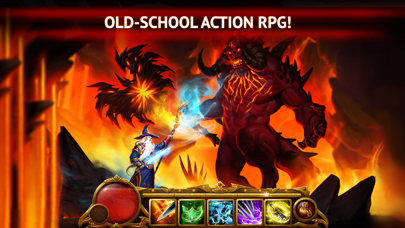
在 Guild of Heroes: Legendary War 中將你的傷害輸出提升至 10 倍,利用這個破解版本將與龍和黑暗地牢的史詩戰鬥轉變為單方面的勝利,敵人毫無抵抗地倒下。
無論你是在進行任務磨練、主宰 PVP 競技場,還是參與公會戰爭,這個 Mod IPA 消除了磨練,立即解鎖高級功能,凍結你的資源以防止意外花費,讓自動戰鬥處理重複的戰鬥,而你可以專注於策略和進度。
- 玩家傷害倍數 - x1 - 10(必須與無敵模式一起使用) → 將你的攻擊力從 1 倍縮放至 10 倍倍數
- 無敵模式 → 在戰鬥中變得無敵
- 防封禁 → 安全遊玩而不被偵測(避免可疑行為或濫用)
- 敵人自動自殺 → 敵人在沒有你干預的情況下自行消滅
- 解鎖自動戰鬥 → 自動化戰鬥和磨練
- 自訂售價 → 為物品銷售設定你自己的價值
- 高級啟用 → 免費存取所有高級功能
- 凍結資源 → 鎖定你的金幣和材料以防止花費
- 免費藥水製作 → 無成本製作藥水
- 免費欄位擴展 → 免費增加背包空間
- 無復活成本 → 在戰鬥中無需付費即可重生
- 即時技能 → 使用能力無冷卻或延遲
此應用程式也內建 iGameGod,讓你可以使用 Auto Touch 自動執行重複操作、透過 App Speed Manager 調整遊戲速度、使用 Memory Engine 修改記憶體數值,以及更多強大的 iOS 遊戲工具。
從上方連結下載 Guild of Heroes: Legendary War Hack modded IPA。點選安裝按鈕並依照畫面指示在 iPhone、iPad 或 Apple Silicon 上安裝此 iOS 應用程式修改版。
需要更多協助?請查看我們的 iOSGods 應用程式常見問題 以獲得詳細解答與疑難排解。
Únete a Guild of Heroes y lucha contra las fuerzas del mal en un nuevo mundo de fantasía lleno de aventuras y peligros. Aquí podrás encontrar tu camino hacia la gloria y el reconocimiento. Equipa a tu personaje y practica con la espada y la magia para mejorar tus habilidades.
Este es un juego RPG de acción de fantasía gratuito para tabletas y teléfonos móviles. Guild of Heroes es diferente a otros juegos debido a su estilo de juego sencillo y práctico. ¡Compruébalo por ti mismo!
◆ Salta al corazón de la batalla. Una IU intuitiva que te ayudará a desenvolverte en el juego en muy poco tiempo. Pero para convertirte en un héroe de verdad, debes trabajar duro.
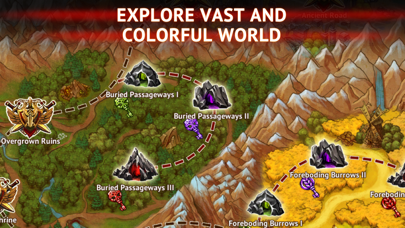
◆ Explora un inmenso y colorido mundo. Adéntrate en un viaje épico a través de lugares únicos que esconden numerosos secretos. Viajarás por inmensas explanadas, bosques espesos y cuevas y mazmorras muy profundas.
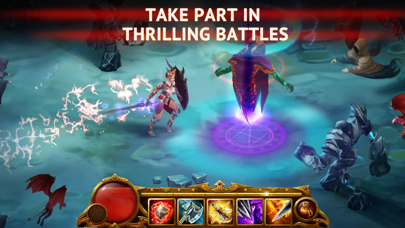
◆ Aplasta a tus enemigos. Cada uno tendrá habilidades y comportamientos únicos. Encuentra sus puntos débiles y no les des la oportunidad de derrotarte.
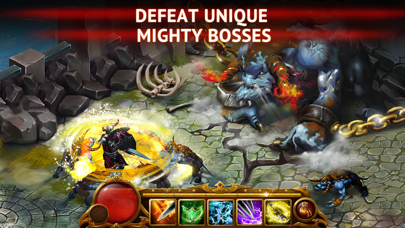
◆ Derrota a poderosos jefes. Estos hijos de la oscuridad han evolucionado hasta convertirse en seres prácticamente invencibles. Solo temen a sus propios Lores Oscuros. Mátalos para obtener antiguos artefactos únicos.
◆ Equipa a tu personaje. Escoge tu propia armadura y juego de armas de entre los cientos de opciones disponibles.
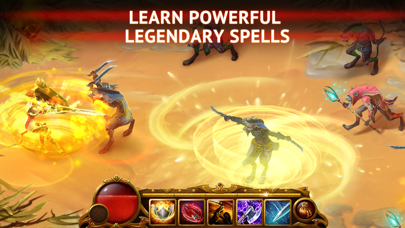
◆ Aprende nuevos hechizos, mejóralos y úsalos en la batalla. En este mundo, se pueden controlar todos los elementos con magia. Úsalos e incluso las fuerzas más oscuras se someterán a ti.
◆ Juega codo con codo con tus amigos. Siempre te ayudarán a vencer a los enemigos más poderosos y malvados. Cread vuestro propio equipo de guerreros y preparaos para emocionantes retos.
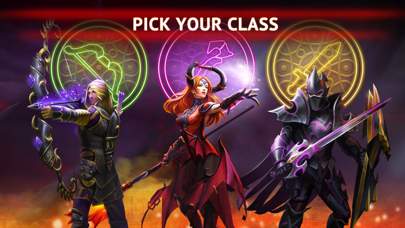
◆ Cambia la clase de tu personaje conforme vas avanzando en el juego. Elige una de las tres clases disponibles: guerrero, arquero o mago. Cámbiala en cualquier momento sin tener que volver a empezar el juego.
Creado por MY.GAMES B.V.

- 未越獄/受限或已越獄的 iPhone 或 iPad。
- Sideloadly 或替代方案。
- 執行 Windows/macOS/Linux 且已安裝 iTunes 的電腦。
步驟 1: 透過上方連結將已破解的 .IPA 檔案下載到您的電腦。若要從 iOSGods App 下載,請參閱我們的 iOSGods App IPA 下載教學,其中包含影片範例。
步驟 2: 下載 Sideloadly 並將其安裝在您的 Windows 或 Mac 上。
步驟 3: 在電腦上開啟 Sideloadly,連接您的 iOS 裝置,並等待裝置名稱出現在 Sideloadly 中。
步驟 4: 當 Sideloadly 辨識到您的 iOS 裝置後,將下載好的修改版 .IPA 檔案拖曳並放到 Sideloadly 應用程式中。
步驟 5: 輸入您的 Apple Account 電子郵件,然後按下「Start」。系統會要求您輸入密碼,請依指示提供所需資訊。
步驟 6: 等待 Sideloadly 完成已破解 IPA 的旁載/安裝。如果安裝過程中發生問題,請閱讀下方的注意事項。
步驟 7: 安裝完成並在主畫面上看到該應用程式後,您需要前往 設定 → 一般 → 描述檔 / VPN 與裝置管理。進入後,點選您在步驟 6 中輸入的電子郵件,然後點選「信任 [email protected]」。
步驟 8: 現在回到主畫面並開啟新安裝的應用程式,一切應該都能正常運作。您可能需要依照遊戲內破解彈出視窗中的進一步指示操作。
注意: 在 iOS/iPadOS 16 及更新版本上,您必須 啟用開發者模式。若使用免費的 Apple Developer 帳號,您將需要每 7 天重複此程序。如有任何疑問或問題,請閱讀我們的 主題中的 Sideloadly 常見問題區段。



![[Puzzle & Dragons JP] パズル&ドラゴンズ Hack](https://is1-ssl.mzstatic.com/image/thumb/Purple211/v4/ca/88/05/ca880549-d75e-5b3d-321e-b111dbb2fcda/AppIcon-0-0-1x_U007emarketing-0-8-0-85-220.png/100x100bb.jpg)


