Inicio de sesión requerido
Inicia sesión con tu cuenta de iOSGods para continuar.
Inicia sesión con tu cuenta de iOSGods para continuar.

Carista OBD2 es una aplicación de diagnóstico y personalización de automóviles DIY que te permite leer códigos, monitorear datos en vivo del motor y desbloquear funciones ocultas del vehículo desde tu iPhone. Este Mod IPA modificado otorga acceso premium, para que puedas diagnosticar luces de advertencia, personalizar el comportamiento de tu automóvil y realizar tareas de mantenimiento sin visitas al taller.
- Premium → acceso completo a todas las herramientas de diagnóstico y personalización
Esta app también incluye iGameGod, que te ofrece acceso a Auto Touch para automatizar tareas repetitivas, App Speed Manager para ajustar la velocidad del juego, edición de valores con Memory Engine y más potentes herramientas para juegos de iOS.
Descarga Carista OBD2 Modded modded IPA desde los enlaces de arriba. Toca el botón de instalación y sigue las instrucciones para instalar este hack iOS en tu iPhone, iPad o Mac con Apple Silicon.
¿Necesitas más ayuda? Consulta nuestras Preguntas frecuentes de la app iOSGods para respuestas detalladas y consejos de solución de problemas.
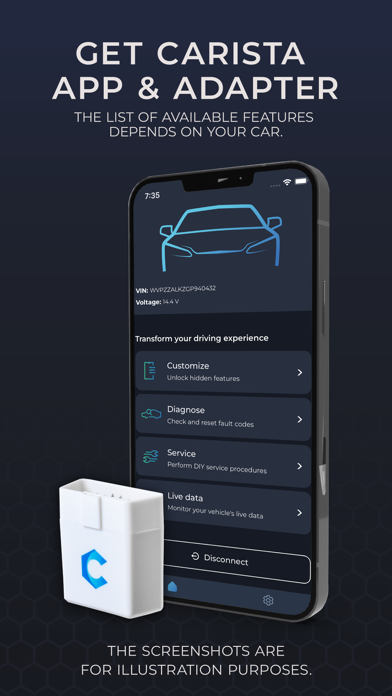
Carista App es como un taller mecánico en tu mano: activa extras ocultos, diagnostica testigos, controla datos en directo y realiza el mantenimiento de tu coche.
Ahorra tiempo y dinero en visitas al taller con Carista. Personaliza el comportamiento de tu coche, desbloquea funciones ocultas, diagnostica las luces de advertencia del salpicadero, controla los parámetros en tiempo real y realiza sencillos procedimientos de servicio de forma rápida y sencilla. Opciones avanzadas de la app disponibles para determinados modelos de Audi, BMW, Buick, Cadillac, Chevrolet, Cupra, Dacia, Ford, Gemini, GMC, Holden, Hyundai, Infiniti, Jaguar, Kia, Land Rover, Lexus, Lincoln, MAN, Mazda, Mini, Nissan, Opel/Vauxhall, Pontiac, Renault, Saab, Scion, Seat, Skoda, Toyota, Volkswagen y Volvo.
CARISTA “TODO EN UNO”
-Activa extras: desbloquea funciones ocultas, incluidas las protegidas por SFD, y adapta tu coche a tus preferencias
-Diagnostica tu coche: identifica y resuelve rápidamente los problemas antes de que se conviertan en costosas reparaciones.
-Monitoriza datos en vivo: mantente informado sobre la salud y el rendimiento de tu coche.
-Haz el servicio: ahorra en el mantenimiento rutinario y evita largas visitas al taller.
MARCAS COMPATIBLES
Carista es compatible con algunos modelos de Audi, BMW, Buick, Cadillac, Chevrolet, Dacia, Ford, GMC, Holden, Infiniti, Jaguar, Land Rover, Lexus, Lincoln, Mazda, MINI, Nissan, Opel/Vauxhall, Renault, Scion, SEAT, Škoda, Toyota, Volkswagen y Volvo. Comprueba si tu coche es compatible aquí: https://carista.com/supported-cars
¿POR QUÉ ELEGIR CARISTA?
- Compatible con una amplia gama de marcas de coches.
- Fácil de usar: conecta el lector, activa el Bluetooth, pulsa «Conectar», comprueba de qué es capaz tu coche.
- Increíble servicio de atención al cliente.
- Actualizaciones frecuentes: nuevas funciones y marcas.
-Seguimiento del progreso: controla tus ahorros y desbloquea ofertas exclusivas.
HARDWARE
Siente todo el potencial de la App Carista emparejándola con el Lector EVO Carista (y el Escáner OBD Carista-color blanco-, no compatible con las marcas Ford y los coches VAG 2020+ protegidos por SFD). También compatible con OBDLink MX+, OBDLink CX, OBDLink MX Bluetooth o LX, Kiwi3, o un auténtico ELM327 v1.4 Bluetooth. Descubre más en: https://carista.com/es/adapters
PRECIO
Todas las funciones de pago están disponibles con una compra dentro de la aplicación de nuestra funcionalidad Pro: una suscripción autorenovable a 59,99€ /año ó 14,99 €/mes.
CARACTERÍSTICAS CLAVE (La disponibilidad exacta de las funciones depende de tu vehículo).
*PERSONALIZACIONES
Personalización el confort y comodidad del vehículo. Más de 300 funciones ocultas por marca.
-Barrido de la agujas del indicador al arrancar
-Logotipo de la pantalla de inicio
-Tema del cuadro de instrumentos virtual
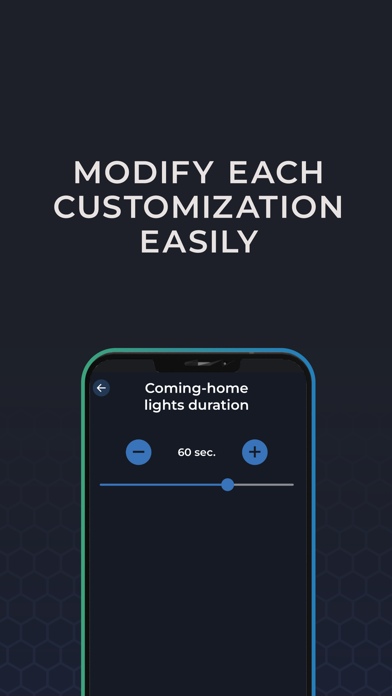
-Luces: DRL, entrada/salida
-Comportamiento del acelerador
y más funciones para mejorar tu experiencia
*DIAGNÓSTICO AVANZADO
Realiza diagnósticos electrónicos a nivel profesional (comprobación y restablecimiento de códigos de avería) de todos los módulos del vehículo, incluidos el ABS, el airbag y otros sistemas específicos del fabricante.
*SERVICIO
Realiza sencillos procedimientos de mantenimiento sin ayuda del mecánico y ahórrate largas esperas y costes adicionales en el taller.
-Herramienta de retracción del freno de estacionamiento electrónico (EPB)
-Reseteo del Servicio
-Sensores de presión (TPMS)
y otras herramientas.
*DATOS EN VIVO
Controla los datos en directo y obtén información valiosa, tanto si estás comprobando la salud de tu propio coche como considerando la compra de un coche usado.
-Control de lanzamiento
-Información sobre km reales
-Recuento de colisiones del airbag
*vehículos 2005/2008+
Todos los coches con puerto OBD
Diagnóstico básico OBD
Live Data OBD2 Básicos
Pruebas de emisiones
Información y ayuda: https://carista.com
Condiciones de uso y política de privacidad: https://carista.com/app-legal
- iPhone o iPad con o sin Jailbreak.
- Sideloadly u otras alternativas.
- Ordenador con Windows/macOS/Linux e iTunes instalado.
PASO 1: Descargue el archivo .IPA pre-modificado desde el enlace de arriba a su ordenador. Para descargarlo desde la iOSGods App, consulte nuestro Tutorial de descarga del IPA desde la iOSGods App, que incluye un ejemplo en vídeo.
PASO 2: Descargue Sideloadly e instálelo en su Windows o Mac.
PASO 3: Abra Sideloadly en su ordenador, conecte su dispositivo iOS y espere hasta que el nombre del dispositivo aparezca en Sideloadly.
PASO 4: Una vez que su iDevice sea reconocido, arrastre el archivo .IPA modificado que descargó y suéltelo en la aplicación Sideloadly.
PASO 5: Introduzca el correo electrónico de su Apple Account y, a continuación, pulse «Start». Le pedirá que introduzca su contraseña. Proporcione la información solicitada.
PASO 6: Espere a que Sideloadly termine de hacer sideload/instalar el IPA modificado. Si surgen problemas durante la instalación, por favor lea la nota a continuación.
PASO 7: Una vez completada la instalación y al ver la app en la pantalla de inicio, deberá ir a Ajustes → General → Perfiles / VPN y Gestión de Dispositivos. Una vez allí, toque el correo electrónico que introdujo en el paso 6 y, después, toque en «Confiar en [email protected]».
PASO 8: Ahora vaya a la pantalla de inicio y abra la app recién instalada; todo debería funcionar correctamente. Es posible que tenga que seguir instrucciones adicionales específicas de cada app dentro del popup del hack en el juego.
NOTA: En iOS/iPadOS 16 y posteriores, debe activar el Modo Desarrollador. Para cuentas gratuitas de Apple Developer, deberá repetir este proceso cada 7 días. Si tiene alguna pregunta o problema, lea nuestra sección de Preguntas Frecuentes de Sideloadly del tema.