تسجيل الدخول مطلوب
سجّل الدخول بحساب iOSGods للمتابعة.
سجّل الدخول بحساب iOSGods للمتابعة.
Carista OBD2 هو تطبيق تشخيص وتخصيص سيارات DIY يتيح لك قراءة الرموز ومراقبة بيانات المحرك المباشرة وفتح ميزات المركبة المخفية من جهاز iPhone الخاص بك. يمنحك هذا Mod IPA المعدل إمكانية الوصول المميز، حتى تتمكن من تشخيص أضواء التحذير وتخصيص سلوك سيارتك وإجراء مهام الصيانة دون زيارة الورش.
- الوصول المميز → إمكانية الوصول الكاملة إلى جميع أدوات التشخيص والتخصيص
يأتي هذا التطبيق أيضًا مع iGameGod، مما يتيح لك الوصول إلى Auto Touch لأتمتة المهام المتكررة، وApp Speed Manager لضبط سرعة اللعب، وتعديل القيم عبر Memory Engine، والمزيد من أدوات ألعاب iOS القوية.
قم بتنزيل Carista OBD2 Modded modded IPA من الروابط أعلاه. اضغط على زر التثبيت واتبع التعليمات لتثبيت هذا التعديل لـ iOS على iPhone أو iPad أو Apple Silicon.
هل تحتاج إلى مزيد من المساعدة؟ راجع الأسئلة الشائعة لتطبيق iOSGods للحصول على إجابات مفصلة ونصائح لاستكشاف الأخطاء.
Carista App is a mobile DIY car mechanic in the palm of your hands - code features, diagnose warning lights, monitor live data, and service your car.
Save time and money from visits to the workshop with Carista. Customize your car’s behavior, unlock hidden features, diagnose dashboard warning lights, monitor real-time parameters, and perform simple DIY procedures quickly and easily. Advanced app settings available for certainudi, BMW, Buick, Cadillac, Chevrolet, Cupra, Dacia, Ford, Gemini, GMC, Holden, Hyundai, Infiniti, Jaguar, Kia, Land Rover, Lexus, Lincoln, MAN, Mazda, Mini, Nissan, Opel/Vauxhall, Pontiac, Renault, Saab, Scion, Seat, Skoda, Toyota, Volkswagen and Volvo models.
THE ALL-IN-ONE CAR TOOL
-Customise your car's behavior: unlock hidden features, including SFD-protected ones, and tailor your car to your preferences.
-Diagnose and Reset dashboard warning lights: quickly identify and resolve issues before they escalate into costly repairs.
-Monitor real-time parameters: stay informed about your car's health and performance with live data readings.
-Perform simple DIY procedures: save on routine maintenance and avoid lengthy workshop visits.
SUPPORTED VEHICLES
Audi, BMW, Buick, Cadillac, Chevrolet, Dacia, Ford, GMC, Holden, Infiniti, Jaguar, Land Rover, Lexus, Lincoln, Mazda, MINI, Nissan, Opel/Vauxhall, Renault, Scion, SEAT, Škoda, Toyota, Volkswagen and Volvo models. Check if your car is supported here: https://carista.com/supported-cars
WHY THE CARISTA APP?
- A wide range of car brands supported.
- User-friendly and simple: plug the scanner, switch Bluetooth on, press “Connect”, see what your car is capable of.
- Brilliant customer service.
- Frequent updates: new features and brands.
-Savings progress tracker: monitor your savings and unlock exclusive offers.
HARDWARE
Experience the full potential of the Carista App by pairing it with the Carista EVO Scanner (and Carista OBD Scanner-white one-, not compatible with Ford brands and SFD-protected 2020+ VAG cars). While Carista App can also be used with other compatible OBD2 adapters such as OBDLink MX+, OBDLink CX, OBDLink MX Bluetooth or LX adapters, Kiwi3 adapter, or a genuine Bluetooth ELM327 v1.4 (ensuring it's not fake or defective). Discover more at: https://carista.com/en/scanners
PRICING
All paid features are available with an in-app purchase of our Pro functionality: an auto-renewable subscription at £59.99/year or £14.99/month.
KEY FEATURES (Exact feature availability depends on your vehicle).
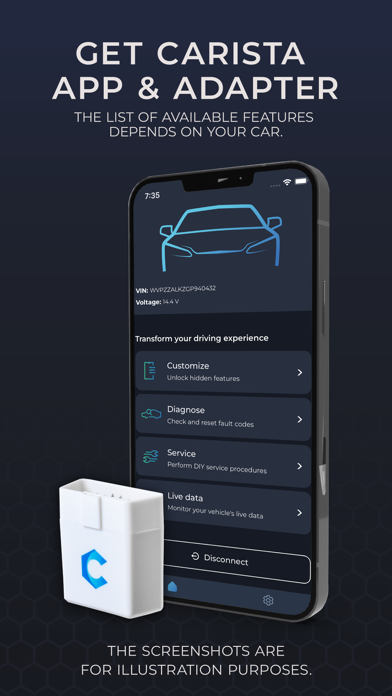
*CUSTOMIZATIONS
Personalization of comfort & convenience features of the car. More than 300 hidden features per brand.
-Gauge needle sweep at startup
-Start screen logo
-Virtual instrument cluster theme
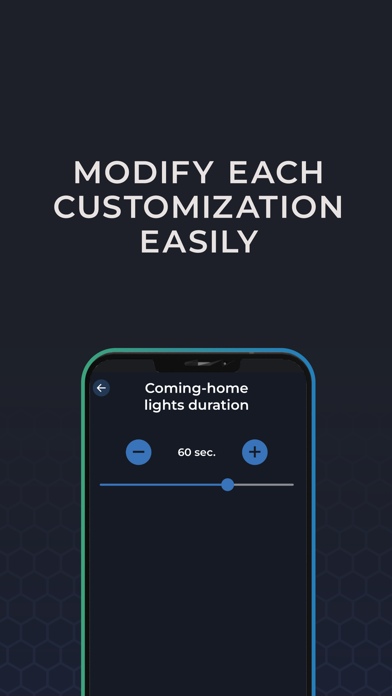
-Lights: DRL, coming/ leaving-home
-Throttle response behavior
and more powerful features to enhance your experience!
*ADVANCED DIAGNOSTICS
Perform dealer-level electronic diagnostics (fault code checking and resetting) of all modules in the vehicle, including ABS, airbag, and other manufacturer-specific systems.
*SERVICE
Perform simple service procedures without the mechanic’s help and spare yourself the long waiting time and extra costs at the workshop.
-Electronic parking brake (EPB) retraction tool
-Service reset
-Tire pressure sensors (TPMS)
-Diesel Particulate Filter (DPF) regeneration
-Battery registration
And other helpful tools.
*LIVE DATA
Monitor live data and gain valuable insights, whether you're checking your own car's health or researching a used car purchase.
-Launch control count
-Mileage information
-Airbag crashes count
-Service interval info
-Engine Turbo
And others to keep your car running smoothly and efficiently.
*For 2005/2008+ vehicles
For all cars with OBD port:
Basic OBD Diagnostics
Basic OBD2 Live Data
Emissions Test Service tools
Information and help: https://carista.com
Terms of Use and Privacy Policy: https://carista.com/app-legal

- iPhone أو iPad بجيلبريك أو بدون جيلبريك.
- Sideloadly أو بدائلها.
- كمبيوتر يعمل بنظام Windows/macOS/Linux مع تثبيت iTunes.
الخطوة 1: قم بتنزيل ملف .IPA المعدّل مسبقًا من الرابط أعلاه إلى الكمبيوتر الخاص بك. للتنزيل من تطبيق iOSGods App، اطلع على دليل تنزيل IPA من تطبيق iOSGods App الذي يتضمن مثالًا بالفيديو.
الخطوة 2: قم بتنزيل Sideloadly وتثبيته على جهاز Windows أو Mac.
الخطوة 3: افتح Sideloadly على الكمبيوتر، ووصّل جهاز iOS الخاص بك، وانتظر حتى يظهر اسم جهازك داخل Sideloadly.
الخطوة 4: بمجرد التعرّف على جهاز iDevice الخاص بك، اسحب ملف .IPA المعدّل الذي قمت بتنزيله وأفلِته داخل تطبيق Sideloadly.
الخطوة 5: أدخل البريد الإلكتروني لحساب Apple Account الخاص بك، ثم اضغط على «Start». سيُطلب منك بعد ذلك إدخال كلمة المرور. تابع وأدخل المعلومات المطلوبة.
الخطوة 6: انتظر حتى ينتهي Sideloadly من تحميل/تثبيت ملف IPA المعدّل. في حال واجهت أي مشاكل أثناء التثبيت، يرجى قراءة الملاحظة أدناه.
الخطوة 7: بعد اكتمال التثبيت ورؤية التطبيق على الشاشة الرئيسية، انتقل إلى Settings → General → Profiles / VPN & Device Management. ثم اضغط على البريد الإلكتروني الذي أدخلته في الخطوة 6، ثم اضغط على «الوثوق بـ [email protected]».
الخطوة 8: الآن انتقل إلى الشاشة الرئيسية وافتح التطبيق الذي تم تثبيته للتو وسيعمل كل شيء بشكل صحيح. قد تحتاج إلى اتباع تعليمات إضافية خاصة بكل تطبيق داخل النافذة المنبثقة للتعديل أثناء اللعب.
ملاحظة: بدءًا من iOS/iPadOS 16 وما بعده، يجب تفعيل وضع المطور (Developer Mode). بالنسبة لحسابات Apple Developer المجانية، ستحتاج إلى تكرار هذه العملية كل 7 أيام. إذا كانت لديك أي أسئلة أو مشاكل، يرجى قراءة قسم الأسئلة الشائعة حول Sideloadly في الموضوع.