ログインが必要
iOSGodsアカウントでサインインして続けてください。
iOSGodsアカウントでサインインして続けてください。
Pokémon Shuffle Mobileを無制限の移動、自動S評価、永続的なメガ進化、時間制限なしで支配できる無料Mod IPAハックです。すべてのパズル制限を削除し、すべてのステージを簡単にクリアしながら、1回の勝利につき3,000コインを獲得できます。
- 無制限の移動 → アクションを使い切ることなくパズルを解く
- 常にS評価 → すべてのレベルで最高スコアを達成
- 常にメガ進化 → バトル全体でメガ進化を有効に保つ
- 時間制限なし → プレッシャーなく自分のペースでプレイ
- 毎回3,000コイン → ステージ完了時に最大通貨を獲得
x64またはARM64 iDevices: iPhone 5s、6、6 Plus、6s、6s Plus、7、7 Plus、8、8 Plus、X、Xr、Xs、Xs Max、SE、iPod Touch 6G、iPad Air、Air 2、Pro、iPad Mini 2、3、4以降。
このアプリにはiGameGodも搭載されており、繰り返し作業を自動化するAuto Touch、ゲーム速度を調整できるApp Speed Manager、Memory Engineによる値の編集など、強力なiOSゲーム用ツールをご利用いただけます。
Pokémon Shuffle Mobile Hack modded IPAを上のリンクからダウンロードします。インストールボタンをタップし、画面の指示に従ってiPhone、iPad、Apple SiliconにこのiOSアプリハックをインストールします。
さらにヘルプが必要ですか? 詳しい回答とトラブルシューティングはiOSGodsアプリ よくある質問をご覧ください。
ポケモン初!スマートフォン向け本格ゲームアプリ!!
■ゲーム紹介
・パズルを解くことでポケモンとバトルする新感覚パズルゲーム
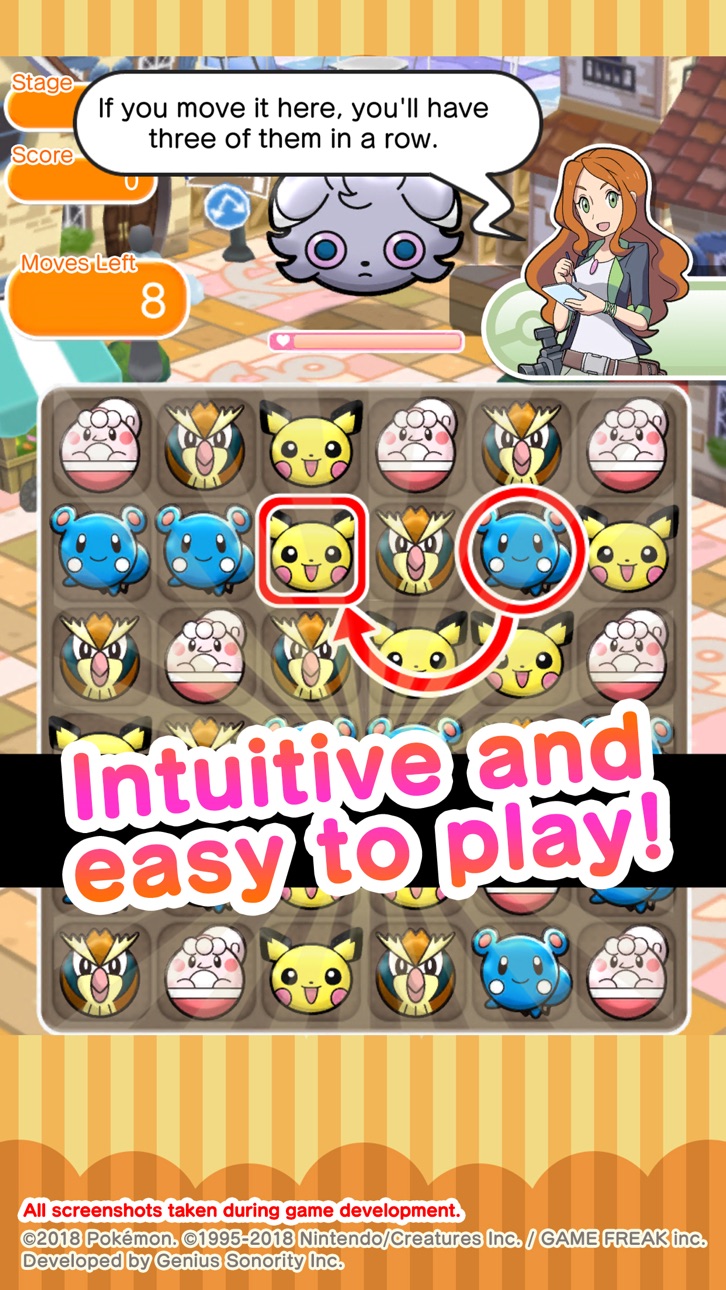
『ポケとる スマホ版』は、ポケモンたちを縦、横に3つ以上揃えて、ポケモンたちを消すことで野生のポケモンにダメージを与えバトルするパズルゲームです。
また、バトルだけではなく、ポケモンの収集や育成も楽しむことができるので、カジュアルにプレイするだけではなく、じっくりと楽しめる内容となっているよ。
・豊富なステージ数とポケモンたち
『ポケとる スマホ版』には、リリース時に登場するポケモンたちだけでなく、リリース後も順次ステージや登場ポケモンの追加を予定していて、遊びごたえのある内容となっているよ。
難易度も多種多様で、パズルゲーム初心者の方から上級者の方まで、満足できる内容となっているよ。
・直感的で簡単な操作方法
『ポケとる スマホ版』では、ポケモンとその移動先を選ぶだけで、その後は自動的にコンボが進んでいくので、非常に簡単にプレイすることができるよ。
簡単な操作性で奥深いゲーム性も秘めているので、ゲーム初心者の方から上級者の方まで、広く楽しむことができるよ。
■お知らせ
新規ユーザー登録でニックネームが入力できない場合は、、、
http://www.poketoru.jp/news/post.php/9/
■ご注意
・利用規約
ご利用前に必ず利用規約をご確認ください。
・端末の設定
お使いの端末の設定やご利用状況によっては、うまく起動できないことがあります。
今後、一部の機能については、ユーザー間の公平性を保つため、特定の操作(Jailbreakなど)を
行った端末では遊んでいただけなくなることがあります。
・通信環境
本アプリを通信状態が悪い環境でプレイすると、データが破損したり、プレイ状況が消失してしまう恐れがあります。
ゲームは必ず通信状態が良好な場所にてプレイしてください。
一時的な通信状況が原因の場合、時間をおいて「リトライ」ボタンをおしていただくことで復帰できる場合がございます。
万が一、通信エラーにより不都合が発生しても対応をおこなうことができませんのでご注意ください。
・ご購入の前に
本アプリの対象OSバージョンは12以上となります。OSバージョンにより、利用できる機能が異なる場合がございます。
購入される前には必ず、お持ちのスマートフォンで無料コンテンツが正しく利用できることをご確認の上、ご購入ください。
端末の状態や相性によっては、うまく動作しないことがあります。
・お問合せ
お問い合わせいただく際は、『ポケとる スマホ版』お問い合わせフォームからお問い合わせください。
フォーム以外からお問い合わせいただくと、確認までお時間を頂く場合がございます。
スクリーンショット © 各権利者 · App Store

iOSGods は Apple Inc.、Google LLC、および掲載アプリの開発者と提携しておらず、承認や協賛も受けていません。Apple、iOS、App Store は Apple Inc. の商標です。Android および Google Play は Google LLC の商標です。その他のアプリ名、アイコン、画像、商標はすべて各権利者に帰属します。

- 脱獄/Jailed済みまたは脱獄済みのiPhoneまたはiPad。
- Sideloadlyまたは代替手段。
- iTunesがインストールされているWindows/macOS/Linuxを実行しているコンピュータ。
ステップ1: 上のリンクから事前にハックされた.IPAファイルをコンピュータにダウンロードします。iOSGodsアプリからダウンロードする方法は、ビデオ例付きのiOSGodsアプリIPAダウンロードチュートリアルをご覧ください。
ステップ2: SideloadlyをダウンロードしてWindowsまたはMacにインストールします。
ステップ3: コンピュータでSideloadlyを開き、iOSデバイスを接続して、デバイス名がSideloadlyに表示されるまで待ちます。
ステップ4: iDeviceが認識されたら、ダウンロードしたModされた.IPAファイルをSideloadlyアプリにドラッグ&ドロップします。
ステップ5: Apple Accountのメールアドレスを入力し、「Start」を押します。次にパスワードの入力を求められます。必要な情報を入力してください。
ステップ6: Sideloadlyがハックされたipaのサイドロード/インストールを完了するのを待ちます。インストール中に問題が発生した場合は、以下の注意事項をお読みください。
ステップ7: インストールが完了し、ホーム画面にアプリが表示されたら、設定 → 一般 → プロファイル / VPNとデバイス管理に移動する必要があります。そこで、ステップ6で入力したメールをタップし、「Trust [email protected]」をタップします。
ステップ8: ホーム画面に戻り、新しくインストールされたアプリを開けば、すべて正常に動作するはずです。ゲーム内のハックのポップアップで、アプリごとの追加指示に従う必要がある場合があります。
注意: iOS/iPadOS 16以降では、デベロッパモードを有効にするが必要です。無料のApple Developerアカウントの場合、このプロセスを7日ごとに繰り返す必要があります。質問や問題がある場合は、トピックのSideloadly FAQセクションをお読みください。
Game Name iOS Mod IPA is an action adventure game enhanced with powerful gameplay boosts and quality-of-life improvements. Win battles faster, earn rewards quicker, and enjoy uninterrupted play without ads.
- Unlimited Gold - spend freely to unlock premium content
- Damage Multiplier - deal significantly more damage in combat
- Defense Multiplier - take less damage and survive longer
- Reward Multiplier - earn more loot from every battle
- Max Level - instantly reach the highest player rank
- No Ads - play without interruptions or advertisements
This app also comes with iGameGod, giving you access to Auto Touch to automate repetitive tasks, App Speed Manager for adjustable gameplay speed, Memory Engine value editing, and more powerful iOS game tools.
Game Name Mod IPAを上のリンクからダウンロードします。インストールボタンをタップし、画面の指示に従ってiPhone、iPad、Apple SiliconにこのiOSアプリハックをインストールします。
さらにヘルプが必要ですか 詳しい回答とトラブルシューティングはiOSGodsアプリ よくある質問をご覧ください。
----------------------------------------------------------
--------------------------------------------------