需要登录
请使用您的 iOSGods 账户登录以继续。
请使用您的 iOSGods 账户登录以继续。
停止观看你在Basketball Club Story中的资源不断流失,这个修改版IPA冻结你的货币、研究点数和消耗品,让你可以不用磨练就能建立梦想队伍。按照自己的时间表管理球队的成长,将你赚取的每一枚硬币和物品都锁定在原地。
无论你是在完善教练策略、尝试不同的球员阵容,还是只是按照自己的节奏享受建队体验,这个Hack都能消除资源管理的压力,让你专注于重要的事情:打造冠军阵容并主宰竞争。
- 冻结货币 → 保留你的硬币和现金
- 冻结研究点数 → 锁定你的进度升级
- 冻结消耗生命 → 保持你的体力或能量完整
- 冻结物品 → 保持你的背包不变
此应用还内置 iGameGod,让你能够使用 Auto Touch 自动执行重复操作、通过 App Speed Manager 调节游戏速度、使用 Memory Engine 修改内存数值,以及更多强大的 iOS 游戏工具。
从上方链接下载 Basketball Club Story Hack modded IPA。点击安装按钮并按照屏幕提示在 iPhone、iPad 或 Apple Silicon 上安装此 iOS 应用修改版。
需要更多帮助?请查看我们的 iOSGods 应用常见问题解答 获取详细解答和故障排除技巧。
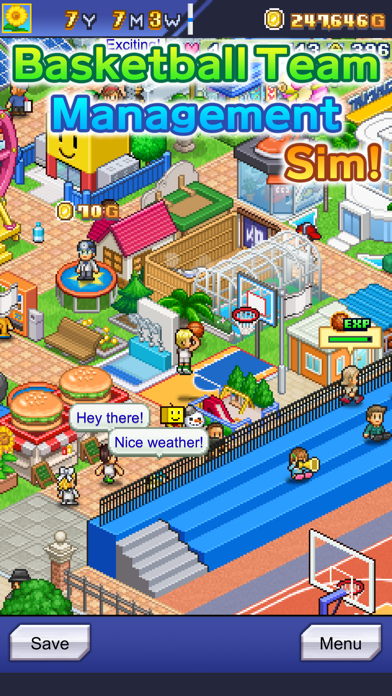
Make your very own world-class basketball team!
Specialize in one skill? Be a jack-of-all-trades? Or something in between?
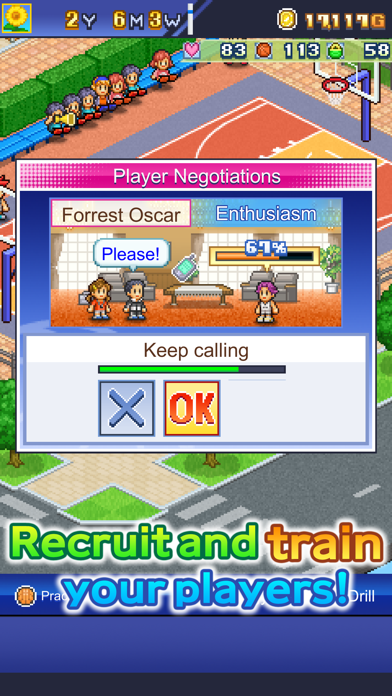
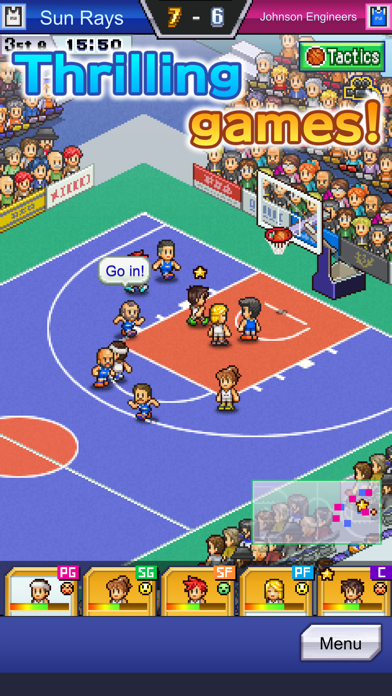
Create your own basketball team, recruit a cast of zany players, and compete against other teams. It's up to YOU to coach them to victory!
Plus, build facilities for your clubhouse for your players and visitors to enjoy. Mix, match, and position them however you like!
Sign with sponsors to gain impressive monetary support. Foster them alongside the rest of your team for even more rewards!
Don't forget to connect with your local fans through community outreach. The more they learn about basketball, the more passionate they'll become!
With the help of your players, sponsors, and spectators, you'll create the world's best basketball team!
All game progress is stored on your device.
Save data cannot be restored after deleting or reinstalling the app. Transferring data to another device is not supported.
Try searching for "Kairosoft" to see all of our games, or visit us at https://kairopark.jp
Be sure to check out both our free-to-play and our paid games!
Kairosoft's pixel art game series continues!
Follow us on Twitter for the latest Kairosoft news and information.
https://twitter.com/kairokun2010

- 未越狱/受限或已越狱的 iPhone 或 iPad。
- Sideloadly 或替代方案。
- 运行 Windows/macOS/Linux 且已安装 iTunes 的电脑。
步骤 1: 通过上方链接将已破解的 .IPA 文件下载到您的电脑。如需从 iOSGods App 下载,请参阅我们的 iOSGods App IPA 下载教程,其中包含视频示例。
步骤 2: 下载 Sideloadly 并将其安装到您的 Windows 或 Mac 上。
步骤 3: 在电脑上打开 Sideloadly,连接您的 iOS 设备,等待设备名称在 Sideloadly 中显示。
步骤 4: 当 Sideloadly 识别到您的 iOS 设备后,将下载好的修改版 .IPA 文件拖放到 Sideloadly 应用中。
步骤 5: 输入您的 Apple Account 邮箱,然后点击 "Start"。系统会提示您输入密码,请按要求填写信息。
步骤 6: 等待 Sideloadly 完成已破解 IPA 的旁加载/安装。如果安装过程中出现问题,请阅读下方的注意事项。
步骤 7: 安装完成并在主屏幕上看到该应用后,您需要前往 设置 → 通用 → 描述文件 / VPN 与设备管理。进入后,点击您在第 6 步中输入的邮箱,然后点击 "信任 [email protected]"。
步骤 8: 现在返回主屏幕并打开新安装的应用,一切应可正常运行。您可能需要按照游戏内修改弹窗中的具体说明执行进一步操作。
注意: 在 iOS/iPadOS 16 及更高版本上,您必须 启用开发者模式。对于免费的 Apple Developer 账户,您需要每 7 天重复一次此操作。如有任何疑问或问题,请阅读我们的 主题中的 Sideloadly 常见问题部分。