تسجيل الدخول مطلوب
سجّل الدخول بحساب iOSGods للمتابعة.
سجّل الدخول بحساب iOSGods للمتابعة.
الأحجار الكريمة غير المحدودة وعدم وجود إعلانات يحولان تجربة Runefall - Medieval Match 3 Hack في المطابقة الثلاثية مع هذا التهكير المجاني لـ iOS، مما يتيح لك إعادة بناء Rivermoor دون الحاجة إلى الطحن أو الانقطاعات. ركز بشكل كامل على استراتيجية الألغاز واستعادة المدينة التي تجعل هذه المغامرة العصرية الوسطى جذابة.
- أحجار كريمة غير محدودة → أنفق بحرية على المعززات والتعزيزات
- بدون إعلانات → لعب بدون انقطاع
يأتي هذا التطبيق أيضًا مع iGameGod، مما يتيح لك الوصول إلى Auto Touch لأتمتة المهام المتكررة، وApp Speed Manager لضبط سرعة اللعب، وتعديل القيم عبر Memory Engine، والمزيد من أدوات ألعاب iOS القوية.
قم بتنزيل Runefall - Medieval Match 3 Hack modded IPA من الروابط أعلاه. اضغط على زر التثبيت واتبع التعليمات لتثبيت هذا التعديل لـ iOS على iPhone أو iPad أو Apple Silicon.
هل تحتاج إلى مزيد من المساعدة؟ راجع الأسئلة الشائعة لتطبيق iOSGods للحصول على إجابات مفصلة ونصائح لاستكشاف الأخطاء.
Welcome to the historic medieval village of Rivermoor!
Your host, Hadrick, the constable of Rivermoor awaits you. Choose your avatar and begin an epic adventure! Help Hadrick to reserve the peace in this vacant medieval town.
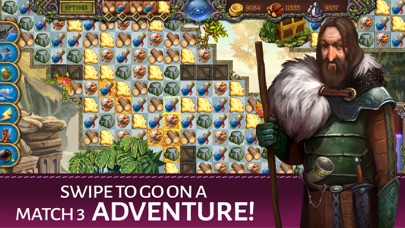
Match 3 or more gold, stone, and wood pieces to earn those resources. The larger the match, the more resources you receive. Use your resources to help rebuild the town of Rivermoor. Rivermoor is an old-time medieval village that was abandoned during the war and has a remaining population of only 3. They desperately need an extra hand to earn enough to pay their dues to the royal King!
Unlock secret sections of every match 3 challenge and blast tiles to discover the hidden artifacts! Each level is complete when you have found the artifacts. What ancient secrets and runes will you uncover? Use your inventory tool to keep track of the artifacts, runes, and resources that you collect. Piece together information to solve quests and serve your duties to the village!
Earn more bonuses with SEQUENCES! Match objects in the sequence of 5 listed at the top of your screen to earn more resources.
Explore the beautiful kingdom of Silverdale in this innovative new Match-3 adventure that pairs the classic matching mechanic with discovery, item collection, and even quests! Traverse huge environments, collect resources, overcome obstacles, solve puzzles, and upgrade the quaint village of Rivermoor.
So...Do you plan to stay the night? Only the bravest match 3 knights are up for this epic challenge. Help Hadrick complete his chores and begin your epic match 3 adventure quest!
--- RUNEFALL TOP FEATURES ---
Swipe to go on a free Match 3 adventure!
Collect items to solve quests!
Encounter a myriad of environmental obstacles!
Purchase dozens of power-ups for Rivermoor!
Traverse enormous levels!
Unlock 7 power-ups and dozens of gameplay bonuses!
A quirky cast of fully-voiced characters!
Log in Daily for rewards
Like us on Facebook:
https://www.facebook.com/tamalakigames/

- iPhone أو iPad بجيلبريك أو بدون جيلبريك.
- Sideloadly أو بدائلها.
- كمبيوتر يعمل بنظام Windows/macOS/Linux مع تثبيت iTunes.
الخطوة 1: قم بتنزيل ملف .IPA المعدّل مسبقًا من الرابط أعلاه إلى الكمبيوتر الخاص بك. للتنزيل من تطبيق iOSGods App، اطلع على دليل تنزيل IPA من تطبيق iOSGods App الذي يتضمن مثالًا بالفيديو.
الخطوة 2: قم بتنزيل Sideloadly وتثبيته على جهاز Windows أو Mac.
الخطوة 3: افتح Sideloadly على الكمبيوتر، ووصّل جهاز iOS الخاص بك، وانتظر حتى يظهر اسم جهازك داخل Sideloadly.
الخطوة 4: بمجرد التعرّف على جهاز iDevice الخاص بك، اسحب ملف .IPA المعدّل الذي قمت بتنزيله وأفلِته داخل تطبيق Sideloadly.
الخطوة 5: أدخل البريد الإلكتروني لحساب Apple Account الخاص بك، ثم اضغط على «Start». سيُطلب منك بعد ذلك إدخال كلمة المرور. تابع وأدخل المعلومات المطلوبة.
الخطوة 6: انتظر حتى ينتهي Sideloadly من تحميل/تثبيت ملف IPA المعدّل. في حال واجهت أي مشاكل أثناء التثبيت، يرجى قراءة الملاحظة أدناه.
الخطوة 7: بعد اكتمال التثبيت ورؤية التطبيق على الشاشة الرئيسية، انتقل إلى Settings → General → Profiles / VPN & Device Management. ثم اضغط على البريد الإلكتروني الذي أدخلته في الخطوة 6، ثم اضغط على «الوثوق بـ [email protected]».
الخطوة 8: الآن انتقل إلى الشاشة الرئيسية وافتح التطبيق الذي تم تثبيته للتو وسيعمل كل شيء بشكل صحيح. قد تحتاج إلى اتباع تعليمات إضافية خاصة بكل تطبيق داخل النافذة المنبثقة للتعديل أثناء اللعب.
ملاحظة: بدءًا من iOS/iPadOS 16 وما بعده، يجب تفعيل وضع المطور (Developer Mode). بالنسبة لحسابات Apple Developer المجانية، ستحتاج إلى تكرار هذه العملية كل 7 أيام. إذا كانت لديك أي أسئلة أو مشاكل، يرجى قراءة قسم الأسئلة الشائعة حول Sideloadly في الموضوع.