需要登入
請使用您的 iOSGods 帳戶登入以繼續。
請使用您的 iOSGods 帳戶登入以繼續。
無限寶石和零廣告透過這個免費的 iOS 破解版本改變你的 Runefall 三消遊戲體驗,讓你無需磨練或中斷即可重建 Rivermoor。純粹專注於謎題策略和城鎮修復,這些正是這款中世紀冒險遊戲引人入勝的地方。
- 無限寶石 → 自由花費在強化和加速上
- 無廣告 → 不間斷的遊戲體驗
此應用程式也內建 iGameGod,讓你可以使用 Auto Touch 自動執行重複操作、透過 App Speed Manager 調整遊戲速度、使用 Memory Engine 修改記憶體數值,以及更多強大的 iOS 遊戲工具。
從上方連結下載 Runefall - Medieval Match 3 Hack modded IPA。點選安裝按鈕並依照畫面指示在 iPhone、iPad 或 Apple Silicon 上安裝此 iOS 應用程式修改版。
需要更多協助?請查看我們的 iOSGods 應用程式常見問題 以獲得詳細解答與疑難排解。
Welcome to the historic medieval village of Rivermoor!
Your host, Hadrick, the constable of Rivermoor awaits you. Choose your avatar and begin an epic adventure! Help Hadrick to reserve the peace in this vacant medieval town.
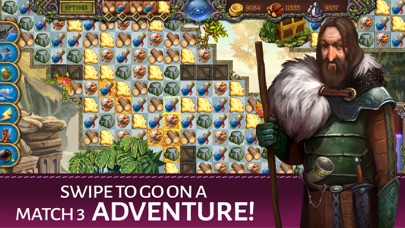
Match 3 or more gold, stone, and wood pieces to earn those resources. The larger the match, the more resources you receive. Use your resources to help rebuild the town of Rivermoor. Rivermoor is an old-time medieval village that was abandoned during the war and has a remaining population of only 3. They desperately need an extra hand to earn enough to pay their dues to the royal King!
Unlock secret sections of every match 3 challenge and blast tiles to discover the hidden artifacts! Each level is complete when you have found the artifacts. What ancient secrets and runes will you uncover? Use your inventory tool to keep track of the artifacts, runes, and resources that you collect. Piece together information to solve quests and serve your duties to the village!
Earn more bonuses with SEQUENCES! Match objects in the sequence of 5 listed at the top of your screen to earn more resources.
Explore the beautiful kingdom of Silverdale in this innovative new Match-3 adventure that pairs the classic matching mechanic with discovery, item collection, and even quests! Traverse huge environments, collect resources, overcome obstacles, solve puzzles, and upgrade the quaint village of Rivermoor.
So...Do you plan to stay the night? Only the bravest match 3 knights are up for this epic challenge. Help Hadrick complete his chores and begin your epic match 3 adventure quest!
--- RUNEFALL TOP FEATURES ---
Swipe to go on a free Match 3 adventure!
Collect items to solve quests!
Encounter a myriad of environmental obstacles!
Purchase dozens of power-ups for Rivermoor!
Traverse enormous levels!
Unlock 7 power-ups and dozens of gameplay bonuses!
A quirky cast of fully-voiced characters!
Log in Daily for rewards
Like us on Facebook:
https://www.facebook.com/tamalakigames/

- 未越獄/受限或已越獄的 iPhone 或 iPad。
- Sideloadly 或替代方案。
- 執行 Windows/macOS/Linux 且已安裝 iTunes 的電腦。
步驟 1: 透過上方連結將已破解的 .IPA 檔案下載到您的電腦。若要從 iOSGods App 下載,請參閱我們的 iOSGods App IPA 下載教學,其中包含影片範例。
步驟 2: 下載 Sideloadly 並將其安裝在您的 Windows 或 Mac 上。
步驟 3: 在電腦上開啟 Sideloadly,連接您的 iOS 裝置,並等待裝置名稱出現在 Sideloadly 中。
步驟 4: 當 Sideloadly 辨識到您的 iOS 裝置後,將下載好的修改版 .IPA 檔案拖曳並放到 Sideloadly 應用程式中。
步驟 5: 輸入您的 Apple Account 電子郵件,然後按下「Start」。系統會要求您輸入密碼,請依指示提供所需資訊。
步驟 6: 等待 Sideloadly 完成已破解 IPA 的旁載/安裝。如果安裝過程中發生問題,請閱讀下方的注意事項。
步驟 7: 安裝完成並在主畫面上看到該應用程式後,您需要前往 設定 → 一般 → 描述檔 / VPN 與裝置管理。進入後,點選您在步驟 6 中輸入的電子郵件,然後點選「信任 [email protected]」。
步驟 8: 現在回到主畫面並開啟新安裝的應用程式,一切應該都能正常運作。您可能需要依照遊戲內破解彈出視窗中的進一步指示操作。
注意: 在 iOS/iPadOS 16 及更新版本上,您必須 啟用開發者模式。若使用免費的 Apple Developer 帳號,您將需要每 7 天重複此程序。如有任何疑問或問題,請閱讀我們的 主題中的 Sideloadly 常見問題區段。