Потрібен вхід
Увійдіть у свій обліковий запис iOSGods, щоб продовжити.
Увійдіть у свій обліковий запис iOSGods, щоб продовжити.

Mod Features
- God Mode
- Multiply Attack
Завантажте Armada: Warship Battles Mod APK з кнопки вище. Після натискання завантаження дотримуйтесь інструкцій, щоб встановити модифікований APK на пристрій Android або емулятор.
Потрібна допомога? Перегляньте наш Поширені запитання про Android для детальних відповідей та порад з усунення несправностей.
Armada is a Turn-Based Naval Battle Epic Si-Fi RPG with hundreds famous warships in the history.
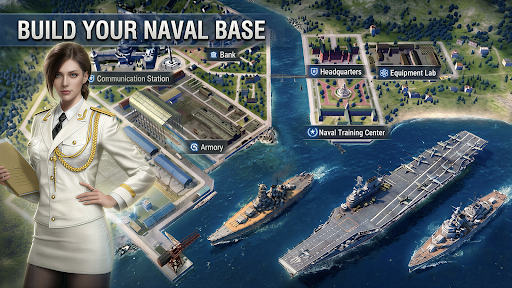
Construct your naval base and build your own fleet! Battle your way through epic Campaign and save the world. Fight with other players with your strategy to see who is the king of the ocean. Challenge the mysterious Super Warships hiding over the world.
Collect the epic warships in history and training a powerful fleet to face various situations.
Assemble the greatest fleet of warships for strategic victories!
Features
[Strategic Gameplay]
Witness the dazzling display of each Warship's unique skills.
Different crew groups to pick and choose additional abilities for your warships!
Come up with the best strategy to win battles.
[Endless Fun]
Construct, decorate your naval base, battle other commanders, explore unknown oceans, fight in PvP battles, expand your Collection, train warships, and more.
[Massive Collection]
Battleship, carrier, cruiser, destroyer.
Different warships, different attributes and thousands combination to against all kind of challenge!
Collect as many warships as you can and assemble the greatest fleet.
[Raid other players]
Look for opponent and raid their base for resources. Train and arm your warships, to be the king on the ocean!
[Equipment]
You need to find as many as powerful equipment as you can.
They will enhance the power of your warships. If you can collect a set of equipment your warship will get some special abilities.
[Special action]
Every day, the government will issues bounty for the commanders to complete their special missions.
Carefully choose the mission to earn your great reward if you don't want to bury at the bottom of the ocean.
[Super giant warships]
They are big, powerful and mysterious.
They are hiding all over the world and no one knows where they came from.
Explore and find them, challenge and defeat them with your clan allies to get unique materials in return.
Community:
Discord: https://discord.gg/x24PVWV68z
Facebook: https://www.facebook.com/profile.php?id=61582053720220
Website: https://www.tikofun.com/
Privacy Policy:
https://www.tikofun.com/pp.html
Term of Service:
https://www.tikofun.com/terms.html
- iPhone або iPad без джейлбрейку/у заводському стані або з джейлбрейком.
- Sideloadly або альтернативи.
- Комп'ютер під керуванням Windows/macOS/Linux із встановленим iTunes.
КРОК 1: Завантажте попередньо зламаний .IPA-файл за посиланням вище на свій комп'ютер. Щоб завантажити з iOSGods App, перегляньте наш Посібник із завантаження IPA в iOSGods App, який містить відеоприклад.
КРОК 2: Завантажте Sideloadly і встановіть його на своєму Windows або Mac.
КРОК 3: Відкрийте Sideloadly на комп'ютері, підключіть свій iOS-пристрій і зачекайте, поки назва пристрою з'явиться у Sideloadly.
КРОК 4: Коли ваш iDevice буде розпізнано, перетягніть завантажений модифікований .IPA-файл і відпустіть його в застосунок Sideloadly.
КРОК 5: Введіть електронну пошту вашого Apple Account, потім натисніть «Start». Після цього вас попросять ввести пароль. Введіть необхідні дані.
КРОК 6: Зачекайте, доки Sideloadly завершить sideload/встановлення зламаного IPA. Якщо під час встановлення виникнуть проблеми, прочитайте примітку нижче.
КРОК 7: Коли встановлення завершено й ви побачите застосунок на головному екрані, перейдіть до Налаштування → Загальні → Профілі / VPN і керування пристроєм. Там натисніть на електронну пошту, яку ви ввели на кроці 6, а потім натисніть «Довіряти [email protected]».
КРОК 8: Тепер перейдіть на головний екран і відкрийте щойно встановлений застосунок — усе має працювати належним чином. Можливо, доведеться виконати додаткові інструкції для конкретного застосунку в спливаючому вікні хака в грі.
ПРИМІТКА: У iOS/iPadOS 16 і пізніших версіях потрібно увімкнути режим розробника. Для безкоштовних облікових записів Apple Developer цей процес доведеться повторювати кожні 7 днів. Якщо у вас є запитання або проблеми, прочитайте наш розділ FAQ зі Sideloadly у темі.