Login necessário
Entre com sua conta iOSGods para continuar.
Entre com sua conta iOSGods para continuar.

Mod Features
- God Mode
- Multiply Attack
Baixe Armada: Warship Battles Mod APK do botão acima. Depois de tocar em baixar, basta seguir as instruções para instalar o APK modificado no seu dispositivo Android ou emulador.
Precisa de ajuda? Confira nossas Perguntas frequentes sobre Android para respostas detalhadas e dicas de solução de problemas.
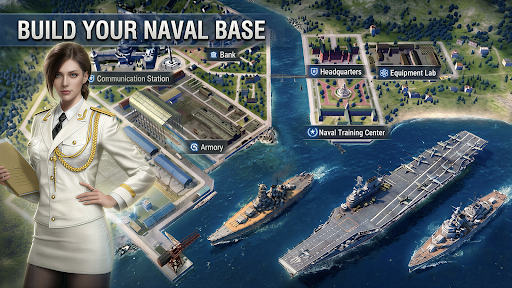
Armada is a Turn-Based Naval Battle Epic Si-Fi RPG with hundreds famous warships in the history.
Construct your naval base and build your own fleet! Battle your way through epic Campaign and save the world. Fight with other players with your strategy to see who is the king of the ocean. Challenge the mysterious Super Warships hiding over the world.
Collect the epic warships in history and training a powerful fleet to face various situations.
Assemble the greatest fleet of warships for strategic victories!
Features
[Strategic Gameplay]
Witness the dazzling display of each Warship's unique skills.
Different crew groups to pick and choose additional abilities for your warships!
Come up with the best strategy to win battles.
[Endless Fun]
Construct, decorate your naval base, battle other commanders, explore unknown oceans, fight in PvP battles, expand your Collection, train warships, and more.
[Massive Collection]
Battleship, carrier, cruiser, destroyer.
Different warships, different attributes and thousands combination to against all kind of challenge!
Collect as many warships as you can and assemble the greatest fleet.
[Raid other players]
Look for opponent and raid their base for resources. Train and arm your warships, to be the king on the ocean!
[Equipment]
You need to find as many as powerful equipment as you can.
They will enhance the power of your warships. If you can collect a set of equipment your warship will get some special abilities.
[Special action]
Every day, the government will issues bounty for the commanders to complete their special missions.
Carefully choose the mission to earn your great reward if you don't want to bury at the bottom of the ocean.
[Super giant warships]
They are big, powerful and mysterious.
They are hiding all over the world and no one knows where they came from.
Explore and find them, challenge and defeat them with your clan allies to get unique materials in return.
Community:
Discord: https://discord.gg/x24PVWV68z
Facebook: https://www.facebook.com/profile.php?id=61582053720220
Website: https://www.tikofun.com/
Privacy Policy:
https://www.tikofun.com/pp.html
Term of Service:
https://www.tikofun.com/terms.html
- iPhone ou iPad sem jailbreak/jailed ou com jailbreak.
- Sideloadly ou alternativas.
- Computador com Windows/macOS/Linux e iTunes instalado.
PASSO 1: Baixe o arquivo .IPA pré-hackeado do link acima para o seu computador. Para baixar pelo iOSGods App, veja nosso Tutorial de download de IPA do iOSGods App, que inclui um exemplo em vídeo.
PASSO 2: Baixe o Sideloadly e instale-o no seu Windows ou Mac.
PASSO 3: Abra o Sideloadly no seu computador, conecte seu dispositivo iOS e aguarde até que o nome do dispositivo apareça no Sideloadly.
PASSO 4: Assim que seu iDevice for reconhecido, arraste o arquivo .IPA modificado que você baixou e solte-o no aplicativo Sideloadly.
PASSO 5: Digite o e-mail da sua Apple Account e pressione “Start”. Em seguida, será solicitada a sua senha. Prossiga e forneça as informações solicitadas.
PASSO 6: Aguarde o Sideloadly finalizar o sideload/instalação do IPA hackeado. Se houver problemas durante a instalação, leia a observação abaixo.
PASSO 7: Quando a instalação estiver concluída e você vir o app na Tela de Início, será necessário acessar Ajustes → Geral → Perfis / Gerenciamento de VPN e Dispositivo. Lá, toque no e-mail que você inseriu no passo 6 e, em seguida, toque em “Confiar em [email protected]”.
PASSO 8: Agora vá para a Tela de Início e abra o app recém-instalado; tudo deve funcionar normalmente. Você pode precisar seguir instruções adicionais específicas no popup do hack dentro do jogo.
OBSERVAÇÃO: No iOS/iPadOS 16 e versões posteriores, você deve ativar o Modo de Desenvolvedor. Para contas Apple Developer gratuitas, será necessário repetir este processo a cada 7 dias. Se tiver dúvidas ou problemas, leia nossa seção de FAQ do Sideloadly no tópico.