Inicio de sesión requerido
Inicia sesión con tu cuenta de iOSGods para continuar.
Inicia sesión con tu cuenta de iOSGods para continuar.

Mod Features
- God Mode
- Multiply Attack
Descarga Armada: Warship Battles Mod APK desde el botón de arriba. Una vez que toques descargar, sigue las instrucciones para instalar el APK modificado en tu dispositivo Android o emulador.
¿Necesitas ayuda? Consulta nuestras Preguntas frecuentes de Android para respuestas detalladas y consejos de solución de problemas.
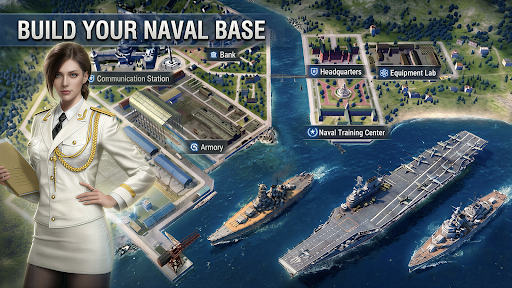
Armada is a Turn-Based Naval Battle Epic Si-Fi RPG with hundreds famous warships in the history.
Construct your naval base and build your own fleet! Battle your way through epic Campaign and save the world. Fight with other players with your strategy to see who is the king of the ocean. Challenge the mysterious Super Warships hiding over the world.
Collect the epic warships in history and training a powerful fleet to face various situations.
Assemble the greatest fleet of warships for strategic victories!
Features
[Strategic Gameplay]
Witness the dazzling display of each Warship's unique skills.
Different crew groups to pick and choose additional abilities for your warships!
Come up with the best strategy to win battles.
[Endless Fun]
Construct, decorate your naval base, battle other commanders, explore unknown oceans, fight in PvP battles, expand your Collection, train warships, and more.
[Massive Collection]
Battleship, carrier, cruiser, destroyer.
Different warships, different attributes and thousands combination to against all kind of challenge!
Collect as many warships as you can and assemble the greatest fleet.
[Raid other players]
Look for opponent and raid their base for resources. Train and arm your warships, to be the king on the ocean!
[Equipment]
You need to find as many as powerful equipment as you can.
They will enhance the power of your warships. If you can collect a set of equipment your warship will get some special abilities.
[Special action]
Every day, the government will issues bounty for the commanders to complete their special missions.
Carefully choose the mission to earn your great reward if you don't want to bury at the bottom of the ocean.
[Super giant warships]
They are big, powerful and mysterious.
They are hiding all over the world and no one knows where they came from.
Explore and find them, challenge and defeat them with your clan allies to get unique materials in return.
Community:
Discord: https://discord.gg/x24PVWV68z
Facebook: https://www.facebook.com/profile.php?id=61582053720220
Website: https://www.tikofun.com/
Privacy Policy:
https://www.tikofun.com/pp.html
Term of Service:
https://www.tikofun.com/terms.html
- iPhone o iPad con o sin Jailbreak.
- Sideloadly u otras alternativas.
- Ordenador con Windows/macOS/Linux e iTunes instalado.
PASO 1: Descargue el archivo .IPA pre-modificado desde el enlace de arriba a su ordenador. Para descargarlo desde la iOSGods App, consulte nuestro Tutorial de descarga del IPA desde la iOSGods App, que incluye un ejemplo en vídeo.
PASO 2: Descargue Sideloadly e instálelo en su Windows o Mac.
PASO 3: Abra Sideloadly en su ordenador, conecte su dispositivo iOS y espere hasta que el nombre del dispositivo aparezca en Sideloadly.
PASO 4: Una vez que su iDevice sea reconocido, arrastre el archivo .IPA modificado que descargó y suéltelo en la aplicación Sideloadly.
PASO 5: Introduzca el correo electrónico de su Apple Account y, a continuación, pulse «Start». Le pedirá que introduzca su contraseña. Proporcione la información solicitada.
PASO 6: Espere a que Sideloadly termine de hacer sideload/instalar el IPA modificado. Si surgen problemas durante la instalación, por favor lea la nota a continuación.
PASO 7: Una vez completada la instalación y al ver la app en la pantalla de inicio, deberá ir a Ajustes → General → Perfiles / VPN y Gestión de Dispositivos. Una vez allí, toque el correo electrónico que introdujo en el paso 6 y, después, toque en «Confiar en [email protected]».
PASO 8: Ahora vaya a la pantalla de inicio y abra la app recién instalada; todo debería funcionar correctamente. Es posible que tenga que seguir instrucciones adicionales específicas de cada app dentro del popup del hack en el juego.
NOTA: En iOS/iPadOS 16 y posteriores, debe activar el Modo Desarrollador. Para cuentas gratuitas de Apple Developer, deberá repetir este proceso cada 7 días. Si tiene alguna pregunta o problema, lea nuestra sección de Preguntas Frecuentes de Sideloadly del tema.