Connexion requise
Connectez-vous avec votre compte iOSGods pour continuer.
Connectez-vous avec votre compte iOSGods pour continuer.

Les Munitions Illimitées et l'Absence de Rechargement transforment Zombie Gunship Survival en une expérience de défense aérienne irrésistible, vous permettant de cribler les morts-vivants de feu sans pause ni pénalité dans ce hack iOS modifié.
Avec l'Absence de Spawn de Zombies et le Coup Unique Mortel activés, vous contrôlez le rythme et la puissance de chaque engagement, transformant les missions de pillage tactique en pure domination depuis votre siège de mitrailleuse. Ce Mod IPA supprime la gestion des ressources et la tension de survie, vous permettant de vous concentrer sur l'action pure de destruction de zombies et la défense de base sans la corvée.
- Munitions Illimitées → ne jamais manquer de munitions
- Absence de Rechargement → tirer en continu
- Pas de Surchauffe → puissance de feu soutenue
- Absence de Spawn de Zombies → contrôlez les vagues d'ennemis
- Vitesse des Zombies Réduite → ralentir le mouvement des morts-vivants
- Coup Unique Mortel [Humains et Mitrailleuse] → élimination instantanée
- Les Zombies ne Font Aucun Dégât → invulnérable aux attaques
- Vitesse de Mouvement → traversée plus rapide
Remarque : Votre hélicoptère inflige des dégâts à vos humains, donc si vous les frappez alors que le Coup Unique Mortel est activé, ils meurent aussi.
Cette app est également livrée avec iGameGod, qui vous donne accès à Auto Touch pour automatiser les tâches répétitives, App Speed Manager pour ajuster la vitesse de jeu, à l'édition de valeurs avec Memory Engine, et à d'autres outils puissants pour les jeux iOS.
Téléchargez Zombie Gunship Survival Hack modded IPA depuis les liens ci-dessus. Appuyez sur le bouton d'installation et suivez les instructions pour installer ce hack iOS sur votre iPhone, iPad ou Apple Silicon.
Besoin de plus d'aide ? Consultez notre FAQ de l'app iOSGods pour des réponses détaillées et des conseils de dépannage.
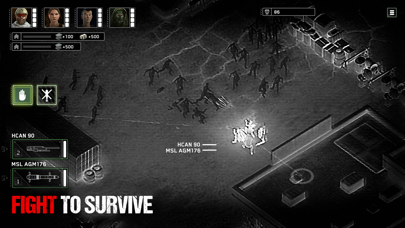
Installé dans le siège du tireur d'un AC-130, vous devez survivre à l'apocalypse zombie et défendre l'humanité depuis les cieux ! Menez vos troupes au sol lors de missions tactiques délicates pour récupérer des ressources. Rapportez-les à la base pour améliorer vos défenses face aux assauts répétés des zombies.
Pulvérisez les zombies dans ce nouveau volet de la série à succès Zombie Gunship.
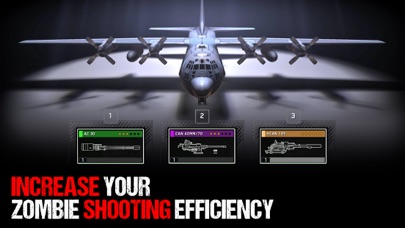
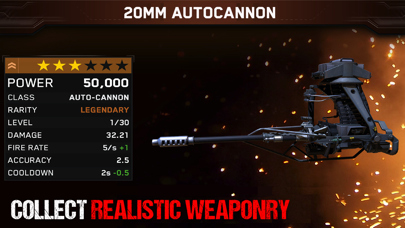
● Des graphismes haute définition, des scénarios captivants et un arsenal constitué d'armes réelles
● Profitez d'un arsenal d'armes réalistes et améliorez votre précision au tir
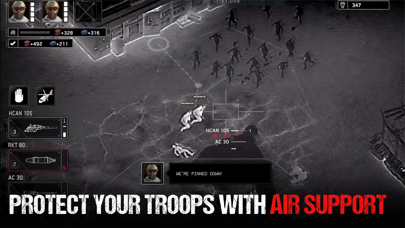
● Assurez un appui aérien et menez vos troupes au sol
● Construisez une base aérienne pour en faire votre centre des opérations
● Défendez votre base contre les attaques de zombies
● Survivez dans un environnement hostile et semez la destruction depuis les cieux !
Conditions de service :
En accédant à un produit flaregames ou en l'utilisant, vous acceptez nos Conditions de service (www.flaregames.com/terms-service/).
Avis aux parents :
Zombie Gunship Survival est un jeu disponible en téléchargement gratuit, il est cependant possible d'acheter certains objets en jeu avec de l’argent « réel ». Si vous ne souhaitez pas utiliser ces fonctionnalités, vous pouvez désactiver les achats intégrés dans les paramètres de votre appareil. Selon nos conditions d’utilisation, Zombie Gunship Survival est disponible en téléchargement pour des joueurs de 13 ans et plus uniquement sauf consentement parental explicite. Plus d'informations sur :
http://www.flaregames.com/parents-guide/
- iPhone ou iPad avec ou sans Jailbreak.
- Sideloadly ou alternatives.
- Ordinateur sous Windows/macOS/Linux avec iTunes installé.
ÉTAPE 1: Téléchargez le fichier .IPA pré-modifié depuis le lien ci-dessus sur votre ordinateur. Pour le télécharger depuis l'iOSGods App, consultez notre Tutoriel de téléchargement de l'IPA depuis l'iOSGods App qui comprend un exemple en vidéo.
ÉTAPE 2: Téléchargez Sideloadly et installez-le sur votre Windows ou Mac.
ÉTAPE 3: Ouvrez Sideloadly sur votre ordinateur, connectez votre appareil iOS et attendez que le nom de votre appareil apparaisse dans Sideloadly.
ÉTAPE 4: Une fois votre iDevice reconnu, glissez le fichier .IPA modifié que vous avez téléchargé et déposez-le dans l'application Sideloadly.
ÉTAPE 5: Saisissez l'adresse e-mail de votre Apple Account, puis appuyez sur « Start ». Il vous sera ensuite demandé d'entrer votre mot de passe. Fournissez les informations requises.
ÉTAPE 6: Attendez que Sideloadly termine le sideloading/l'installation de l'IPA modifié. En cas de problème durant l'installation, veuillez lire la remarque ci-dessous.
ÉTAPE 7: Une fois l'installation terminée et l'app visible sur votre écran d'accueil, vous devez aller dans Réglages → Général → Profils / VPN et gestion de l'appareil. Là, appuyez sur l'adresse e-mail saisie à l'étape 6, puis appuyez sur « Faire confiance à [email protected] ».
ÉTAPE 8: Allez maintenant sur votre écran d'accueil et ouvrez l'app nouvellement installée ; tout devrait fonctionner correctement. Vous devrez peut-être suivre des instructions supplémentaires propres à chaque app, dans la fenêtre du hack en jeu.
REMARQUE : À partir d'iOS/iPadOS 16, vous devez activer le mode Développeur. Pour les comptes Apple Developer gratuits, vous devrez répéter ce processus tous les 7 jours. Pour toute question ou problème, lisez notre section FAQ Sideloadly du sujet.

![Screw Jam iOS Mod IPA [ Debug Menu ]](https://is1-ssl.mzstatic.com/image/thumb/Purple211/v4/03/f0/c1/03f0c167-2d2d-f530-781c-914c8f961af7/AppIcon-0-0-1x_U007emarketing-0-8-0-85-220.png/100x100bb.jpg)


