Anmeldung erforderlich
Melde dich mit deinem iOSGods-Konto an, um fortzufahren.
Melde dich mit deinem iOSGods-Konto an, um fortzufahren.
Dieses Zombie-Überlebens-Idle-Game-Hack für iOS entfernt den Grind und die Bezahlschranke, sodass du die Ressourcenengpässe überspringst, die die Progression in Idle Zombie: Survival Station verlangsamen. Baue deine postapokalyptische Basis auf, schalte Premium-Inhalte frei und dominiere die Untoten, ohne echtes Geld auszugeben oder auf Timer zu warten.
Mit dieser modifizierten IPA erhältst du sofortigen Zugriff auf alle Stände, kostenlose Upgrades und God Mode, sodass du dich auf Strategie und Kampf konzentrieren kannst, anstatt Ressourcen zu sammeln. Egal ob du neu bei Idle-Spielen bist oder ein erfahrener Spieler, der das vollständige Spiel ohne Bezahlschranke erleben möchte, dieser Hack verwandelt das Überlebenserlebnis in reine Progression.
- Erstkauf-Belohnung einfordern → schalte den anfänglichen Premium-Bonus frei
- Kostenlose Spezialangebote → greife auf zeitlich begrenzte Angebote kostenlos zu
- Premium-Event freischalten → nimm an exklusiven Events teil
- Alle Stände freischalten → greife von Anfang an auf alle Einrichtungen zu
- Kostenlose Stand-Upgrades → verbessere Gebäude ohne Ressourcenausgaben
- Kostenlose Upgrades und Bau → konstruiere und verbessere ohne Kosten
- God Mode (Niemals sterben) → überstehe jeden Kampf unbesiegt
Lade Idle Zombie: Survival Station Hack modded IPA über die obigen Links herunter. Tippe auf den Installations-Button und folge den Anweisungen, um diese iOS-App auf deinem iPhone, iPad oder Apple Silicon zu installieren.
Brauchst du mehr Hilfe? In unseren iOSGods App häufig gestellten Fragen findest du ausführliche Antworten und Tipps zur Fehlerbehebung.
Willkommen bei IDLE ZOMBIE: SURVIVAL STATION!
Betreten Sie eine postapokalyptische Welt, die von Zombies überrannt wird, in der das Überleben nicht garantiert ist und der Kampf unerbittlich ist. Als Anführer der letzten Überlebensstation der Menschheit müssen Sie sich bewaffnen, Ressourcen sammeln und sich auf den ultimativen Kampf gegen die Untoten und andere Überlebende vorbereiten!
In IDLE ZOMBIE: SURVIVAL STATION tauchen Sie ein in:
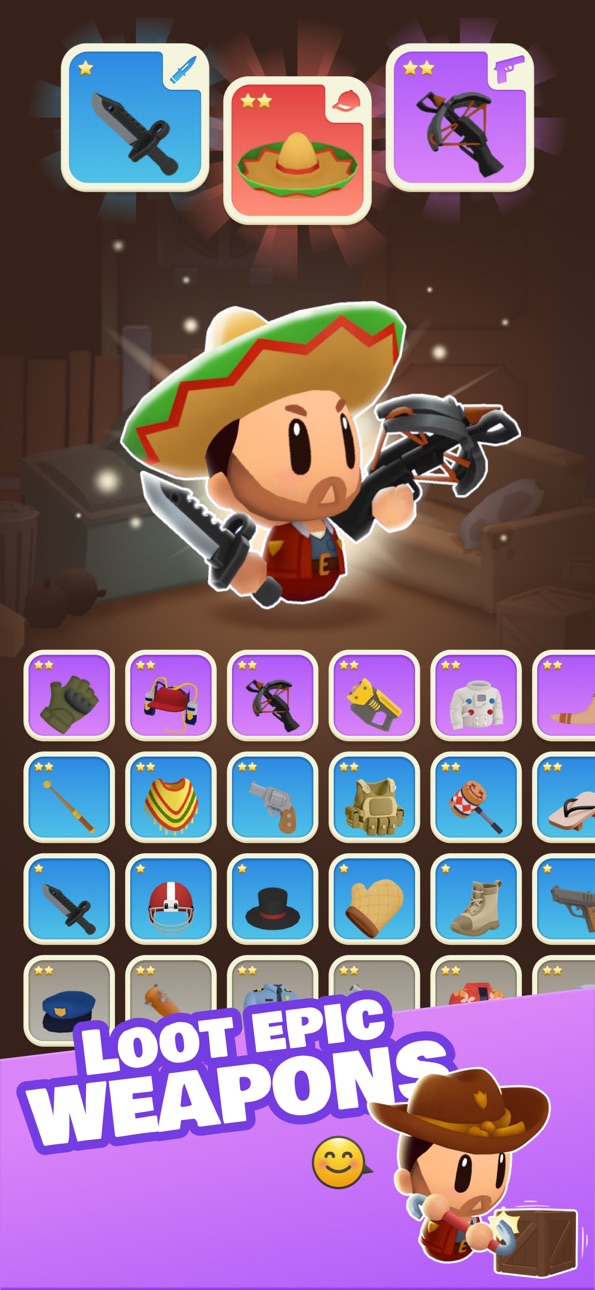
• Plündern und Sammeln: Trotzen Sie tückischen Zonen, um mächtige Waffen, seltene Haustiere und wichtige Ressourcen zu sammeln, um Ihre Kampfstärke zu steigern und sich auf härtere Herausforderungen vorzubereiten.
• Kämpfe überleben: Beteiligen Sie sich an herzzerreißenden Überlebenskämpfen gegen unerbittliche Wellen von Zombies. Es können alberne Zombies sein, die leicht zu besiegen sind, oder extrem wilde und schwer zu handhabende.
• Fordern Sie die Arena heraus: Betreten Sie die Arena und treten Sie gegen andere Spieler an. Beweise deine Fähigkeiten in erbitterten PvP-Schlachten, klettere die Bestenliste hoch und festige deinen Status als ultimativer Überlebens-Tycoon!
• Baue dein Arsenal auf: Sammle seltene, epische und legendäre Waffen und Fähigkeiten, um das Blatt in Schlachten zu wenden und sowohl die Untoten als auch deine Rivalen zu dominieren.
Wer sollte spielen?
Idle Zombie: Survival Station ist perfekt für:
• Action-Junkies, die sich nach intensiven Zombie-Schlachten und Überlebensabenteuern sehnen,
• Sammler, die gerne Waffen, Gefährten und Werkzeuge aufrüsten, um sich einen Vorteil zu verschaffen,
• Wettkampfspieler, die ihre Gegner in spannenden Arena-Duellen überdauern wollen,
• Zombie-Fans, die sich nach einem epischen Apokalypse-Erlebnis sehnen.
Bereit, sich der Apokalypse zu stellen? Dein Überleben, dein Kampf, dein Sieg.
Lade jetzt IDLE ZOMBIE: SURVIVAL STATION herunter und beginne deine Reise!
Du brauchst Hilfe? Kontaktiere uns in deiner bevorzugten Sprache per E-Mail: [email protected]
Häufig gestellte Fragen: https://unimob.helpshift.com/hc/en/4-idle-zombie-survival-tycoon/
Bespreche mehr auf:
• Unserem Discord: https://discord.gg/uT6TbhjDRW
• Unserer Facebook-Seite: https://www.facebook.com/idle.zombie.tycoon
Terms of Use (EULA)
Standard Apple Terms of Use (EULA)
https://www.apple.com/legal/internet-services/itunes/dev/stdeula/
Screenshots © der jeweiligen Inhaber · App Store


iOSGods ist nicht mit Apple Inc., Google LLC oder den Entwicklern der hier aufgeführten Apps verbunden und wird von ihnen weder unterstützt noch gesponsert. Apple, iOS und App Store sind Marken von Apple Inc. Android und Google Play sind Marken von Google LLC. Alle weiteren App-Namen, Symbole, Grafiken und Marken gehören ihren jeweiligen Inhabern.
- Nicht-Jailbroken/Jailed oder Jailbroken iPhone oder iPad.
- Sideloadly oder Alternativen.
- Computer mit Windows/macOS/Linux und installiertem iTunes.
SCHRITT 1: Lade die vorinstallierte .IPA-Datei über den obigen Link auf deinen Computer herunter. Zum Herunterladen aus der iOSGods-App siehe unser iOSGods App IPA Download-Tutorial mit Videobeispiel.
SCHRITT 2: Lade Sideloadly herunter und installiere es auf deinem Windows oder Mac.
SCHRITT 3: Öffne Sideloadly auf deinem Computer, verbinde dein iOS-Gerät und warte, bis dein Gerätename in Sideloadly erscheint.
SCHRITT 4: Sobald dein iDevice erkannt wird, ziehe die heruntergeladene gemoddete .IPA-Datei in die Sideloadly-Anwendung.
SCHRITT 5: Gib deine Apple-Account-E-Mail ein und drücke „Start". Du wirst dann nach deinem Passwort gefragt. Gib die erforderlichen Informationen ein.
SCHRITT 6: Warte, bis Sideloadly das Sideloading/Installieren der gehackten IPA abgeschlossen hat. Bei Problemen während der Installation lies bitte den Hinweis unten.
SCHRITT 7: Sobald die Installation abgeschlossen ist und die App auf deinem Home-Bildschirm angezeigt wird, musst du zu Einstellungen → Allgemein → Profile / VPN & Geräteverwaltung gehen. Tippe dort auf die E-Mail, die du in Schritt 6 eingegeben hast, und dann auf „Trust [email protected]".
SCHRITT 8: Gehe nun zu deinem Home-Bildschirm und öffne die neu installierte App – alles sollte einwandfrei funktionieren. Möglicherweise musst du weitere App-spezifische Anweisungen im Hack-Popup im Spiel befolgen.
HINWEIS: iOS/iPadOS 16 und höher: Du musst den Entwicklermodus aktivieren. Bei kostenlosen Apple Developer-Accounts musst du diesen Vorgang alle 7 Tage wiederholen. Bei Fragen oder Problemen lies bitte unsere Sideloadly-FAQ-Sektion im Thema.
Game Name iOS Mod IPA is an action adventure game enhanced with powerful gameplay boosts and quality-of-life improvements. Win battles faster, earn rewards quicker, and enjoy uninterrupted play without ads.
- Unlimited Gold - spend freely to unlock premium content
- Damage Multiplier - deal significantly more damage in combat
- Defense Multiplier - take less damage and survive longer
- Reward Multiplier - earn more loot from every battle
- Max Level - instantly reach the highest player rank
- No Ads - play without interruptions or advertisements
This app also comes with iGameGod, giving you access to Auto Touch to automate repetitive tasks, App Speed Manager for adjustable gameplay speed, Memory Engine value editing, and more powerful iOS game tools.
Lade Game Name Mod IPA über die obigen Links herunter. Tippe auf den Installations-Button und folge den Anweisungen, um diese iOS-App auf deinem iPhone, iPad oder Apple Silicon zu installieren.
Brauchst du mehr Hilfe In unseren iOSGods App häufig gestellten Fragen findest du ausführliche Antworten und Tipps zur Fehlerbehebung.
----------------------------------------------------------
--------------------------------------------------