ต้องเข้าสู่ระบบ
เข้าสู่ระบบด้วยบัญชี iOSGods เพื่อดำเนินการต่อ
เข้าสู่ระบบด้วยบัญชี iOSGods เพื่อดำเนินการต่อ
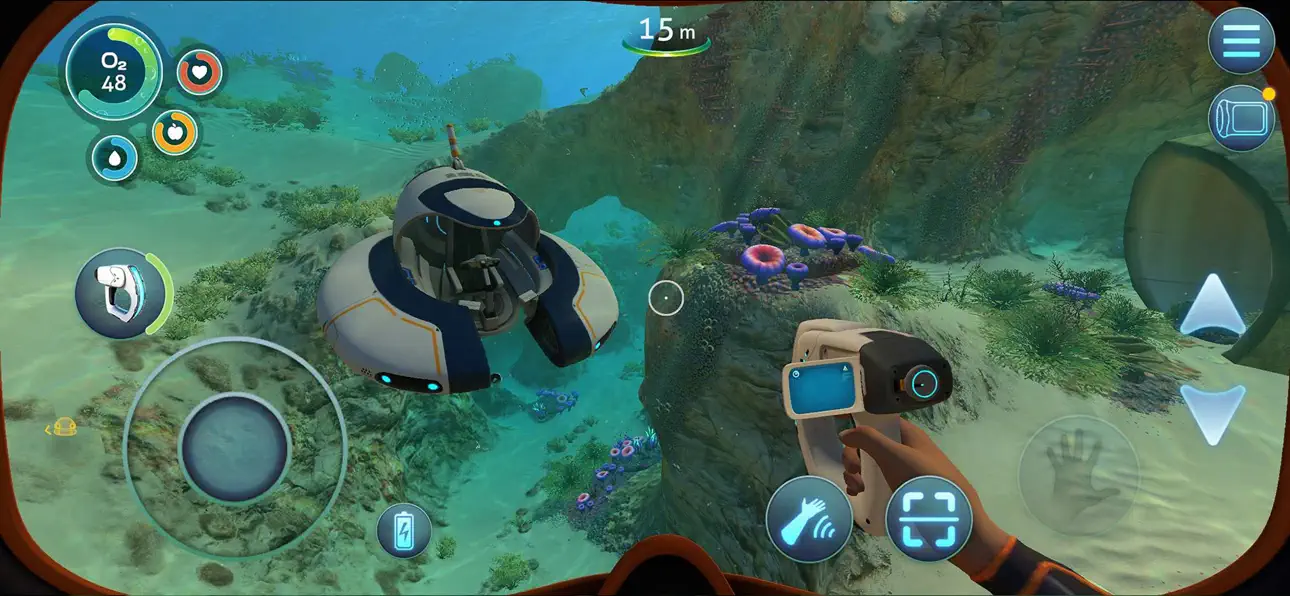
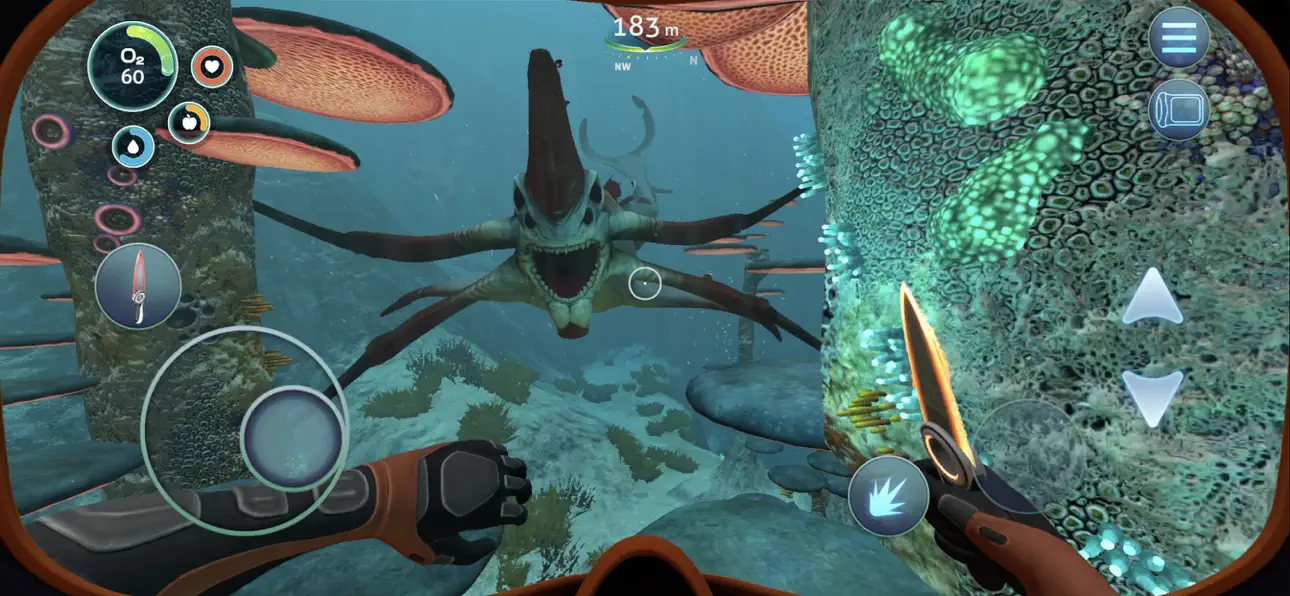
Subnautica เป็นเกมผจญภัยใต้น้ำที่คุณสำรวจดาวเคราะห์มหาสมุทรต่างดาว สร้างอุปกรณ์ และเอาชีวิตรอดจากสิ่งมีชีวิตที่อันตรายในโลกเปิดขนาดมหาศาล Mod IPA นี้ปลดล็อกเมนูนักพัฒนาระหว่างการเล่นเกม ให้คุณเข้าถึงคำสั่งขั้นสูงและโกงเพื่อปรับแต่งประสบการณ์ของคุณ
- เมนูนักพัฒนา (หยุดเกมและคุณจะเห็นปุ่มเมนูนักพัฒนา) → เข้าถึงคำสั่งขั้นสูงและโกง
สำหรับคำสั่งนักพัฒนาทั้งหมด ไปที่ ที่นี่
แอปนี้ยังมาพร้อมกับ iGameGod ซึ่งช่วยให้คุณเข้าถึง Auto Touch สำหรับการทำงานซ้ำ ๆ โดยอัตโนมัติ, App Speed Manager สำหรับปรับความเร็วของเกม, การแก้ไขค่าด้วย Memory Engine และเครื่องมือสำหรับเกม iOS ที่ทรงพลังอื่น ๆ อีกมากมาย
ดาวน์โหลด Subnautica iOS Mod IPA จากลิงก์ด้านบน แตะปุ่มติดตั้งและทำตามคำแนะนำบนหน้าจอเพื่อติดตั้งแฮ็กแอป iOS นี้บน iPhone, iPad หรือ Apple Silicon
ต้องการความช่วยเหลือเพิ่มเติม? ดู คำถามที่พบบ่อยของแอป iOSGods สำหรับคำตอบโดยละเอียดและเคล็ดลับการแก้ไขปัญหา
*Stelle sicher, dass dein Gerät unterstützt wird, bevor du Subnautica spielst!*
Subnautica ist ein Unterwasser-Abenteuerspiel, das auf einem außerirdischen Ozeanplaneten angesiedelt ist. Dich erwartet eine riesige offene Welt voller Wunder und Gefahren!
Tauche ab in die Tiefe, stelle Ausrüstung her, steuere U-Boote und überliste wilde Tiere, um üppige Korallenriffe, Vulkane, Höhlensysteme und noch vieles mehr zu erkunden – und versuche dabei, am Leben zu bleiben! Lüfte das Geheimnis dieser Welt, in der es vor Kreaturen nur so wimmelt – sowohl freundlich als auch feindlich – und die mit Spuren aus vergangen Zeiten übersät ist.
Spiele im Überlebensmodus, um die originale Herausforderung zu erleben oder wechsle in den Freiheits- oder Kreativmodus, um diesen ozeanischen Planeten ohne den Einfluss von Durst, Hunger oder Sauerstoff zu entdecken.
FEATURES
• ÜBERLEBE – Nachdem du auf einem weitläufigen Unterwasserplaneten bruchlandest, wird die Zeit knapp, um Wasser und Nahrung zu finden und die Ausrüstung zu entwickeln, die du brauchst, um deine Umgebung zu erkunden.
• ERKUNDE – Behalte deinen Hunger, Durst und deine Sauerstoffversorgung im Auge, während du in gewaltige Seetangwälder, sonnendurchflutete Flachländer, bioluminiszente Riffe und verschlungene Höhlensysteme eintauchst.
• PLÜNDERE – Sammle Ressourcen aus dem Ozean um dich herum. Wage dich tiefer und weiter vor, um seltenere Ressourcen zu finden und komplexere Gegenstände zu bauen.
• BAUE – Baue Basen, die dir als Unterschlupf dienen, Fahrzeuge, die du steuern kannst und Überlebenswerkzeuge, die dir helfen, dich in dieser Unterwasserwelt zurechtzufinden.
• LÜFTE GEHEIMNISSE – Was ist auf diesem Planeten geschehen? Was hat deine Bruchlandung ausgelöst? Kannst du einen Weg finden, den Planeten bei lebendigem Leib zu verlassen?
• SPIELE AUF DEINE ART – Spiele im Überlebensmodus, um die originale Herausforderung zu erleben oder wechsle in den Freiheits- oder Kreativmodus, um diesen ozeanischen Planeten ohne den Einfluss von Durst, Hunger oder Sauerstoff zu entdecken.
FÜR MOBILE GERÄTE NEUGESTALTET
• Überarbeitete Benutzeroberfläche – exklusive mobile UI mit vollständiger Touch-Steuerung
• Game-Center-Erfolge
• Cloud-Speicher – Teile deinen Fortschritt zwischen iOS-Geräten
• Kompatibel mit MFi-Controllern
• Optimierung für iPhone 16 (einschließlich Pro Max)
-----
*NICHT UNTERSTÜTZTE GERÄTE (das Spiel wird nicht funktionieren)* :
- iPhone Xr, iPhone SE Gen 2 (2020)
- iPad Mini Gen 5, iPad Air Gen 3, iPad Gen 8, iPad Gen 9
*NUR BEI NIEDRIGER AUFLÖSUNG UNTERSTÜTZTE GERÄTE* :
- iPhone Xs, iPhone Xs Max, iPhone 11, iPhone 11 Pro, iPhone 11 Pro Max, iPhone 12, iPhone 12 Mini, iPhone 13, iPhone 13 Mini, iPhone SE Gen 3 (2022)
- iPad Pro 10.5"", iPad Mini Gen 6, iPad Air Gen 4, iPad Gen 10, iPad Pro 11"" Gen 1, iPad Pro 12.9"" Gen 3
*UNTERSTÜTZTE GERÄTE* :
- iPhone 12 Pro, iPhone 12 Pro Max, iPhone 13 Pro, iPhone 13 Pro Max, iPhone 14 UND DARÜBER
- iPad Pro 11"" Gen 2, iPad Pro 12.9"" Gen 4, iPad Air Gen 5, iPad Pro 11"" Gen 3, iPad Pro 11"" Gen 4, iPad Pro 12.9"" Gen 5, iPad Pro 12.9"" Gen 6 UND DARÜBER
ภาพหน้าจอ © เจ้าของแต่ละราย · App Store


iOSGods ไม่มีความเกี่ยวข้อง ไม่ได้รับการรับรอง และไม่ได้รับการสนับสนุนจาก Apple Inc., Google LLC หรือผู้พัฒนาแอปที่แสดงไว้ที่นี่ Apple, iOS และ App Store เป็นเครื่องหมายการค้าของ Apple Inc. Android และ Google Play เป็นเครื่องหมายการค้าของ Google LLC ชื่อแอป ไอคอน ภาพ และเครื่องหมายการค้าอื่นทั้งหมดเป็นทรัพย์สินของเจ้าของแต่ละราย

- iPhone หรือ iPad ที่ไม่ได้เจลเบรก/ไม่ได้เจลเบรก หรือเจลเบรกแล้ว
- Sideloadly หรือทางเลือกอื่น
- คอมพิวเตอร์ที่ใช้ Windows/macOS/Linux และติดตั้ง iTunes ไว้
ขั้นตอนที่ 1: ดาวน์โหลดไฟล์ .IPA ที่แฮกไว้ล่วงหน้าจากลิงก์ด้านบนลงในคอมพิวเตอร์ของคุณ หากต้องการดาวน์โหลดจากแอป iOSGods โปรดดู วิธีดาวน์โหลด IPA ในแอป iOSGods ซึ่งมีตัวอย่างวิดีโอประกอบ
ขั้นตอนที่ 2: ดาวน์โหลด Sideloadly แล้วติดตั้งบน Windows หรือ Mac ของคุณ
ขั้นตอนที่ 3: เปิด Sideloadly บนคอมพิวเตอร์ เชื่อมต่ออุปกรณ์ iOS แล้วรอจนกว่าชื่ออุปกรณ์ของคุณจะปรากฏใน Sideloadly
ขั้นตอนที่ 4: เมื่อ iDevice ของคุณถูกตรวจพบแล้ว ให้ลากไฟล์ .IPA ที่ม็อดมาวางลงในโปรแกรม Sideloadly
ขั้นตอนที่ 5: กรอกอีเมล Apple Account ของคุณ จากนั้นกด "Start" ระบบจะถามรหัสผ่าน กรอกข้อมูลที่จำเป็นให้เรียบร้อย
ขั้นตอนที่ 6: รอจนกว่า Sideloadly จะ sideload/ติดตั้งไฟล์ IPA ที่แฮกเสร็จ หากเกิดปัญหาระหว่างติดตั้ง โปรดอ่านหมายเหตุด้านล่าง
ขั้นตอนที่ 7: เมื่อการติดตั้งเสร็จสิ้นและเห็นแอปบนหน้าจอหลักแล้ว ให้ไปที่ การตั้งค่า → ทั่วไป → โปรไฟล์ / VPN และการจัดการอุปกรณ์ จากนั้นแตะที่อีเมลที่คุณกรอกในขั้นตอนที่ 6 แล้วแตะ "เชื่อถือ [email protected]"
ขั้นตอนที่ 8: จากนั้นไปที่หน้าจอหลักและเปิดแอปที่ติดตั้งใหม่ ทุกอย่างควรทำงานได้ปกติ คุณอาจต้องทำตามคำแนะนำเพิ่มเติมเฉพาะแอปในป๊อปอัปของม็อดในเกม
หมายเหตุ: สำหรับ iOS/iPadOS 16 ขึ้นไป คุณต้อง เปิดโหมดนักพัฒนา (Developer Mode) สำหรับบัญชี Apple Developer แบบฟรี คุณต้องทำขั้นตอนนี้ซ้ำทุก 7 วัน หากมีคำถามหรือพบปัญหา โปรดอ่าน หัวข้อ FAQ ของ Sideloadly ในกระทู้
Game Name iOS Mod IPA is an action adventure game enhanced with powerful gameplay boosts and quality-of-life improvements. Win battles faster, earn rewards quicker, and enjoy uninterrupted play without ads.
- Unlimited Gold - spend freely to unlock premium content
- Damage Multiplier - deal significantly more damage in combat
- Defense Multiplier - take less damage and survive longer
- Reward Multiplier - earn more loot from every battle
- Max Level - instantly reach the highest player rank
- No Ads - play without interruptions or advertisements
This app also comes with iGameGod, giving you access to Auto Touch to automate repetitive tasks, App Speed Manager for adjustable gameplay speed, Memory Engine value editing, and more powerful iOS game tools.
ดาวน์โหลด Game Name Mod IPA จากลิงก์ด้านบน แตะปุ่มติดตั้งและทำตามคำแนะนำบนหน้าจอเพื่อติดตั้งแฮ็กแอป iOS นี้บน iPhone, iPad หรือ Apple Silicon
ต้องการความช่วยเหลือเพิ่มเติม ดู คำถามที่พบบ่อยของแอป iOSGods สำหรับคำตอบโดยละเอียดและเคล็ดลับการแก้ไขปัญหา
----------------------------------------------------------
--------------------------------------------------