Anmeldung erforderlich
Melden Sie sich mit Ihrem iOSGods-Konto an, um fortzufahren.
Melden Sie sich mit Ihrem iOSGods-Konto an, um fortzufahren.

Unendliche Munition und Unsterblichkeitsmodus in DEAD TRIGGER 2: Zombie Games iOS Mod IPA verwandeln den Shooter in ein unaufhaltsames Zombie-Tötungs-Erlebnis, bei dem dir nie die Munition ausgeht und du jeden Kampf überlebst.
Höre auf, Ressourcen zu verwalten, und beginne, die Apokalypse zu beherrschen: Mit dieser modifizierten IPA wirst du alle 33 Schlachtfelder und über 600 Szenarien mühelos bewältigen, ohne dich abmühen zu müssen, sodass du dich ganz auf die Action und Strategie konzentrieren kannst, die diesen preisgekrönten Shooter legendär machen.
- Unendliche Munition → dir geht nie die Munition aus
- Kein Nachladen → schieße ununterbrochen ohne Unterbrechung
- Unsterblichkeitsmodus → nimm keinen Schaden von Zombies
- Unendliche Verbrauchsmaterialien → unbegrenzte Heilung und Unterstützungsgegenstände
- Besseres Zielvisier → verbesserte Zielgenauigkeit
Diese App wird zusätzlich mit iGameGod geliefert und bietet Ihnen Zugriff auf Auto Touch zur Automatisierung sich wiederholender Aufgaben, App Speed Manager für eine anpassbare Spielgeschwindigkeit, Memory Engine zur Wertbearbeitung und weitere leistungsstarke iOS-Spielwerkzeuge.
Laden Sie DEAD TRIGGER 2: Zombie Games iOS Mod IPA über die obigen Links herunter. Tippen Sie auf den Installations-Button und folgen Sie den Anweisungen, um diese iOS-App auf Ihrem iPhone, iPad oder Apple Silicon zu installieren.
Brauchen Sie mehr Hilfe? In unseren iOSGods App häufig gestellten Fragen finden Sie ausführliche Antworten und Tipps zur Fehlerbehebung.
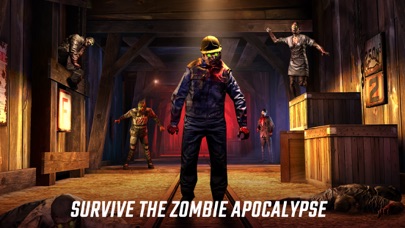
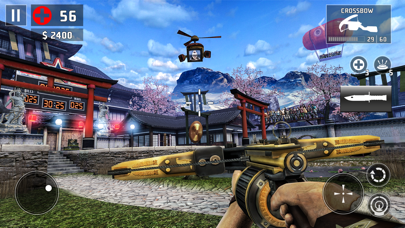
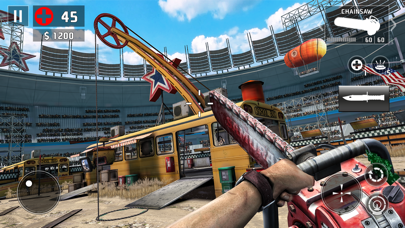
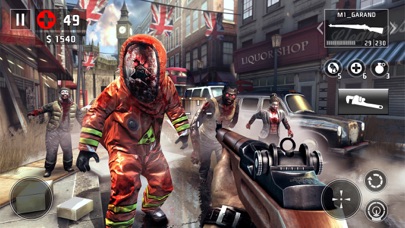
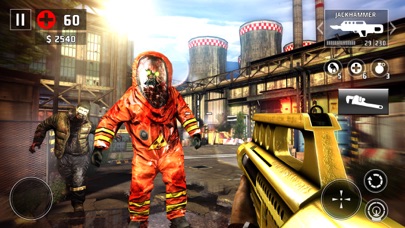
Kämpfe in diesem spannungsgeladenen Ego-Shooter in einer zombieverseuchten Welt ums Überleben. Wähle aus einem riesigen Waffenarsenal und bekämpfe die lebenden Toten an furchteinflößenden Schauplätzen auf der ganzen Welt. Über 60 Millionen Spieler kämpfen schon für die Zukunft der Menschheit – kannst du den Unterschied ausmachen?
„Stundenlanger Spaß in Marathonsitzungen oder kurze, knackige Runden.“ – Gamezebo.com
„Das Spiel macht alles besser, was den Vorgänger ausgezeichnet hat.“ – ArcadeSushi.com
RIESIGE, STETIG AKTUALISIERTE INHALTE. GESCHICHTEN, DIE SICH NACH UND NACH ENTFALTEN.
Das Universum von Dead Trigger 2 wächst ständig. Jedes Update bietet brandneue Inhalte, die dein Spielerlebnis noch besser machen.
• Kämpfe dich durch die Regionen und erkunde 33 einzigartige Umgebungen.
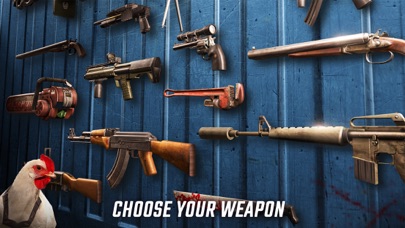
• Suche dir aus über 50 Waffen deinen Lieblings-Zombievernichter aus. Verbessere deine Schussgenauigkeit und töte Zombies mit Kopfschüssen!
• Tauche mit über 600 Gameplay-Szenarien wie der Solo-Kampagne, den globalen Missionen und den Nebenaufgaben in die Action ein. Schließe Erfolge ab, meistere Herausforderungen und erhalte exklusive Spielwährung.
EINE GRAFIK, BEI DER EINEM DAS WASSER IM MUND ZUSAMMENLÄUFT
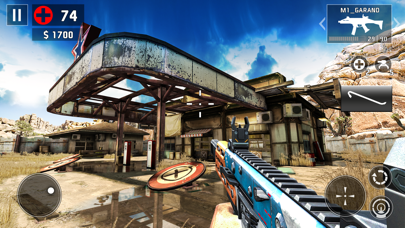
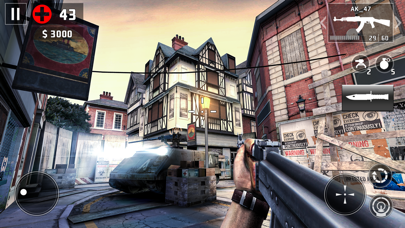
Unsere bahnbrechende Grafik, zu der Echtzeit-Wasserreflexionen, dynamische Vegetation und verbesserte Modelle gehören, wird dich umhauen. Erkunde die unterschiedlichsten Orte und töte die Untoten in verlassenen Minen in Afrika oder den Straßen von Shanghai. Die Apokalypse hat noch nie besser ausgesehen!
NERVENAUFREIBENDES GAMEPLAY
• Brutale Feinde: Die simplen Zombies stellen für Scharfschützen kein Problem dar, aber es braucht mehr als nur einen Schuss, um die starken Bosse zu erledigen. Mach dich auf Kamikaze, Vomitron und andere gefasst – mächtige Untote, die sich einiges einfallen lassen, um dich auszulöschen.
• Coole Waffen: Schnapp dir Nahkampfwaffen wie den Großen Hammer, den Bootmotor und die Machete. Welche Waffe magst du am liebsten? Sieh dir die Granatenhühner, die Raketenhühner und die Hühner mit speziellen Maschinengewehren an. Du wirst sie lieben …
• Geschichte in Echtzeit: Schließe dich dem globalen Widerstand an und halte dich auf dem Laufenden, während sich das globale Gameplay weiterentwickelt und die Handlungen jedes einzelnen Spielers das Blatt im Krieg wenden können. Stürze dich in unterschiedliche Operationen wie die Gesichte, globale Missionen und Nebenaufgaben.
TONNENWEISE FUNKTIONEN
• Turniere mit echten Preisen: Mach dich auf ein paar ernsthafte Schießereien gefasst! Kämpfe in der Arena, für die es jede Woche eigene Gladiatorenregeln gibt, gegen Spieler auf der ganzen Welt. Werde in der neuen Fegefeuer-Arena zur Legende …
• Der Finger ist mächtiger als die Waffe: Wähle das Berührungszielsystem für normale Spieler oder den erweiterten virtuellen Joystick für echte Ego-Shooter-Veteranen. Wenn du lieber wie auf der Konsole spielst, dann nur zu – Dead Trigger 2 unterstützt MOGA.
• Erkunde dein eigenes Versteck und lerne den Büchsenmacher, den Wissenschaftler, den Schmuggler und den Techniker kennen. Diese NPCs werden dir beim Überleben helfen, während du unglaubliche neue Waffen und Apparaturen freischaltest.
- Nicht-Jailbroken/Jailed oder Jailbroken iPhone oder iPad.
- Sideloadly oder Alternativen.
- Computer mit Windows/macOS/Linux und installiertem iTunes.
SCHRITT 1: Laden Sie die vorinstallierte .IPA-Datei über den obigen Link auf Ihren Computer herunter. Zum Herunterladen aus der iOSGods-App siehe unser iOSGods App IPA Download-Tutorial mit Videobeispiel.
SCHRITT 2: Laden Sie Sideloadly herunter und installieren Sie es auf Ihrem Windows oder Mac.
SCHRITT 3: Öffnen Sie Sideloadly auf Ihrem Computer, verbinden Sie Ihr iOS-Gerät und warten Sie, bis Ihr Gerätename in Sideloadly erscheint.
SCHRITT 4: Sobald Ihr iDevice erkannt wird, ziehen Sie die heruntergeladene gemoddete .IPA-Datei in die Sideloadly-Anwendung.
SCHRITT 5: Geben Sie Ihre Apple-Account-E-Mail ein und drücken Sie „Start". Sie werden dann nach Ihrem Passwort gefragt. Geben Sie die erforderlichen Informationen ein.
SCHRITT 6: Warten Sie, bis Sideloadly das Sideloading/Installieren der gehackten IPA abgeschlossen hat. Bei Problemen während der Installation lesen Sie bitte den Hinweis unten.
SCHRITT 7: Sobald die Installation abgeschlossen ist und die App auf Ihrem Home-Bildschirm angezeigt wird, müssen Sie zu Einstellungen → Allgemein → Profile / VPN & Geräteverwaltung gehen. Tippen Sie dort auf die E-Mail, die Sie in Schritt 6 eingegeben haben, und dann auf „Trust [email protected]".
SCHRITT 8: Gehen Sie nun zu Ihrem Home-Bildschirm und öffnen Sie die neu installierte App – alles sollte einwandfrei funktionieren. Möglicherweise müssen Sie weitere App-spezifische Anweisungen im Hack-Popup im Spiel befolgen.
HINWEIS: iOS/iPadOS 16 und höher: Sie müssen den Entwicklermodus aktivieren. Bei kostenlosen Apple Developer-Accounts müssen Sie diesen Vorgang alle 7 Tage wiederholen. Bei Fragen oder Problemen lesen Sie bitte unsere Sideloadly-FAQ-Sektion im Thema.




![[Puzzle & Dragons JP] パズル&ドラゴンズ Hack](https://is1-ssl.mzstatic.com/image/thumb/Purple211/v4/ca/88/05/ca880549-d75e-5b3d-321e-b111dbb2fcda/AppIcon-0-0-1x_U007emarketing-0-8-0-85-220.png/100x100bb.jpg)


