ต้องเข้าสู่ระบบ
เข้าสู่ระบบด้วยบัญชี iOSGods เพื่อดำเนินการต่อ
Hack Features:
- Custom Notes
- No Damage
ดาวน์โหลด Rhythm Hive Hack modded IPA จากลิงก์ด้านบน แตะปุ่มติดตั้งและทำตามคำแนะนำบนหน้าจอเพื่อติดตั้งแฮ็กแอป iOS นี้บน iPhone, iPad หรือ Apple Silicon
ต้องการความช่วยเหลือเพิ่มเติม? ดู คำถามที่พบบ่อยของแอป iOSGods สำหรับคำตอบโดยละเอียดและเคล็ดลับการแก้ไขปัญหา
HYBE Official Rhythm Game - Rhythm Hive
■ BTS, TOMORROW X TOGETHER, ENHYPEN, SEVENTEEN, LE SSERAFIM, NewJeans, BOYNEXTDOOR, ILLIT, TWS’s music in rhythm games!
Enjoy full or short versions of Artist’s songs! One more news! You can even play solo and unit songs!
Check out the newest songs and different versions of existing songs like "Take Two", "Killin' It Girl (feat. GloRilla)", "Love Language", "Bad Desire (With or Without You)", "HBD", "SPAGHETTI (feat. j-hope of BTS)", "How Sweet", "Hollywood Action", "NOT CUTE ANYMORE", "OVERDRIVE" and more!
■ Check out and collect all of Artist’s Photo Cards through the Collection Book!
You can check out Artist’s various themes, and gather a desired Artist’s cards through missions!
■ Voice and Message Cards only available on Rhythm Hive + dynamic Live Cards never before seen anywhere else!
Check out Voice and Message Cards recorded by the Artists themselves and see them move on UR Grade Cards now!
■ From debut to now, check out various forms of Artists through Cards!
What happens if you gather and improve Cards?! You can check out various forms of Artists through Rhythm Hive exclusive Selfie Cards!
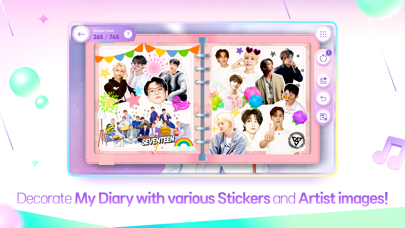
■ Your very own Diary you can make with Artists! Have you tried putting on various stickers?
Create your own Diary theme consisting of album covers and cute and cool moments of Artists, and decorate it with stickers!
■ New missions and guides for new users!
New missions and guides for Hivers logging in for the first time! Learn the game, get rewards! Have fun playing!!
■ Special rewards for Weverse users!
Link with your Weverse account (whether it be BTS, TOMORROW X TOGETHER, ENHYPEN, SEVENTEEN, LE SSERAFIM, NewJeans, BOYNEXTDOOR, ILLIT, TWS) for special rewards!
[Smartphone App Access Permission Notice]
Rhythm Hive requires access to the following to provide its services.
----
[Smartphone App Access Permission Notice]
Rhythm Hive requires access to the following to provide its services.
[Optional]
- Storage (Photos/Media/Files): Required for saving images when taking a photo.
- Notifications: Required to receive updates and PUSH notifications from the game app.
*Choosing not to allow optional access permissions will still let you use the app.
[How to Deny Access Permission]
- Settings > Privacy > Select Permission manager > Allow or deny permission.
*App permissions are used for playing the game only and are not used for any other purposes.
[Product Information and Terms]
※ A separate fee is charged for purchasing paid content.
▶ Payment amounts and methods are separately announced and are different for each product. (The actual charged amount may differ for foreign currencies depending on the exchange rate, fee, etc.)
▶ Product terms and periods are announced separately in the game.
▶ You can purchase the subscription product via in-app purchase, and the transaction is made each month from the date of your first purchase until you cancel the subscription.
※ If you don't cancel the subscription within 24 hours before the next transaction day, it is renewed automatically, and the cancellation is handled in accordance with the Market's cancellation policy.
[Contact]
DRIMAGE Co., Ltd
Privacy Policy: https://account.drimage.com/en/policies/privacy-policy
Terms of Service: https://account.drimage.com/en/policies/terms-of-service
- iPhone หรือ iPad ที่ไม่ได้เจลเบรก/ไม่ได้เจลเบรก หรือเจลเบรกแล้ว
- Sideloadly หรือทางเลือกอื่น
- คอมพิวเตอร์ที่ใช้ Windows/macOS/Linux และติดตั้ง iTunes ไว้
ขั้นตอนที่ 1: ดาวน์โหลดไฟล์ .IPA ที่แฮกไว้ล่วงหน้าจากลิงก์ด้านบนลงในคอมพิวเตอร์ของคุณ หากต้องการดาวน์โหลดจากแอป iOSGods โปรดดู วิธีดาวน์โหลด IPA ในแอป iOSGods ซึ่งมีตัวอย่างวิดีโอประกอบ
ขั้นตอนที่ 2: ดาวน์โหลด Sideloadly แล้วติดตั้งบน Windows หรือ Mac ของคุณ
ขั้นตอนที่ 3: เปิด Sideloadly บนคอมพิวเตอร์ เชื่อมต่ออุปกรณ์ iOS แล้วรอจนกว่าชื่ออุปกรณ์ของคุณจะปรากฏใน Sideloadly
ขั้นตอนที่ 4: เมื่อ iDevice ของคุณถูกตรวจพบแล้ว ให้ลากไฟล์ .IPA ที่ม็อดมาวางลงในโปรแกรม Sideloadly
ขั้นตอนที่ 5: กรอกอีเมล Apple Account ของคุณ จากนั้นกด "Start" ระบบจะถามรหัสผ่าน กรอกข้อมูลที่จำเป็นให้เรียบร้อย
ขั้นตอนที่ 6: รอจนกว่า Sideloadly จะ sideload/ติดตั้งไฟล์ IPA ที่แฮกเสร็จ หากเกิดปัญหาระหว่างติดตั้ง โปรดอ่านหมายเหตุด้านล่าง
ขั้นตอนที่ 7: เมื่อการติดตั้งเสร็จสิ้นและเห็นแอปบนหน้าจอหลักแล้ว ให้ไปที่ การตั้งค่า → ทั่วไป → โปรไฟล์ / VPN และการจัดการอุปกรณ์ จากนั้นแตะที่อีเมลที่คุณกรอกในขั้นตอนที่ 6 แล้วแตะ "เชื่อถือ [email protected]"
ขั้นตอนที่ 8: จากนั้นไปที่หน้าจอหลักและเปิดแอปที่ติดตั้งใหม่ ทุกอย่างควรทำงานได้ปกติ คุณอาจต้องทำตามคำแนะนำเพิ่มเติมเฉพาะแอปในป๊อปอัปของม็อดในเกม
หมายเหตุ: สำหรับ iOS/iPadOS 16 ขึ้นไป คุณต้อง เปิดโหมดนักพัฒนา (Developer Mode) สำหรับบัญชี Apple Developer แบบฟรี คุณต้องทำขั้นตอนนี้ซ้ำทุก 7 วัน หากมีคำถามหรือพบปัญหา โปรดอ่าน หัวข้อ FAQ ของ Sideloadly ในกระทู้