로그인 필요
계속하려면 iOSGods 계정으로 로그인하세요.
계속하려면 iOSGods 계정으로 로그인하세요.
- Custom Notes
- No Damage
이 앱에는 iGameGod도 포함되어 있어 반복 작업을 자동화하는 Auto Touch, 게임 속도를 조절할 수 있는 App Speed Manager, Memory Engine 값 편집 등 강력한 iOS 게임 도구를 사용할 수 있습니다.
위의 링크에서 Rhythm Hive Hack modded IPA을 다운로드합니다. 설치 버튼을 누르고 화면 안내에 따라 iPhone, iPad 또는 Apple Silicon에 이 iOS 앱 해킹을 설치합니다.
더 많은 도움이 필요하신가요? 자세한 답변과 문제 해결 팁은 iOSGods 앱 자주 묻는 질문을 확인하세요.
HYBE Official Rhythm Game - Rhythm Hive
■ BTS, TOMORROW X TOGETHER, ENHYPEN, SEVENTEEN, LE SSERAFIM, NewJeans, BOYNEXTDOOR, ILLIT, TWS’s music in rhythm games!
Enjoy full or short versions of Artist’s songs! One more news! You can even play solo and unit songs!
Check out the newest songs and different versions of existing songs like "Take Two", "Killin' It Girl (feat. GloRilla)", "Love Language", "Knife", "HBD", "SPAGHETTI (feat. j-hope of BTS)", "How Sweet", "Nice Guy (Live Ver.)", "NOT ME", "Here For You" and more!
■ Check out and collect all of Artist’s Photo Cards through the Collection Book!
You can check out Artist’s various themes, and gather a desired Artist’s cards through missions!
■ Voice and Message Cards only available on Rhythm Hive + dynamic Live Cards never before seen anywhere else!
Check out Voice and Message Cards recorded by the Artists themselves and see them move on UR Grade Cards now!
■ From debut to now, check out various forms of Artists through Cards!
What happens if you gather and improve Cards?! You can check out various forms of Artists through Rhythm Hive exclusive Selfie Cards!
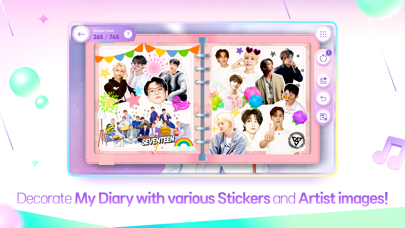
■ Your very own Diary you can make with Artists! Have you tried putting on various stickers?
Create your own Diary theme consisting of album covers and cute and cool moments of Artists, and decorate it with stickers!
■ New missions and guides for new users!
New missions and guides for Hivers logging in for the first time! Learn the game, get rewards! Have fun playing!!
■ Special rewards for Weverse users!
Link with your Weverse account (whether it be BTS, TOMORROW X TOGETHER, ENHYPEN, SEVENTEEN, LE SSERAFIM, NewJeans, BOYNEXTDOOR, ILLIT, TWS) for special rewards!
[Smartphone App Access Permission Notice]
Rhythm Hive requires access to the following to provide its services.
----
[Smartphone App Access Permission Notice]
Rhythm Hive requires access to the following to provide its services.
[Optional]
- Storage (Photos/Media/Files): Required for saving images when taking a photo.
- Notifications: Required to receive updates and PUSH notifications from the game app.
*Choosing not to allow optional access permissions will still let you use the app.
[How to Deny Access Permission]
- Settings > Privacy > Select Permission manager > Allow or deny permission.
*App permissions are used for playing the game only and are not used for any other purposes.
[Product Information and Terms]
※ A separate fee is charged for purchasing paid content.
▶ Payment amounts and methods are separately announced and are different for each product. (The actual charged amount may differ for foreign currencies depending on the exchange rate, fee, etc.)
▶ Product terms and periods are announced separately in the game.
▶ You can purchase the subscription product via in-app purchase, and the transaction is made each month from the date of your first purchase until you cancel the subscription.
※ If you don't cancel the subscription within 24 hours before the next transaction day, it is renewed automatically, and the cancellation is handled in accordance with the Market's cancellation policy.
[Contact]
DRIMAGE Co., Ltd
Privacy Policy: https://account.drimage.com/en/policies/privacy-policy
Terms of Service: https://account.drimage.com/en/policies/terms-of-service
- 탈옥/제일 또는 탈옥된 iPhone 또는 iPad가 필요합니다.
- Sideloadly 또는 대체 도구가 필요합니다.
- iTunes가 설치된 Windows/macOS/Linux 컴퓨터가 필요합니다.
1단계: 위 링크에서 미리 해킹된 .IPA 파일을 컴퓨터에 다운로드합니다. iOSGods App에서 다운로드하려면 동영상 예시가 포함된 iOSGods App IPA 다운로드 튜토리얼를 참고하십시오.
2단계: Sideloadly를 다운로드하여 Windows 또는 Mac에 설치합니다.
3단계: 컴퓨터에서 Sideloadly를 실행하고 iOS 기기를 연결한 후, Sideloadly에 기기 이름이 표시될 때까지 기다립니다.
4단계: iDevice가 인식되면, 다운로드한 모드된 .IPA 파일을 Sideloadly 애플리케이션에 끌어다 놓습니다.
5단계: Apple Account 이메일을 입력한 후 “Start”를 누릅니다. 그러면 비밀번호를 입력하라는 메시지가 표시됩니다. 요청된 정보를 제공해 주십시오.
6단계: Sideloadly가 해킹된 IPA의 사이드로드/설치를 완료할 때까지 기다리십시오. 설치 중 문제가 발생하면 아래 참고 사항을 읽어 주십시오.
7단계: 설치가 완료되어 홈 화면에서 앱이 보이면 설정 → 일반 → 프로파일 / VPN 및 기기 관리 경로로 이동해야 합니다. 그곳에서 6단계에서 입력한 이메일을 탭한 다음 “[email protected] 신뢰”를 탭하십시오.
8단계: 이제 홈 화면으로 돌아가 새로 설치된 앱을 열면 모든 것이 정상적으로 작동할 것입니다. 게임 내 해킹 팝업에서 앱별 추가 안내를 따라야 할 수도 있습니다.
참고: iOS/iPadOS 16 이상에서는 개발자 모드를 활성화해야 합니다. 무료 Apple Developer 계정의 경우 이 과정을 7일마다 반복해야 합니다. 질문이나 문제가 있는 경우 해당 토픽의 Sideloadly FAQ 섹션를 읽어보십시오.