تسجيل الدخول مطلوب
سجّل الدخول بحساب iOSGods للمتابعة.
سجّل الدخول بحساب iOSGods للمتابعة.
افتح جميع أدوات تحرير الفيديو المميزة مع هذه النسخة المعدلة من Perfect Video Editor, Collage، وهي Mod IPA كاملة الميزات تزيل الحواجز المالية عن رسوم الحركة الرئيسية، والصورة داخل الصورة، وتخطيطات الشاشة المقسمة، وتأثيرات مفتاح اللون، ومرشحات الفسيفساء. حرر ومقص ودمج وحول مقاطعك باستخدام ميزات بمستوى احترافي متاحة الآن بحرية.
- المميز مفتوح → جميع ميزات التحرير المدفوعة مفعلة
يأتي هذا التطبيق أيضًا مع iGameGod، مما يتيح لك الوصول إلى Auto Touch لأتمتة المهام المتكررة، وApp Speed Manager لضبط سرعة اللعب، وتعديل القيم عبر Memory Engine، والمزيد من أدوات ألعاب iOS القوية.
قم بتنزيل Perfect Video Editor, Collage Modded modded IPA من الروابط أعلاه. اضغط على زر التثبيت واتبع التعليمات لتثبيت هذا التعديل لـ iOS على iPhone أو iPad أو Apple Silicon.
هل تحتاج إلى مزيد من المساعدة؟ راجع الأسئلة الشائعة لتطبيق iOSGods للحصول على إجابات مفصلة ونصائح لاستكشاف الأخطاء.
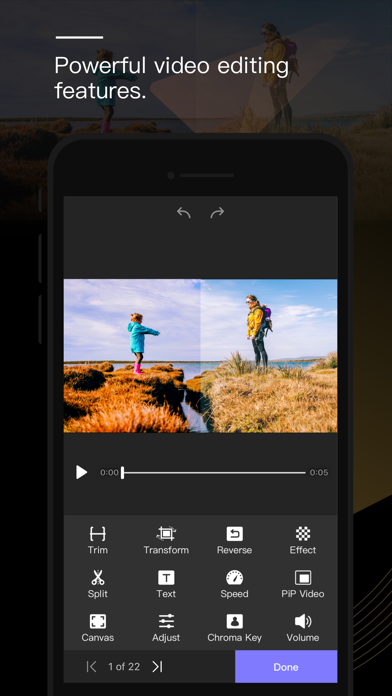
Perfect Video is a really EASY TO USE and Full featured video/slideshow editing app. It lets you quickly Trim, Merge, Split, Reverse, Rotate, Mirror, Flip and Crop clips, add Subtitles, add Mosaic, add Watermark, Photos, and Text, pick Transitions, add Music and Recordings, and export your video clips.
[PREMIUM FEATURES]
1. Keyframe animations: Various editing operations can add key points.
2. Picture in Picture Video.
3. Split Screen: Playing two videos side-by-side.
4. Chroma Key (Green/Blue Screen): Replace the video solid background with a video or photo.
5. Mosaic Video: Pixelate or blur or Highlighted a part in the video.
6. Video Color: Adjust the video color (Brightness, Contrast, Saturation, Hue,…) in a real-time manner.
7). Photo Motion: Set Ken Burns effect for photos.
[OHTER FEATURES & HOW TO USE]
1) Importing Videos or Photos: Add multiple videos or photos to a project instantly.
2) Multiple canvas ratios: Video original size, 1:1, 4:5, 16:9, 9:16, 4:3, 3:4, 19.5:9, 9:19.5, 3:2, 2:3, 2:1, 1:2, 2.39:1 .
3) Canvas background setting: Set the color or make background blur, or add a custom picture.
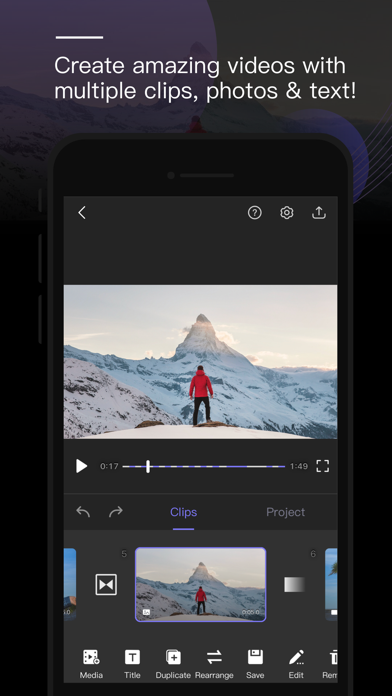
4) Combine: Merge multiple videos, photos or text into one video clip.
5) Split: With this feature, you can remove the middle part of the video, speed up/down part of the video.
6) Video to picture: Extract still images from video via Split feature.
7) Trim: Cut out any unwanted moments.
8) Slow Motion: Slow down or speed up video (0.25x-6x).
9) Crop & Mirror & Flip & Rotate and Angle adjustment .
10) Reverse: Reverse video playback.
11) Duplicate: Duplicate projects or create duplicates of video clips.
12) Animated Subtitles: Add animated text or images to videos.
13) Watermark: Display your own logo on video.
14) Volume: Mute the video or increase the video volume (0-500%).
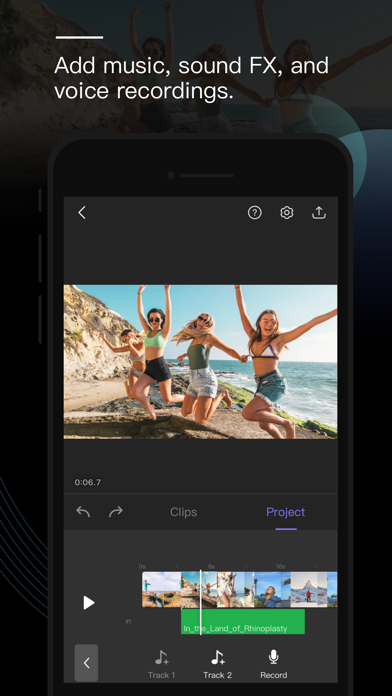
15) Music: Add multiple songs to a project. You can also choose a specific part of a song to include in your project by trimming it.
16) Sound Effects: Choose from many pre-defined sound effects.
17) Transitions: Select from a host of pre-defined video clip transitions.
18) Video Fade In/Out: Configure the fade-in and fade-out options in the Settings screen for the first and last shots.
19) Compress Video: Reduce video file size dramatically without reducing video resolution.
20) Save Storage Space: Perfect Video only saves the video location so imported videos don’t take up valuable storage space (just DON'T DELETE the original video you're editing).
21) High Resolution: Support for several formats, including 1920x1080HD, and support for up to 4K resolution on iPhone 6s, iPhone 6s Plus, iPad Air 2, iPad Pro and later.
22) Share: Save your video to your Camera Roll or share it on Instagram, Facebook, YouTube or via email.
23) Two Modes: UI supports both portrait and landscape modes.
24) Instant Actions: All actions are performed in an instant manner. No need to wait any more!
If you have a question or suggestion, please contact us. We’ll get right back to you. Thanks!
Email: [email protected]

- iPhone أو iPad بجيلبريك أو بدون جيلبريك.
- Sideloadly أو بدائلها.
- كمبيوتر يعمل بنظام Windows/macOS/Linux مع تثبيت iTunes.
الخطوة 1: قم بتنزيل ملف .IPA المعدّل مسبقًا من الرابط أعلاه إلى الكمبيوتر الخاص بك. للتنزيل من تطبيق iOSGods App، اطلع على دليل تنزيل IPA من تطبيق iOSGods App الذي يتضمن مثالًا بالفيديو.
الخطوة 2: قم بتنزيل Sideloadly وتثبيته على جهاز Windows أو Mac.
الخطوة 3: افتح Sideloadly على الكمبيوتر، ووصّل جهاز iOS الخاص بك، وانتظر حتى يظهر اسم جهازك داخل Sideloadly.
الخطوة 4: بمجرد التعرّف على جهاز iDevice الخاص بك، اسحب ملف .IPA المعدّل الذي قمت بتنزيله وأفلِته داخل تطبيق Sideloadly.
الخطوة 5: أدخل البريد الإلكتروني لحساب Apple Account الخاص بك، ثم اضغط على «Start». سيُطلب منك بعد ذلك إدخال كلمة المرور. تابع وأدخل المعلومات المطلوبة.
الخطوة 6: انتظر حتى ينتهي Sideloadly من تحميل/تثبيت ملف IPA المعدّل. في حال واجهت أي مشاكل أثناء التثبيت، يرجى قراءة الملاحظة أدناه.
الخطوة 7: بعد اكتمال التثبيت ورؤية التطبيق على الشاشة الرئيسية، انتقل إلى Settings → General → Profiles / VPN & Device Management. ثم اضغط على البريد الإلكتروني الذي أدخلته في الخطوة 6، ثم اضغط على «الوثوق بـ [email protected]».
الخطوة 8: الآن انتقل إلى الشاشة الرئيسية وافتح التطبيق الذي تم تثبيته للتو وسيعمل كل شيء بشكل صحيح. قد تحتاج إلى اتباع تعليمات إضافية خاصة بكل تطبيق داخل النافذة المنبثقة للتعديل أثناء اللعب.
ملاحظة: بدءًا من iOS/iPadOS 16 وما بعده، يجب تفعيل وضع المطور (Developer Mode). بالنسبة لحسابات Apple Developer المجانية، ستحتاج إلى تكرار هذه العملية كل 7 أيام. إذا كانت لديك أي أسئلة أو مشاكل، يرجى قراءة قسم الأسئلة الشائعة حول Sideloadly في الموضوع.