Потрібен вхід
Увійдіть у свій обліковий запис iOSGods, щоб продовжити.
Увійдіть у свій обліковий запис iOSGods, щоб продовжити.
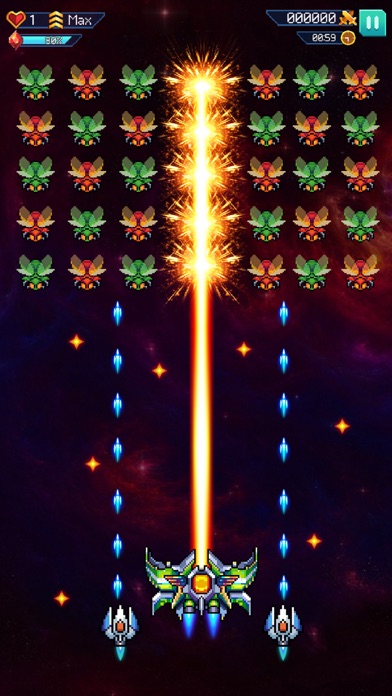
Розблокуйте преміум-винагороди та домінуйте в Galaxiga: Classic Arcade Game за допомогою цього потужного iOS злому. Насолоджуйтесь необмеженою енергією, розблокованими літаками та дронами, безкоштовними самоцвітами та легкими перемогами в PvP без ризику блокування.
- Premium Pass (тільки винагороди) → доступ до екслюзивних рівнів винагород
- Необмежена енергія (пов'язана з Premium Pass) → грайте без обмежень енергії
- Розблокований літак (рівень 1 рівень 2) → усі варіанти літаків доступні з початку
- Розблокований дрон (рівень 1 рівень 2) → усі варіанти дронів доступні з початку
- Розблокований камінь (рівень 1 рівень 2) → усі варіанти каменів доступні з початку
- Вартість розблокування самоцвітів 0 (літак дрон камінь) → розблокуйте літальні апарати та предмети безкоштовно
- Легке вбивство (тільки SP - без PVP) → миттєво перемагайте ворогів у одиночній грі
- Перемога в PvP вибір вищого рангу (літак дрон камінь) → гарантовані перемоги в PvP без ризику блокування
Цей застосунок також постачається з iGameGod, який надає доступ до Auto Touch для автоматизації повторюваних дій, App Speed Manager для регулювання швидкості гри, редагування значень за допомогою Memory Engine та інших потужних інструментів для iOS-ігор.
Завантажте Galaxiga: Classic Arcade Game Hack modded IPA за посиланнями вище. Натисніть кнопку встановлення та дотримуйтесь інструкцій, щоб встановити цей хак iOS на iPhone, iPad або Apple Silicon.
Потрібна додаткова допомога? Перегляньте наш Поширені запитання про застосунок iOSGods для детальних відповідей та порад з усунення несправностей.
Step into the thrilling world of Galaxiga: Classic Arcade Game, a modern arcade-style space shooter packed with action, upgrades, and endless excitement. Defend the galaxy from waves of alien invaders, unlock powerful starships, and become the ultimate space commander. Whether you enjoy classic arcade shooters or modern alien attack games, this adventure delivers the perfect mix of nostalgia and fast-paced action.
THE ULTIMATE SPACE BATTLE AWAITS
Dive into intense intergalactic battles filled with enemy formations, powerful bosses, and challenging missions. As the commander of the Galaxy Fleet, you will pilot advanced starships, dodge enemy fire, and unleash powerful attacks to protect the universe. Upgrade your weapons, strengthen your shields, and unlock new abilities to dominate the battlefield.
FEATURES
- Arcade-style space shooting with smooth controls and modern visual effects.
- Challenging mission levels with unique alien enemies and epic boss encounters.
- Customizable starships with upgrade options and ability enhancements.
- Seasonal events, special missions, and exclusive rewards.
- Multiplayer and co-op modes to compete or team up with other players.
- Global leaderboards to showcase your skills worldwide.
MASTER THE ART OF SPACE COMBAT
Sharpen your reflexes, develop your strategy, and push your limits as missions become more difficult. Only the most skilled pilots can survive the toughest alien waves.
NOSTALGIA MEETS INNOVATION
Galaxiga: Classic Arcade Game blends classic arcade-inspired gameplay with modern graphics, dynamic effects, and deep progression systems, offering an exciting experience for players of all ages.
COMPETE WITH THE GALAXY
Rise through the leaderboards, earn achievements, and prove your dominance across the universe.
DOWNLOAD NOW
Join the battle, unleash your starship’s power, and defend the galaxy in this action-packed arcade shooter. Download Galaxiga: Classic Arcade Game and start your intergalactic adventure.
Join us on Facebook:
https://www.facebook.com/galaxiga.game
Join our Community:
https://www.facebook.com/groups/GalaxigaGame/
*** Term of Use:
https://sites.google.com/view/onesoft/terms-and-condition
*** Privacy policy:
https://sites.google.com/view/onesoft/privacy-policy
- iPhone або iPad без джейлбрейку/у заводському стані або з джейлбрейком.
- Sideloadly або альтернативи.
- Комп'ютер під керуванням Windows/macOS/Linux із встановленим iTunes.
КРОК 1: Завантажте попередньо зламаний .IPA-файл за посиланням вище на свій комп'ютер. Щоб завантажити з iOSGods App, перегляньте наш Посібник із завантаження IPA в iOSGods App, який містить відеоприклад.
КРОК 2: Завантажте Sideloadly і встановіть його на своєму Windows або Mac.
КРОК 3: Відкрийте Sideloadly на комп'ютері, підключіть свій iOS-пристрій і зачекайте, поки назва пристрою з'явиться у Sideloadly.
КРОК 4: Коли ваш iDevice буде розпізнано, перетягніть завантажений модифікований .IPA-файл і відпустіть його в застосунок Sideloadly.
КРОК 5: Введіть електронну пошту вашого Apple Account, потім натисніть «Start». Після цього вас попросять ввести пароль. Введіть необхідні дані.
КРОК 6: Зачекайте, доки Sideloadly завершить sideload/встановлення зламаного IPA. Якщо під час встановлення виникнуть проблеми, прочитайте примітку нижче.
КРОК 7: Коли встановлення завершено й ви побачите застосунок на головному екрані, перейдіть до Налаштування → Загальні → Профілі / VPN і керування пристроєм. Там натисніть на електронну пошту, яку ви ввели на кроці 6, а потім натисніть «Довіряти [email protected]».
КРОК 8: Тепер перейдіть на головний екран і відкрийте щойно встановлений застосунок — усе має працювати належним чином. Можливо, доведеться виконати додаткові інструкції для конкретного застосунку в спливаючому вікні хака в грі.
ПРИМІТКА: У iOS/iPadOS 16 і пізніших версіях потрібно увімкнути режим розробника. Для безкоштовних облікових записів Apple Developer цей процес доведеться повторювати кожні 7 днів. Якщо у вас є запитання або проблеми, прочитайте наш розділ FAQ зі Sideloadly у темі.