로그인 필요
계속하려면 iOSGods 계정으로 로그인하세요.
계속하려면 iOSGods 계정으로 로그인하세요.
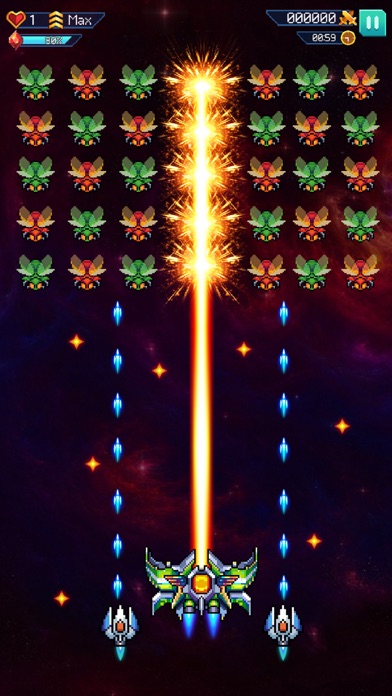
Galaxiga: Classic Arcade Game의 강력한 iOS 해킹 도구로 프리미엄 보상을 잠금 해제하고 게임을 지배하세요. 무제한 에너지, 잠금 해제된 비행기와 드론, 무료 젬, 그리고 밴 위험 없이 쉬운 PvP 승리를 즐기세요.
- Premium Pass (Rewards Only) → 독점 보상 티어에 접근
- Energy Unlimited (Linked Premium Pass) → 에너지 제한 없이 플레이
- Plane Unlocked (Tier 1 Tier 2) → 처음부터 모든 비행기 변형 사용 가능
- Drone Unlocked (Tier 1 Tier 2) → 처음부터 모든 드론 변형 사용 가능
- Stone Unlocked (Tier 1 Tier 2) → 처음부터 모든 돌 변형 사용 가능
- Unlock Gem Cost 0 (Plane Drone Stone) → 항공기 및 아이템 무료 잠금 해제
- Easy Kill (Only SP - No PVP) → 싱글플레이에서 적을 즉시 격파
- Win PvP Select Higher Rank (Plane Drone Stone) → 밴 위험 없이 PvP 승리 보장
이 앱에는 iGameGod도 포함되어 있어 반복 작업을 자동화하는 Auto Touch, 게임 속도를 조절할 수 있는 App Speed Manager, Memory Engine 값 편집 등 강력한 iOS 게임 도구를 사용할 수 있습니다.
위의 링크에서 Galaxiga: Classic Arcade Game Hack modded IPA을 다운로드합니다. 설치 버튼을 누르고 화면 안내에 따라 iPhone, iPad 또는 Apple Silicon에 이 iOS 앱 해킹을 설치합니다.
더 많은 도움이 필요하신가요? 자세한 답변과 문제 해결 팁은 iOSGods 앱 자주 묻는 질문을 확인하세요.
Willkommen in der actiongeladenen Welt von Galaxiga: Classic Arcade Game – dem modernen Space-Shooter, der klassische Arcade-Action mit schnellen, packenden Gefechten verbindet. Besiege Wellen von Alien-Angreifern, schalte mächtige Raumschiffe frei und werde zum ultimativen Kommandanten der Galaxie.
EIN EPISCHER KAMPF UM DIE GALAXIE
Stelle dich intensiven Weltraumschlachten, in denen dich feindliche Formationen und riesige Bossgegner erwarten. Steuere dein Schiff präzise, weiche tödlichem Beschuss aus und entfessle beeindruckende Feuerkraft, um die Invasion aufzuhalten. Rüste deine Waffen auf, verbessere deine Verteidigung und schalte neue Fähigkeiten frei, um jedes Gefecht zu dominieren.
HIGHLIGHTS
- Klassischer vertikaler Space-Shooter mit modernem Look und flüssigem Gameplay.
- Zahlreiche Level mit einzigartigen Alien-Gegnern und herausfordernden Bossfights.
- Mächtige Raumschiffe mit vielseitigen Upgrade- und Anpassungsoptionen.
- Zeitlimitierte Events, Spezialmissionen und wertvolle Belohnungen.
- PvP-Modus und Koop-Spiel, um Freunde herauszufordern oder gemeinsam gegen Alien-Bedrohungen anzutreten.
- Weltweite Bestenlisten, um dein Können unter Beweis zu stellen.
MEISTERE DIE KUNST DES SPACE-COMBAT
Reaktionsschnelligkeit und kluge Entscheidungen sind entscheidend. Mit jedem Level werden die Gegner stärker und aggressiver – nur die besten Piloten schaffen es bis zum Ende.
RETRO-FEELING TRIFFT MODERNE ACTION
Galaxiga: Classic Arcade Game vereint das nostalgische Arcade-Gefühl mit verbesserten Effekten, zeitgemäßer Grafik und einem tiefen Fortschrittssystem für Spieler jeden Alters.
EROBERE DIE SPITZE DER GALAXIE
Steige in den Ranglisten auf, verdiene Erfolge und zeige der Welt, dass du der stärkste Pilot im Universum bist.
JETZT STARTEN
Wage dich in den Kampf, steuere dein Raumschiff und verteidige das Universum. Lade Galaxiga: Classic Arcade Game jetzt herunter und beginne dein intergalaktisches Abenteuer!
BESUCHEN SIE UNS
Besuchen Sie uns auf Facebook:
https://www.facebook.com/galaxiga.game
Treten Sie der Gruppe bei, um schnell unsere Unterstützung zu erhalten:
https://www.facebook.com/groups/GalaxigaGame/
*** Nutzungsbedingungen:
https://sites.google.com/view/onesoft/terms-and-condition
*** Datenschutzrichtlinie:
https://sites.google.com/view/onesoft/privacy-policy
- 탈옥/제일 또는 탈옥된 iPhone 또는 iPad가 필요합니다.
- Sideloadly 또는 대체 도구가 필요합니다.
- iTunes가 설치된 Windows/macOS/Linux 컴퓨터가 필요합니다.
1단계: 위 링크에서 미리 해킹된 .IPA 파일을 컴퓨터에 다운로드합니다. iOSGods App에서 다운로드하려면 동영상 예시가 포함된 iOSGods App IPA 다운로드 튜토리얼를 참고하십시오.
2단계: Sideloadly를 다운로드하여 Windows 또는 Mac에 설치합니다.
3단계: 컴퓨터에서 Sideloadly를 실행하고 iOS 기기를 연결한 후, Sideloadly에 기기 이름이 표시될 때까지 기다립니다.
4단계: iDevice가 인식되면, 다운로드한 모드된 .IPA 파일을 Sideloadly 애플리케이션에 끌어다 놓습니다.
5단계: Apple Account 이메일을 입력한 후 “Start”를 누릅니다. 그러면 비밀번호를 입력하라는 메시지가 표시됩니다. 요청된 정보를 제공해 주십시오.
6단계: Sideloadly가 해킹된 IPA의 사이드로드/설치를 완료할 때까지 기다리십시오. 설치 중 문제가 발생하면 아래 참고 사항을 읽어 주십시오.
7단계: 설치가 완료되어 홈 화면에서 앱이 보이면 설정 → 일반 → 프로파일 / VPN 및 기기 관리 경로로 이동해야 합니다. 그곳에서 6단계에서 입력한 이메일을 탭한 다음 “[email protected] 신뢰”를 탭하십시오.
8단계: 이제 홈 화면으로 돌아가 새로 설치된 앱을 열면 모든 것이 정상적으로 작동할 것입니다. 게임 내 해킹 팝업에서 앱별 추가 안내를 따라야 할 수도 있습니다.
참고: iOS/iPadOS 16 이상에서는 개발자 모드를 활성화해야 합니다. 무료 Apple Developer 계정의 경우 이 과정을 7일마다 반복해야 합니다. 질문이나 문제가 있는 경우 해당 토픽의 Sideloadly FAQ 섹션를 읽어보십시오.