ต้องเข้าสู่ระบบ
เข้าสู่ระบบด้วยบัญชี iOSGods เพื่อดำเนินการต่อ
เข้าสู่ระบบด้วยบัญชี iOSGods เพื่อดำเนินการต่อ
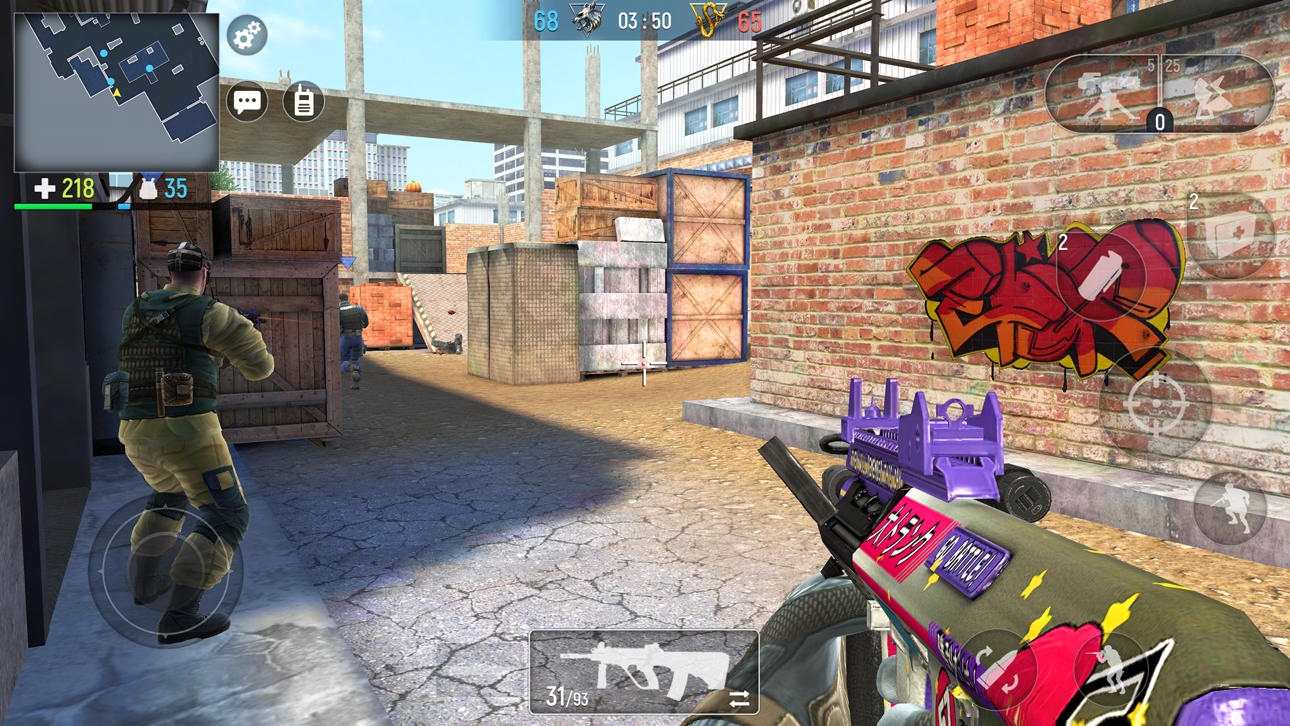
มองเห็นศัตรูทุกคนผ่านกำแพงใน Modern Ops ด้วย ESP (Extra Sensory Perception, wallhack) hack สำหรับ iOS ที่ให้ความตระหนักรู้สนามรบที่สมบูรณ์ในการต่อสู้แบบมัลติเพลเยอร์แบบเรียลไทม์ Mod IPA นี้เปิดเผยตำแหน่งของคู่ต่อสู้ได้ทันที ช่วยให้คุณเอาชนะและยิงปืนคู่ต่อสู้ได้ดีกว่าในการต่อสู้ทางยุทธศาสตร์ทุกครั้ง
- ESP / Wall Hack / มองเห็นศัตรูผ่านกำแพง → เปิดเผยตำแหน่งของคู่ต่อสู้ทั้งหมดแบบเรียลไทม์
ดาวน์โหลด Modern Ops: Online Gun FPS ESP Hack modded IPA จากลิงก์ด้านบน แตะปุ่มติดตั้งและทำตามคำแนะนำบนหน้าจอเพื่อติดตั้งแฮ็กแอป iOS นี้บน iPhone, iPad หรือ Apple Silicon
ต้องการความช่วยเหลือเพิ่มเติม? ดู คำถามที่พบบ่อยของแอป iOSGods สำหรับคำตอบโดยละเอียดและเคล็ดลับการแก้ไขปัญหา
Dynamic free multiplayer shooter with PvP battles in real time!
ACCEPT THE CHALLENGE
Clash with other players in exciting mobile FPS with never-ending action.
MAIN FEATURES
- More than 30 modern lethal guns and camos. Choose your own tactics for battle: pistols, snipers, shotgun, machine guns or rifles
- Join team battles against other players from all over the world on unique maps
- Create your own clan and enjoy team game 5vs5 in various locations playing in squad
- Compete in ranked seasons and get promoted to higher leagues among other heroes
- Use killstreaks such as drone strike, sentry gun and attack helicopter. Or even UAV, chopper gunner or rocket launcher
- Intuitive control and easy interface - swipe, aim and shoot
- Perfect optimization
- Regular updates and new game elements
EXCITING GAMEPLAY
Modern Ops: Black Squad is competitive free FPS game with easy and intuitive controls, vivid 3D graphics and exciting gameplay.
One team becomes Counter-Terrorists and attack other Terrorists team.
FREQUENT PROGRESS
Buy different ammo, guns and weapons, upgrade it, change the look of your weapon skins.
Make a progress to be pro in our mobile shooting game.
ภาพหน้าจอ © เจ้าของแต่ละราย · App Store


iOSGods ไม่มีความเกี่ยวข้อง ไม่ได้รับการรับรอง และไม่ได้รับการสนับสนุนจาก Apple Inc., Google LLC หรือผู้พัฒนาแอปที่แสดงไว้ที่นี่ Apple, iOS และ App Store เป็นเครื่องหมายการค้าของ Apple Inc. Android และ Google Play เป็นเครื่องหมายการค้าของ Google LLC ชื่อแอป ไอคอน ภาพ และเครื่องหมายการค้าอื่นทั้งหมดเป็นทรัพย์สินของเจ้าของแต่ละราย
- iPhone หรือ iPad ที่ไม่ได้เจลเบรก/ไม่ได้เจลเบรก หรือเจลเบรกแล้ว
- Sideloadly หรือทางเลือกอื่น
- คอมพิวเตอร์ที่ใช้ Windows/macOS/Linux และติดตั้ง iTunes ไว้
ขั้นตอนที่ 1: ดาวน์โหลดไฟล์ .IPA ที่แฮกไว้ล่วงหน้าจากลิงก์ด้านบนลงในคอมพิวเตอร์ของคุณ หากต้องการดาวน์โหลดจากแอป iOSGods โปรดดู วิธีดาวน์โหลด IPA ในแอป iOSGods ซึ่งมีตัวอย่างวิดีโอประกอบ
ขั้นตอนที่ 2: ดาวน์โหลด Sideloadly แล้วติดตั้งบน Windows หรือ Mac ของคุณ
ขั้นตอนที่ 3: เปิด Sideloadly บนคอมพิวเตอร์ เชื่อมต่ออุปกรณ์ iOS แล้วรอจนกว่าชื่ออุปกรณ์ของคุณจะปรากฏใน Sideloadly
ขั้นตอนที่ 4: เมื่อ iDevice ของคุณถูกตรวจพบแล้ว ให้ลากไฟล์ .IPA ที่ม็อดมาวางลงในโปรแกรม Sideloadly
ขั้นตอนที่ 5: กรอกอีเมล Apple Account ของคุณ จากนั้นกด "Start" ระบบจะถามรหัสผ่าน กรอกข้อมูลที่จำเป็นให้เรียบร้อย
ขั้นตอนที่ 6: รอจนกว่า Sideloadly จะ sideload/ติดตั้งไฟล์ IPA ที่แฮกเสร็จ หากเกิดปัญหาระหว่างติดตั้ง โปรดอ่านหมายเหตุด้านล่าง
ขั้นตอนที่ 7: เมื่อการติดตั้งเสร็จสิ้นและเห็นแอปบนหน้าจอหลักแล้ว ให้ไปที่ การตั้งค่า → ทั่วไป → โปรไฟล์ / VPN และการจัดการอุปกรณ์ จากนั้นแตะที่อีเมลที่คุณกรอกในขั้นตอนที่ 6 แล้วแตะ "เชื่อถือ [email protected]"
ขั้นตอนที่ 8: จากนั้นไปที่หน้าจอหลักและเปิดแอปที่ติดตั้งใหม่ ทุกอย่างควรทำงานได้ปกติ คุณอาจต้องทำตามคำแนะนำเพิ่มเติมเฉพาะแอปในป๊อปอัปของม็อดในเกม
หมายเหตุ: สำหรับ iOS/iPadOS 16 ขึ้นไป คุณต้อง เปิดโหมดนักพัฒนา (Developer Mode) สำหรับบัญชี Apple Developer แบบฟรี คุณต้องทำขั้นตอนนี้ซ้ำทุก 7 วัน หากมีคำถามหรือพบปัญหา โปรดอ่าน หัวข้อ FAQ ของ Sideloadly ในกระทู้
Hack Features:
- Inf Coins (Spend)
App Installation Instructions:
---------------------------------------------------------
----------------------------------------------------------
If you require more information or help, please read our Frequently Asked Questions topic on iOSGods.com.
----------------------------------------------------------
--------------------------------------------------




![World War Legion: WW2 FPS PvP iOS Mod IPA [ ESP Boxes, Lines ]](https://is1-ssl.mzstatic.com/image/thumb/Purple221/v4/d6/ab/0c/d6ab0cb8-97a6-7ecf-aee3-59cd96f3a3c7/AppIcon-0-0-1x_U007emarketing-0-8-0-85-220.png/100x100bb.jpg)

![Bullet Force Hack [Aimbot - ESP]](https://is1-ssl.mzstatic.com/image/thumb/Purple211/v4/82/5d/fd/825dfd87-af42-29da-eb4d-914790d7ed7b/AppIcon-0-0-1x_U007emarketing-0-8-0-85-220.png/100x100bb.jpg)


![MaskGun - Online shooting game Hack [ESP]](https://is1-ssl.mzstatic.com/image/thumb/Purple211/v4/a7/1e/0f/a71e0fd1-261c-840a-eead-39def6b9cefd/AppIcon-0-0-1x_U007emarketing-0-8-0-85-220.png/100x100bb.jpg)


![POLYWAR: 3D FPS online shooter Hack [Wall Hack ESP]](https://is1-ssl.mzstatic.com/image/thumb/Purple221/v4/94/ed/61/94ed61b9-88c7-2f58-2467-6d5e42e90c35/AppIcon-0-0-1x_U007emarketing-0-8-0-85-220.png/100x100bb.jpg)


