Inloggen vereist
Log in met je iOSGods-account om door te gaan.
Hack Features
- ADS NO / Rewards Free
- Super Card Active
- Normal Card Active
- Currency / NO Need
- Resources / NO Need
- DMG / When Opp Turn OFF
Download Fitness RPG: Hero health game Hack modded IPA via de bovenstaande links. Tik op de installatieknop en volg de instructies om deze iOS-app-hack op je iPhone, iPad of Apple Silicon te installeren.
Meer hulp nodig? Bekijk onze Veelgestelde vragen over de iOSGods-app voor uitgebreide antwoorden en probleemoplossingstips.
PEDOMETER + RPG!
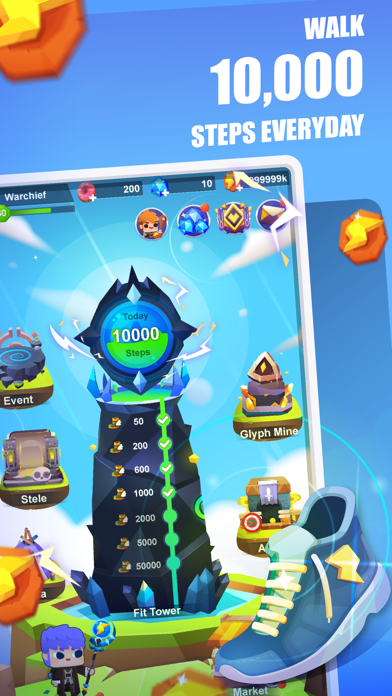
Train your team of heroes as you exercise, the more activities the stronger your heroes become! Let’s take on the challenges, and embark on the journey of becoming the new best you!
It has been 12 years since the Dark Force Took over Fitland. Villagers await the savior to return. Will you be the one to lead a team of heroes, defeat enemies and save them all?
KEY FEATURES:
* Fitness RPG - Convert your steps into free energy and use them to level up heroes
* Sync steps - Uses steps from your phone or sync steps from your Fitbit
* Battlegrounds - Explore the Fitland map, fight monsters and save the kingdom
* Team of heroes - Collect and train different heroes, form your ace team
* Precious equipment and skins - Collect, upgrade precious weapons to make your team stronger
* Arena - Compete with other players and fight your way to the top
Please Note: Fitness RPG is a free-to-play game, but some extra game items can be purchased for real money. You can disable in-app purchases in your device's settings.
HEALTHKIT:
Fitness RPG is also an Apple Watch game: it uses HealthKit to read your steps from Apple Watch. Make sure to grant all permissions when asked to authorize with the Health App to make it work.
SUBSCRIPTION PRICING AND TERMS:
SuperPass offers USD $6.99 monthly subscription after 3-day free trial for accessing exclusive resources and premium features.
End of trial and subscription renewal:
This price is for United States customers. Pricing in other countries may vary and actual charges may be converted to your local currency depending on the country of residence.
Payment will be charged to iTunes Account at confirmation of purchase.
Subscription automatically renews unless auto-renew is turned off at least 24-hours before the end of the current period.
Account will be charged for renewal within 24-hours prior to the end of the current period, and identify the cost of the renewal.
Subscriptions may be managed by the user and auto-renewal may be turned off by going to the user’s Account Settings after purchase.
Any unused portion of a free trial period, if offered, will be forfeited when the user purchases a subscription to that publication, where applicable.
Privacy policy: https://site.shikudo.com/privacy-policy
Terms of use: https://site.shikudo.com/terms-of-use
- Niet-jailbroken/jailed of jailbroken iPhone of iPad.
- Sideloadly of alternatieven.
- Computer met Windows/macOS/Linux en iTunes geïnstalleerd.
STAP 1: Download het vooraf gehackte .IPA-bestand via de link hierboven naar uw computer. Om het te downloaden vanuit de iOSGods App, bekijk onze iOSGods App IPA-downloadhandleiding met een videovoorbeeld.
STAP 2: Download Sideloadly en installeer het op uw Windows of Mac.
STAP 3: Open Sideloadly op uw computer, sluit uw iOS-apparaat aan en wacht tot de naam van uw apparaat in Sideloadly verschijnt.
STAP 4: Zodra uw iDevice is herkend, sleept u het gedownloade gemodde .IPA-bestand naar de Sideloadly-applicatie.
STAP 5: Voer het e-mailadres van uw Apple Account in en druk op “Start”. U wordt vervolgens gevraagd om uw wachtwoord in te voeren. Geef de gevraagde informatie op.
STAP 6: Wacht tot Sideloadly het sideloaden/installeren van de gehackte IPA heeft voltooid. Als er problemen zijn tijdens de installatie, lees dan onderstaande opmerking.
STAP 7: Zodra de installatie is voltooid en u de app op uw beginscherm ziet, gaat u naar Instellingen → Algemeen → Profielen / VPN- en apparaatbeheer. Tik daar op het e-mailadres dat u in stap 6 hebt ingevoerd en tik vervolgens op “Vertrouw [email protected]”.
STAP 8: Ga nu naar uw beginscherm en open de zojuist geïnstalleerde app; alles zou correct moeten werken. Mogelijk moet u verdere app-specifieke instructies volgen in de hack-popup in het spel.
OPMERKING: Op iOS/iPadOS 16 en later moet u Ontwikkelaarsmodus inschakelen. Voor gratis Apple Developer-accounts moet u dit proces elke 7 dagen herhalen. Als u vragen of problemen hebt, lees dan onze Sideloadly FAQ-sectie van het onderwerp.