Login Diperlukan
Masuk dengan akun iOSGods kamu untuk melanjutkan.
Masuk dengan akun iOSGods kamu untuk melanjutkan.
Buka alat pengeditan premium di Airbrush: Face Photo Editor dengan Mod IPA gratis ini, memberikan Anda akses instan ke semua fitur retouching canggih tanpa membayar. Tingkatkan potret Anda dengan penghapusan noda bertenaga AI, penghalusan kulit, dan filter tingkat profesional yang dirancang untuk menyempurnakan setiap selfie.
- PREMIUM → semua alat pengeditan canggih dibuka
Aplikasi ini juga dilengkapi dengan iGameGod, yang memberi Anda akses ke Auto Touch untuk mengotomatiskan tugas berulang, App Speed Manager untuk mengatur kecepatan permainan, pengeditan nilai Memory Engine, dan alat permainan iOS lainnya yang lebih canggih.
Unduh Airbrush: Face Photo Editor iOS Mod IPA dari tautan di atas. Ketuk tombol pasang dan ikuti petunjuk di layar untuk memasang hack iOS ini di iPhone, iPad, atau Apple Silicon.
Butuh bantuan lebih lanjut? Lihat Pertanyaan yang Sering Diajukan untuk Aplikasi iOSGods kami untuk jawaban dan tips lengkap.
Master Your Selfie Game with Airbrush – The Ultimate Photo and Video Editor! With our easy-to-use features, you can master your selfie and photo with tools designed to enhance your natural beauty while maintaining authentic charm.
MASTERFUL PORTRAITS WITH A TAP
• AI Retouch: Unleash the power of artificial intelligence as you elevate your portraits, fine-tuning every detail to perfection.
• Blemish Removal: Say goodbye to acne and blemishes with precision editing that leaves your skin peachy and spotless.
• Smooth: Soften wrinkles and balance skin tones for a youthful glow.
• Highlighter: Illuminate your best features by adding texture or highlighter to make them pop.
• Eye Enhancer: Overcome red eyes, erase dark circles, or experiment with vibrant eye colors for a captivating look.
• Teeth: Flaunt a brighter smile and whiten clothing to keep your style looking immaculate.
• Makeup: From eyebrows to lipstick, apply makeup with virtual tools that rival any beauty editor's kit.
• Hair: Add depth to your hair, explore new hair colors, or simply darken your tresses for dramatic effect.
UNLOCK YOUR CREATIVITY
• Background: Blur distractions or swap backgrounds seamlessly.
• Photo Cleaner: Utilize the Eraser or Stamp to remove unwanted objects and clutter from your shots.
• AI-Powered Adjustments: Tweak photo temperature, saturation, and more, letting AI optimize your image balance.
• Filter & Effects: Dare to be different using filters and effects that push the boundaries of creativity.
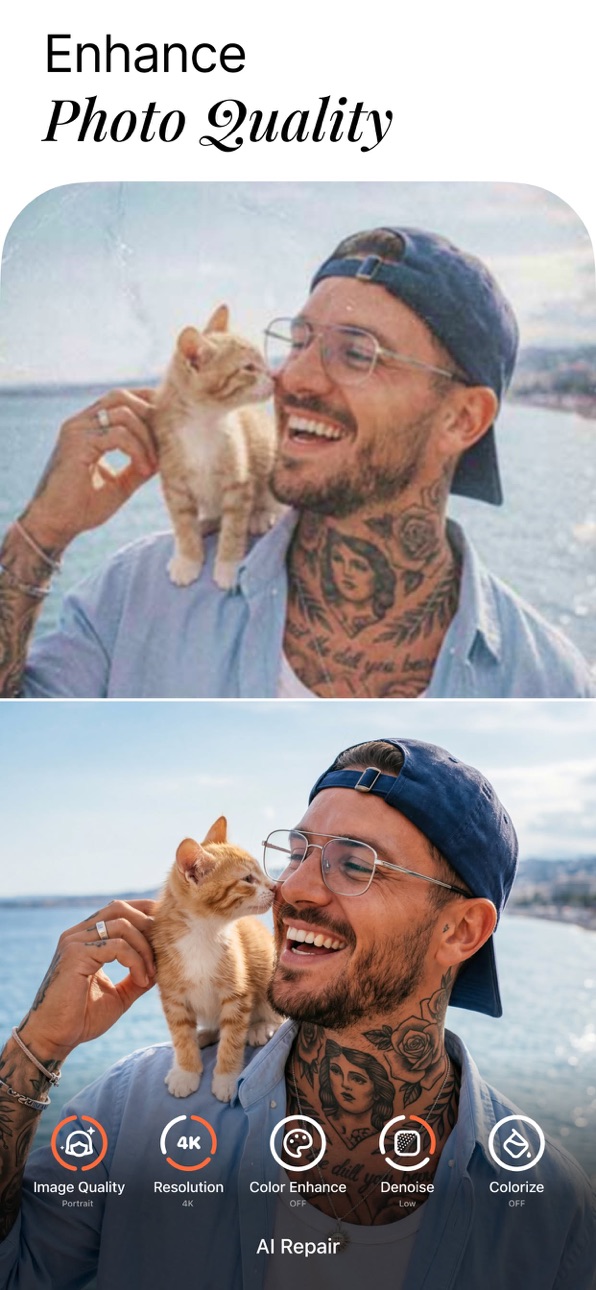
• AI Repair: Enhance lower quality photos effortlessly, breathing new life into every pixel.
SELFIE VIDEO PERFECTION
• Face Retouch: Apply our renowned face retouching to your videos.
• Object Removal: Clear up your scenes by removing distractions.
• Quality Enhancement: Upgrade the clarity of your videos, making every moment crisp and memorable.
HAVE FUN WITH AI
• Mood Swapper: Change your expressions in seconds – when your smile says it all.
• Style Explorer: See yourself in different styles, discovering portrait variations that showcase your versatility.
• Pro Headshots: Generate professional headshots instantly, skipping the studio without compromising on quality.
Join millions who trust Airbrush to edit their photos and selfie videos with ease, speed, and incredible results. Whether it's for a quick touch-up or a complete digital makeover, Airbrush stands out among apps like Facetune, delivering unparalleled precision and simplicity. Get ready to express yourself, capture every moment, and share your world with confidence.
Download Airbrush now and start creating photos and video selfies that reflect the true beauty of your moments.
DISCOVER EDITING TIPS ON SOCIAL MEDIA!
- Instagram: instagram.com/AirbrushOfficial
- TikTok: https://www.tiktok.com/@airbrushofficial
- Facebook: facebook.com/airbrushappofficial
- Twitter: twitter.com/AirbrushApp
Airbrush Premium
With Airbrush Premium, you get everything with unlimited access to our full suite of advanced retouching tools, cutting-edge AI tools, filters and more.
Start your subscription with a free trial - limited to one per Apple account. Once the trial is over, you’ll be charged a nominal subscription fee. Your subscription will automatically renew unless auto-renew is turned off at least 24 hours before the end of the current period. If your subscription is subject to any promotional discount, the discount will expire upon the end of the current period & you’ll be charged the standard rate upon renewal. Go to your Apple account to manage your membership & to turn auto-renew off. Your Apple account will be charged when the purchase is confirmed.
---
Tangkapan layar © pemiliknya masing-masing · App Store


iOSGods tidak berafiliasi, tidak didukung, dan tidak disponsori oleh Apple Inc., Google LLC, maupun pengembang aplikasi yang terdaftar di sini. Apple, iOS, dan App Store adalah merek dagang Apple Inc. Android dan Google Play adalah merek dagang Google LLC. Semua nama aplikasi, ikon, gambar, dan merek dagang lainnya adalah milik pemiliknya masing-masing.

- iPhone atau iPad tanpa Jailbreak atau dengan Jailbreak.
- Sideloadly atau alternatifnya.
- Komputer dengan Windows/macOS/Linux dan iTunes terpasang.
LANGKAH 1: Unduh file .IPA yang sudah di-hack dari tautan di atas ke komputer Anda. Untuk mengunduhnya dari iOSGods App, silakan lihat Tutorial Mengunduh IPA dari iOSGods App kami yang dilengkapi contoh video.
LANGKAH 2: Unduh Sideloadly dan pasang di Windows atau Mac Anda.
LANGKAH 3: Buka Sideloadly di komputer Anda, sambungkan perangkat iOS Anda, dan tunggu hingga nama perangkat Anda muncul di Sideloadly.
LANGKAH 4: Setelah iDevice Anda terdeteksi, seret file .IPA yang sudah dimodifikasi dan lepaskan ke dalam aplikasi Sideloadly.
LANGKAH 5: Masukkan email Apple Account Anda, lalu tekan "Start". Anda kemudian akan diminta memasukkan kata sandi. Silakan isi informasi yang diminta.
LANGKAH 6: Tunggu hingga Sideloadly selesai melakukan sideloading/pemasangan IPA yang di-hack. Jika terjadi masalah saat pemasangan, silakan baca catatan di bawah ini.
LANGKAH 7: Setelah pemasangan selesai dan Anda melihat aplikasi di Layar Beranda, Anda perlu masuk ke Pengaturan → Umum → Profil / VPN & Manajemen Perangkat. Setelah itu, ketuk email yang Anda masukkan pada langkah 6, lalu ketuk "Percayai [email protected]".
LANGKAH 8: Sekarang buka Layar Beranda dan jalankan aplikasi yang baru saja dipasang; semuanya seharusnya berjalan normal. Anda mungkin perlu mengikuti petunjuk tambahan per aplikasi yang muncul di popup hack di dalam game.
CATATAN: Pada iOS/iPadOS 16 dan yang lebih baru, Anda harus mengaktifkan Mode Pengembang. Untuk akun Apple Developer gratis, Anda perlu mengulangi proses ini setiap 7 hari. Jika Anda memiliki pertanyaan atau masalah, silakan baca bagian FAQ Sideloadly di topik tersebut kami.
Game Name iOS Mod IPA is an action adventure game enhanced with powerful gameplay boosts and quality-of-life improvements. Win battles faster, earn rewards quicker, and enjoy uninterrupted play without ads.
- Unlimited Gold - spend freely to unlock premium content
- Damage Multiplier - deal significantly more damage in combat
- Defense Multiplier - take less damage and survive longer
- Reward Multiplier - earn more loot from every battle
- Max Level - instantly reach the highest player rank
- No Ads - play without interruptions or advertisements
This app also comes with iGameGod, giving you access to Auto Touch to automate repetitive tasks, App Speed Manager for adjustable gameplay speed, Memory Engine value editing, and more powerful iOS game tools.
Unduh Game Name Mod IPA dari tautan di atas. Ketuk tombol pasang dan ikuti petunjuk di layar untuk memasang hack iOS ini di iPhone, iPad, atau Apple Silicon.
Butuh bantuan lebih lanjut Lihat Pertanyaan yang Sering Diajukan untuk Aplikasi iOSGods kami untuk jawaban dan tips lengkap.
----------------------------------------------------------
--------------------------------------------------