ต้องเข้าสู่ระบบ
เข้าสู่ระบบด้วยบัญชี iOSGods เพื่อดำเนินการต่อ
เข้าสู่ระบบด้วยบัญชี iOSGods เพื่อดำเนินการต่อ
บัญชาการ Cloud และพันธมิตรของเขาผ่านโลกอัน辽广ของ Midgar ใน FINAL FANTASY VII FREE Hack ซึ่งเป็น RPG ตำนานที่พร้อมใช้งานฟรีบน iOS พร้อมกับเคล็ดลับที่เปลี่ยนแปลงเกมซึ่งช่วยให้คุณเลเวลอัพได้เร็วขึ้นและต่อสู้อย่างชาญฉลาด
ด้วยรางวัล Gil และ AP มหาศาลหลังจากการต่อสู้ทุกครั้ง materia ทันที และการรักษาแบบอัตโนมัติในเมนู คุณสามารถมุ่งเน้นไปที่เรื่องราวและกลยุทธ์แทนการ grind ซึ่งเหมาะสำหรับผู้เล่นที่ต้องการสัมผัสการผจญภัยคลาสสิกนี้โดยไม่ต้องใช้เวลามากมาย
- รางวัล Gil มหาศาลหลังการต่อสู้ → หารายได้สกุลเงินอย่างรวดเร็ว
- รางวัล AP มหาศาลหลังการต่อสู้ (master materia ทันที) → เลเวลอัพความสามารถได้ทันที
- HP รีเซ็ตหลังการต่อสู้ → พร้อมสำหรับการต่อสู้ครั้งต่อไป
- MP รีเซ็ตหลังการต่อสู้ → ใช้คาถาโดยไม่ต้องกังวล
- การรักษาในเมนูไม่ใช้ MP → ฟื้นฟูสุขภาพได้อย่างอิสระ
สร้างโดย Sterling0x1!
แอปนี้ยังมาพร้อมกับ iGameGod ซึ่งช่วยให้คุณเข้าถึง Auto Touch สำหรับการทำงานซ้ำ ๆ โดยอัตโนมัติ, App Speed Manager สำหรับปรับความเร็วของเกม, การแก้ไขค่าด้วย Memory Engine และเครื่องมือสำหรับเกม iOS ที่ทรงพลังอื่น ๆ อีกมากมาย
ดาวน์โหลด FINAL FANTASY VII FREE Hack modded IPA จากลิงก์ด้านบน แตะปุ่มติดตั้งและทำตามคำแนะนำบนหน้าจอเพื่อติดตั้งแฮ็กแอป iOS นี้บน iPhone, iPad หรือ Apple Silicon
ต้องการความช่วยเหลือเพิ่มเติม? ดู คำถามที่พบบ่อยของแอป iOSGods สำหรับคำตอบโดยละเอียดและเคล็ดลับการแก้ไขปัญหา
------------------------------------------------------
- As this application is very large, it will take some time to download.
- This application takes up around 2GB of memory. Over 4GB of free space is required to download it, so make sure that ample spare memory is available before attempting to do so.
------------------------------------------------------
Recommended hardware:
iPhone 7 or later, 5th generation iPad or later, iPad mini 4 or later
Supported OS:
iOS 15.0 or later
*Please be aware that users may experience problems, such as exceptionally slow running speeds, if running this application on devices other than those outlined in the recommended hardware section. Such devices are not suited to playing this game and there is a chance of unforeseen errors occurring if running it on them.
Outline
The smash hit RPG: Final Fantasy VII, which has sold over 11,000,000 units* worldwide, finally arrives on iOS!
*Total includes both packaged sales and downloads.
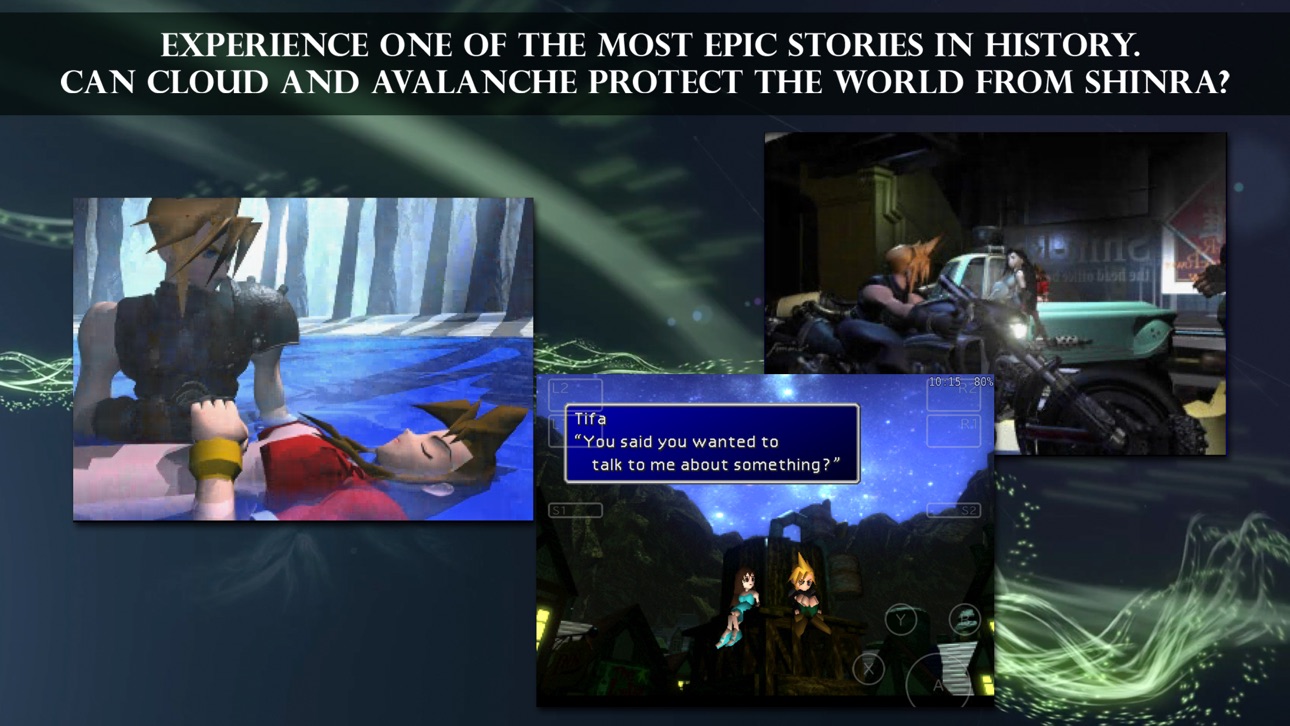
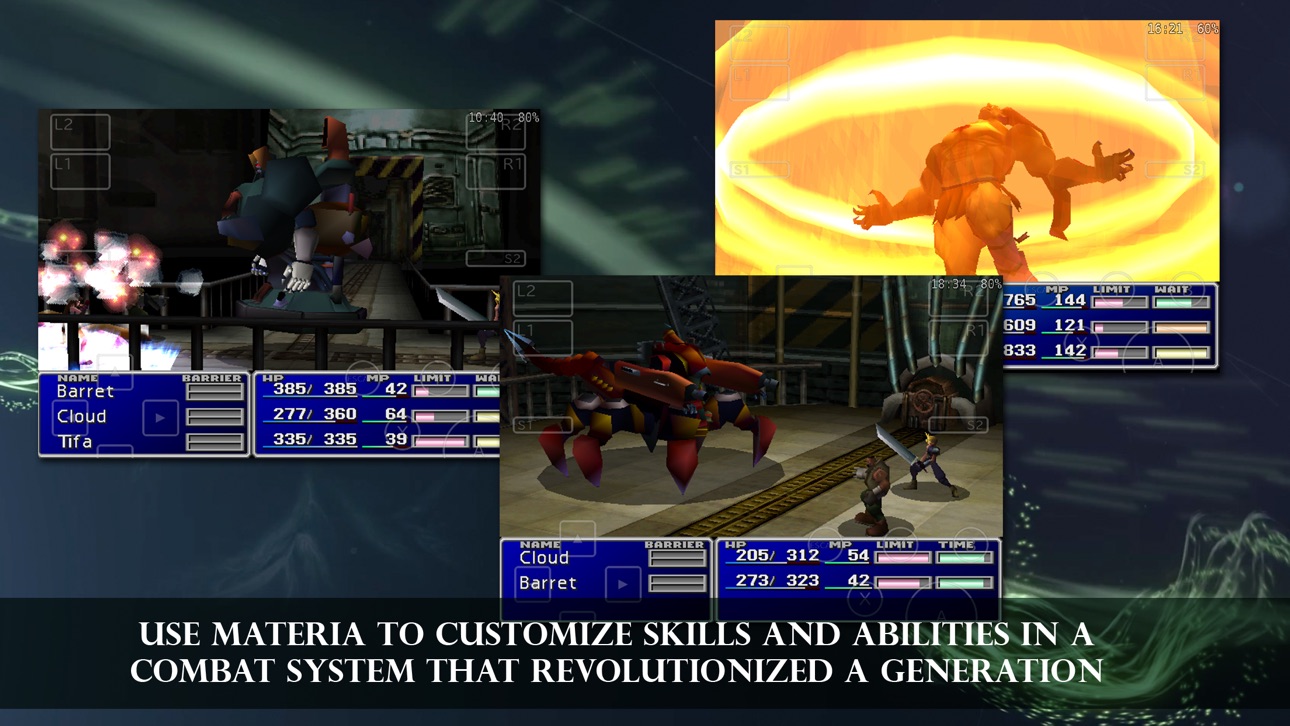
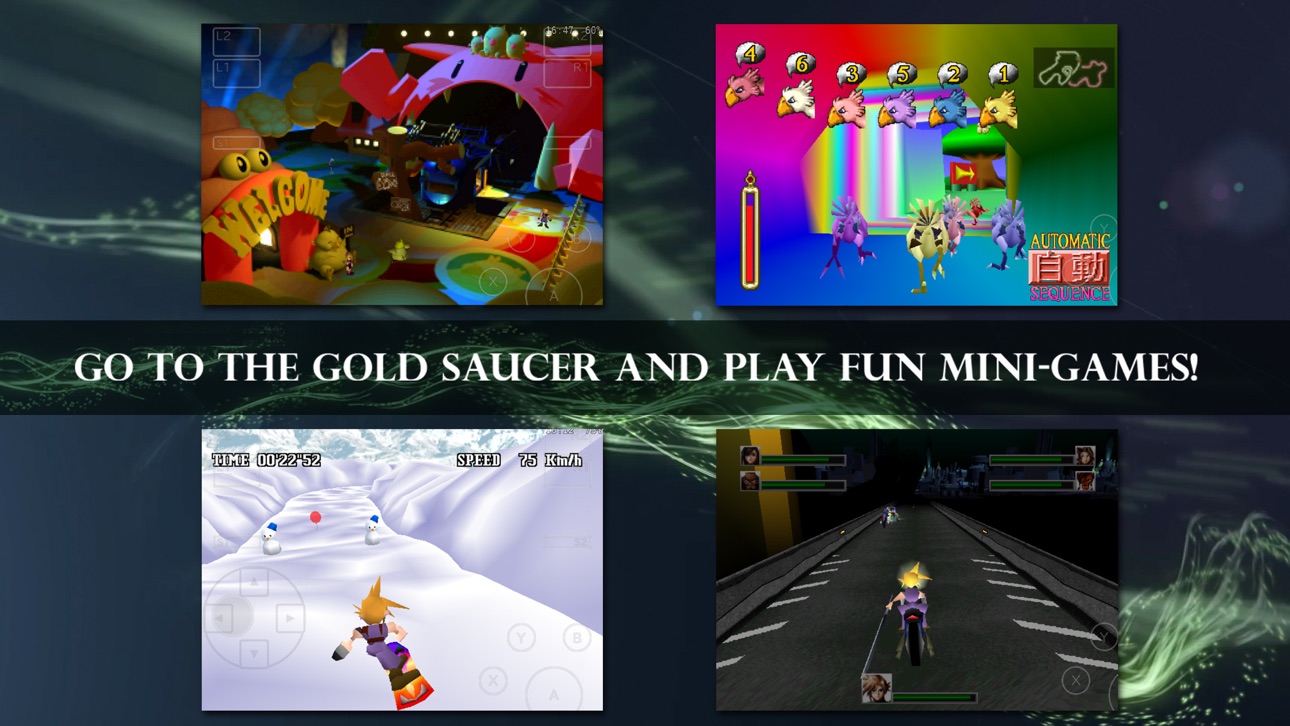
The first Final Fantasy to feature 3D backgrounds and CG movie scenes, this dramatic tale continues to be loved by numerous fans around the world. Battle stages also appear in full 3D for the first time, bringing an even greater sense of awe and spectacle to combat!
Customize your characters in any way you like using the fantastic “material” system that allows endless combinations of spells and abilities.
This product is a port based on Final Fantasy VII for PC (No changes or additions have been made to the story).
Story
With its unshakeable monopoly over Mako energy production, the evil Shinra Electric Power Company holds tight to the reigns of world power.
One day, a Mako reactor serving the sprawling metropolis of Midgar is attacked and destroyed in a bombing raid by a revolutionary group calling themselves Avalanche.
Cloud Strife, a former member of Shinra’s elite “Soldier” unit takes part in the raid as a mercenary hired by Avalanche and sets events in motion that will draw him and his friends into an epic struggle for the fate of the planet itself…
Special features for the iOS edition
- Play using a simple and comfortable virtual controller designed not to obscure the action, choosing between virtual analogue or fixed 4-way digital control pad options. The opacity of on-screen controls can also be adjusted from the Config Menu.
- Two new features to make play easier and more convenient!
The iOS edition also includes an option to turn enemy encounters off on the world and area maps (will not skip event battles) and a Max Stats command to become all-powerful in the blink of an eye.
Major game controls
Movement: Virtual joypad (Select between analogue and digital modes)
Menu navigation: Fixed digital buttons
Confirm: A button
Cancel: B button
Open menu: Y button
ภาพหน้าจอ © เจ้าของแต่ละราย · App Store


iOSGods ไม่มีความเกี่ยวข้อง ไม่ได้รับการรับรอง และไม่ได้รับการสนับสนุนจาก Apple Inc., Google LLC หรือผู้พัฒนาแอปที่แสดงไว้ที่นี่ Apple, iOS และ App Store เป็นเครื่องหมายการค้าของ Apple Inc. Android และ Google Play เป็นเครื่องหมายการค้าของ Google LLC ชื่อแอป ไอคอน ภาพ และเครื่องหมายการค้าอื่นทั้งหมดเป็นทรัพย์สินของเจ้าของแต่ละราย
- iPhone หรือ iPad ที่ไม่ได้เจลเบรก/ไม่ได้เจลเบรก หรือเจลเบรกแล้ว
- Sideloadly หรือทางเลือกอื่น
- คอมพิวเตอร์ที่ใช้ Windows/macOS/Linux และติดตั้ง iTunes ไว้
ขั้นตอนที่ 1: ดาวน์โหลดไฟล์ .IPA ที่แฮกไว้ล่วงหน้าจากลิงก์ด้านบนลงในคอมพิวเตอร์ของคุณ หากต้องการดาวน์โหลดจากแอป iOSGods โปรดดู วิธีดาวน์โหลด IPA ในแอป iOSGods ซึ่งมีตัวอย่างวิดีโอประกอบ
ขั้นตอนที่ 2: ดาวน์โหลด Sideloadly แล้วติดตั้งบน Windows หรือ Mac ของคุณ
ขั้นตอนที่ 3: เปิด Sideloadly บนคอมพิวเตอร์ เชื่อมต่ออุปกรณ์ iOS แล้วรอจนกว่าชื่ออุปกรณ์ของคุณจะปรากฏใน Sideloadly
ขั้นตอนที่ 4: เมื่อ iDevice ของคุณถูกตรวจพบแล้ว ให้ลากไฟล์ .IPA ที่ม็อดมาวางลงในโปรแกรม Sideloadly
ขั้นตอนที่ 5: กรอกอีเมล Apple Account ของคุณ จากนั้นกด "Start" ระบบจะถามรหัสผ่าน กรอกข้อมูลที่จำเป็นให้เรียบร้อย
ขั้นตอนที่ 6: รอจนกว่า Sideloadly จะ sideload/ติดตั้งไฟล์ IPA ที่แฮกเสร็จ หากเกิดปัญหาระหว่างติดตั้ง โปรดอ่านหมายเหตุด้านล่าง
ขั้นตอนที่ 7: เมื่อการติดตั้งเสร็จสิ้นและเห็นแอปบนหน้าจอหลักแล้ว ให้ไปที่ การตั้งค่า → ทั่วไป → โปรไฟล์ / VPN และการจัดการอุปกรณ์ จากนั้นแตะที่อีเมลที่คุณกรอกในขั้นตอนที่ 6 แล้วแตะ "เชื่อถือ [email protected]"
ขั้นตอนที่ 8: จากนั้นไปที่หน้าจอหลักและเปิดแอปที่ติดตั้งใหม่ ทุกอย่างควรทำงานได้ปกติ คุณอาจต้องทำตามคำแนะนำเพิ่มเติมเฉพาะแอปในป๊อปอัปของม็อดในเกม
หมายเหตุ: สำหรับ iOS/iPadOS 16 ขึ้นไป คุณต้อง เปิดโหมดนักพัฒนา (Developer Mode) สำหรับบัญชี Apple Developer แบบฟรี คุณต้องทำขั้นตอนนี้ซ้ำทุก 7 วัน หากมีคำถามหรือพบปัญหา โปรดอ่าน หัวข้อ FAQ ของ Sideloadly ในกระทู้
Game Name iOS Mod IPA is an action adventure game enhanced with powerful gameplay boosts and quality-of-life improvements. Win battles faster, earn rewards quicker, and enjoy uninterrupted play without ads.
- Unlimited Gold - spend freely to unlock premium content
- Damage Multiplier - deal significantly more damage in combat
- Defense Multiplier - take less damage and survive longer
- Reward Multiplier - earn more loot from every battle
- Max Level - instantly reach the highest player rank
- No Ads - play without interruptions or advertisements
This app also comes with iGameGod, giving you access to Auto Touch to automate repetitive tasks, App Speed Manager for adjustable gameplay speed, Memory Engine value editing, and more powerful iOS game tools.
ดาวน์โหลด Game Name Mod IPA จากลิงก์ด้านบน แตะปุ่มติดตั้งและทำตามคำแนะนำบนหน้าจอเพื่อติดตั้งแฮ็กแอป iOS นี้บน iPhone, iPad หรือ Apple Silicon
ต้องการความช่วยเหลือเพิ่มเติม ดู คำถามที่พบบ่อยของแอป iOSGods สำหรับคำตอบโดยละเอียดและเคล็ดลับการแก้ไขปัญหา
----------------------------------------------------------
--------------------------------------------------