تسجيل الدخول مطلوب
سجّل الدخول بحساب iOSGods للمتابعة.
سجّل الدخول بحساب iOSGods للمتابعة.
يوفر هذا التهكير لمحاكي القيادة Driving Academy 2: Car School عملة داخل اللعبة غير محدودة لفتح السيارات والترقيات دون الحاجة للعب المتكرر. أتقن مهارات القيادة والركن باستخدام كل سيارة وخيار تخصيص متاح، وركز على تحسين أسلوبك بدلاً من كسب المال.
- عملات لا نهائية → أنفق بحرية على السيارات والترقيات
يأتي هذا التطبيق أيضًا مع iGameGod، مما يتيح لك الوصول إلى Auto Touch لأتمتة المهام المتكررة، وApp Speed Manager لضبط سرعة اللعب، وتعديل القيم عبر Memory Engine، والمزيد من أدوات ألعاب iOS القوية.
قم بتنزيل Driving Academy 2: Car School Hack modded IPA من الروابط أعلاه. اضغط على زر التثبيت واتبع التعليمات لتثبيت هذا التعديل لـ iOS على iPhone أو iPad أو Apple Silicon.
هل تحتاج إلى مزيد من المساعدة؟ راجع الأسئلة الشائعة لتطبيق iOSGods للحصول على إجابات مفصلة ونصائح لاستكشاف الأخطاء.
Start, Seatbelt, Gas!! Learn Driving the fun way!
Following the all times hit “Driving Academy: Car Games”, we are proud to present:
Driving Academy 2: 3D Car Game
Thought it couldn’t possibly become any better? TRY AGAIN.
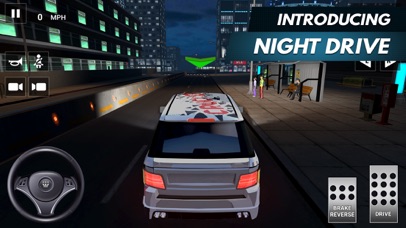
More car options, even better driving simulator, extreme weather experiences, and more accurate real-life physics!
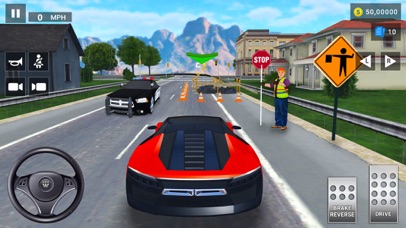
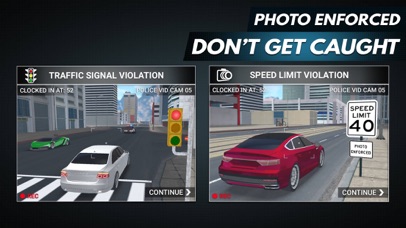
Master your driving and parking skills without having to go to an actual driving school! Pick your car, receive your mission and don’t forget to follow the road signs. Don’t take the wrong turns, follow the signals, and wear your seat belt! After playing this game, there is no chance you won’t become the best driver in the world!
Take your driving skills to the next level.
DOWNLOAD Driving Academy 2: 3D Car Game!
FEATURES
• Ultimate driving simulator experience
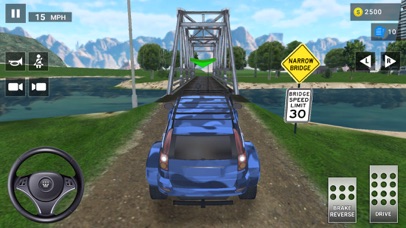
• Real world driving experience in a city with Slopes, Draw bridges, Light rails, Frosted heaves, Fog Areas, Fire lanes, Bike lanes and many more...
• 50 unique road signs to learn
• 200 levels to play, including the Career & Challenges modes
• Drive passengers to their destinations to earn extra coins in the Open World.
• 3 different camera views
• Realistic driving mechanics
• 90 different cars to drive
• Collect and Customize all cars with cool Decals, Spoilers, Rims, and Neon Lights.
• Now available in 25 languages - English, French, Italian, Spanish, Portuguese, German, Indonesian, Russian, Turkish, Simplified Chinese, Traditional Chinese, Japanese, Arabic, Dutch, Finnish, Swedish, Vietnamese, Norwegian, Ukrainian, Korean, Malay, Filipino, Romanian, Polish and Kazakh.
Don’t wait, unbelievable possibilities are just a click away! DOWNLOAD Driving Academy 2: 3D Car Game NOW and start driving!
VISIT US: http://games2win.com
LIKE US: http://facebook.com/Games2win
FOLLOW US: http://twitter.com/Games2win
Contact us at [email protected] for any problems you may have with Driving Academy 2: 3D Car Game
Privacy Policy: http://www.games2win.com/corporate/privacy-policy.asp

- iPhone أو iPad بجيلبريك أو بدون جيلبريك.
- Sideloadly أو بدائلها.
- كمبيوتر يعمل بنظام Windows/macOS/Linux مع تثبيت iTunes.
الخطوة 1: قم بتنزيل ملف .IPA المعدّل مسبقًا من الرابط أعلاه إلى الكمبيوتر الخاص بك. للتنزيل من تطبيق iOSGods App، اطلع على دليل تنزيل IPA من تطبيق iOSGods App الذي يتضمن مثالًا بالفيديو.
الخطوة 2: قم بتنزيل Sideloadly وتثبيته على جهاز Windows أو Mac.
الخطوة 3: افتح Sideloadly على الكمبيوتر، ووصّل جهاز iOS الخاص بك، وانتظر حتى يظهر اسم جهازك داخل Sideloadly.
الخطوة 4: بمجرد التعرّف على جهاز iDevice الخاص بك، اسحب ملف .IPA المعدّل الذي قمت بتنزيله وأفلِته داخل تطبيق Sideloadly.
الخطوة 5: أدخل البريد الإلكتروني لحساب Apple Account الخاص بك، ثم اضغط على «Start». سيُطلب منك بعد ذلك إدخال كلمة المرور. تابع وأدخل المعلومات المطلوبة.
الخطوة 6: انتظر حتى ينتهي Sideloadly من تحميل/تثبيت ملف IPA المعدّل. في حال واجهت أي مشاكل أثناء التثبيت، يرجى قراءة الملاحظة أدناه.
الخطوة 7: بعد اكتمال التثبيت ورؤية التطبيق على الشاشة الرئيسية، انتقل إلى Settings → General → Profiles / VPN & Device Management. ثم اضغط على البريد الإلكتروني الذي أدخلته في الخطوة 6، ثم اضغط على «الوثوق بـ [email protected]».
الخطوة 8: الآن انتقل إلى الشاشة الرئيسية وافتح التطبيق الذي تم تثبيته للتو وسيعمل كل شيء بشكل صحيح. قد تحتاج إلى اتباع تعليمات إضافية خاصة بكل تطبيق داخل النافذة المنبثقة للتعديل أثناء اللعب.
ملاحظة: بدءًا من iOS/iPadOS 16 وما بعده، يجب تفعيل وضع المطور (Developer Mode). بالنسبة لحسابات Apple Developer المجانية، ستحتاج إلى تكرار هذه العملية كل 7 أيام. إذا كانت لديك أي أسئلة أو مشاكل، يرجى قراءة قسم الأسئلة الشائعة حول Sideloadly في الموضوع.





![[ Puzzle & Dragons Korea ] 퍼즐앤드래곤 iOS Mod IPA](https://is1-ssl.mzstatic.com/image/thumb/Purple221/v4/6d/2b/f3/6d2bf3e5-4804-668b-5a66-76f0f9ff5398/AppIcon_ko-0-0-1x_U007emarketing-0-8-0-85-220.png/100x100bb.jpg)


