ต้องเข้าสู่ระบบ
เข้าสู่ระบบด้วยบัญชี iOSGods เพื่อดำเนินการต่อ
เข้าสู่ระบบด้วยบัญชี iOSGods เพื่อดำเนินการต่อ

แอปพลิเคชันโกงสำหรับเกมจำลองการขับขี่ Driving Academy 2: Car School Hack นี้ให้คุณมีเงินในเกมไม่จำกัดเพื่อปลดล็อกรถและอัปเกรดโดยไม่ต้องทำงานหนัก ฝึกฝนทักษะการขับขี่และจอดรถของคุณด้วยทุกคันและตัวเลือกการปรับแต่งที่อยู่ในมือของคุณ และมุ่งเน้นไปที่การปรับปรุงเทคนิคของคุณแทนที่จะหาเงิน
- เงินไม่จำกัด → ใช้จ่ายได้อย่างอิสระสำหรับรถและอัปเกรด
แอปนี้ยังมาพร้อมกับ iGameGod ซึ่งช่วยให้คุณเข้าถึง Auto Touch สำหรับการทำงานซ้ำ ๆ โดยอัตโนมัติ, App Speed Manager สำหรับปรับความเร็วของเกม, การแก้ไขค่าด้วย Memory Engine และเครื่องมือสำหรับเกม iOS ที่ทรงพลังอื่น ๆ อีกมากมาย
ดาวน์โหลด Driving Academy 2: Car School Hack modded IPA จากลิงก์ด้านบน แตะปุ่มติดตั้งและทำตามคำแนะนำบนหน้าจอเพื่อติดตั้งแฮ็กแอป iOS นี้บน iPhone, iPad หรือ Apple Silicon
ต้องการความช่วยเหลือเพิ่มเติม? ดู คำถามที่พบบ่อยของแอป iOSGods สำหรับคำตอบโดยละเอียดและเคล็ดลับการแก้ไขปัญหา
Start, Seatbelt, Gas!! Learn Driving the fun way!
Following the all times hit “Driving Academy: Car Games”, we are proud to present:
Driving Academy 2: 3D Car Game
Thought it couldn’t possibly become any better? TRY AGAIN.
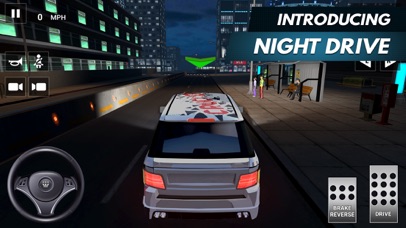
More car options, even better driving simulator, extreme weather experiences, and more accurate real-life physics!
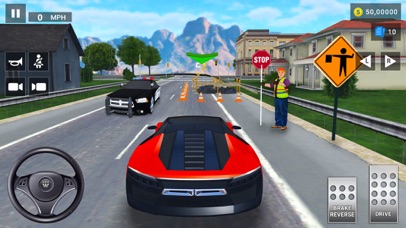
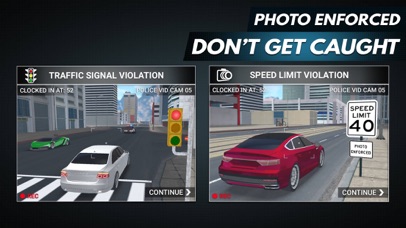
Master your driving and parking skills without having to go to an actual driving school! Pick your car, receive your mission and don’t forget to follow the road signs. Don’t take the wrong turns, follow the signals, and wear your seat belt! After playing this game, there is no chance you won’t become the best driver in the world!
Take your driving skills to the next level.
DOWNLOAD Driving Academy 2: 3D Car Game!
FEATURES
• Ultimate driving simulator experience
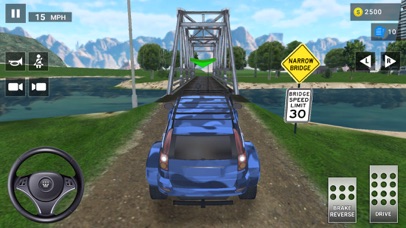
• Real world driving experience in a city with Slopes, Draw bridges, Light rails, Frosted heaves, Fog Areas, Fire lanes, Bike lanes and many more...
• 50 unique road signs to learn
• 200 levels to play, including the Career & Challenges modes
• Drive passengers to their destinations to earn extra coins in the Open World.
• 3 different camera views
• Realistic driving mechanics
• 90 different cars to drive
• Collect and Customize all cars with cool Decals, Spoilers, Rims, and Neon Lights.
• Now available in 25 languages - English, French, Italian, Spanish, Portuguese, German, Indonesian, Russian, Turkish, Simplified Chinese, Traditional Chinese, Japanese, Arabic, Dutch, Finnish, Swedish, Vietnamese, Norwegian, Ukrainian, Korean, Malay, Filipino, Romanian, Polish and Kazakh.
Don’t wait, unbelievable possibilities are just a click away! DOWNLOAD Driving Academy 2: 3D Car Game NOW and start driving!
VISIT US: http://games2win.com
LIKE US: http://facebook.com/Games2win
FOLLOW US: http://twitter.com/Games2win
Contact us at [email protected] for any problems you may have with Driving Academy 2: 3D Car Game
Privacy Policy: http://www.games2win.com/corporate/privacy-policy.asp
- iPhone หรือ iPad ที่ไม่ได้เจลเบรก/ไม่ได้เจลเบรก หรือเจลเบรกแล้ว
- Sideloadly หรือทางเลือกอื่น
- คอมพิวเตอร์ที่ใช้ Windows/macOS/Linux และติดตั้ง iTunes ไว้
ขั้นตอนที่ 1: ดาวน์โหลดไฟล์ .IPA ที่แฮกไว้ล่วงหน้าจากลิงก์ด้านบนลงในคอมพิวเตอร์ของคุณ หากต้องการดาวน์โหลดจากแอป iOSGods โปรดดู วิธีดาวน์โหลด IPA ในแอป iOSGods ซึ่งมีตัวอย่างวิดีโอประกอบ
ขั้นตอนที่ 2: ดาวน์โหลด Sideloadly แล้วติดตั้งบน Windows หรือ Mac ของคุณ
ขั้นตอนที่ 3: เปิด Sideloadly บนคอมพิวเตอร์ เชื่อมต่ออุปกรณ์ iOS แล้วรอจนกว่าชื่ออุปกรณ์ของคุณจะปรากฏใน Sideloadly
ขั้นตอนที่ 4: เมื่อ iDevice ของคุณถูกตรวจพบแล้ว ให้ลากไฟล์ .IPA ที่ม็อดมาวางลงในโปรแกรม Sideloadly
ขั้นตอนที่ 5: กรอกอีเมล Apple Account ของคุณ จากนั้นกด "Start" ระบบจะถามรหัสผ่าน กรอกข้อมูลที่จำเป็นให้เรียบร้อย
ขั้นตอนที่ 6: รอจนกว่า Sideloadly จะ sideload/ติดตั้งไฟล์ IPA ที่แฮกเสร็จ หากเกิดปัญหาระหว่างติดตั้ง โปรดอ่านหมายเหตุด้านล่าง
ขั้นตอนที่ 7: เมื่อการติดตั้งเสร็จสิ้นและเห็นแอปบนหน้าจอหลักแล้ว ให้ไปที่ การตั้งค่า → ทั่วไป → โปรไฟล์ / VPN และการจัดการอุปกรณ์ จากนั้นแตะที่อีเมลที่คุณกรอกในขั้นตอนที่ 6 แล้วแตะ "เชื่อถือ [email protected]"
ขั้นตอนที่ 8: จากนั้นไปที่หน้าจอหลักและเปิดแอปที่ติดตั้งใหม่ ทุกอย่างควรทำงานได้ปกติ คุณอาจต้องทำตามคำแนะนำเพิ่มเติมเฉพาะแอปในป๊อปอัปของม็อดในเกม
หมายเหตุ: สำหรับ iOS/iPadOS 16 ขึ้นไป คุณต้อง เปิดโหมดนักพัฒนา (Developer Mode) สำหรับบัญชี Apple Developer แบบฟรี คุณต้องทำขั้นตอนนี้ซ้ำทุก 7 วัน หากมีคำถามหรือพบปัญหา โปรดอ่าน หัวข้อ FAQ ของ Sideloadly ในกระทู้





![[ Puzzle & Dragons Korea ] 퍼즐앤드래곤 iOS Mod IPA](https://is1-ssl.mzstatic.com/image/thumb/Purple221/v4/6d/2b/f3/6d2bf3e5-4804-668b-5a66-76f0f9ff5398/AppIcon_ko-0-0-1x_U007emarketing-0-8-0-85-220.png/100x100bb.jpg)


