Giriş Gerekli
Devam etmek için iOSGods hesabınızla giriş yapın.
Devam etmek için iOSGods hesabınızla giriş yapın.
Bu Epic Battle Simulator 2 Mod IPA'sında ücretsiz uygulama içi satın almalar, premium askerler ve yükseltmelerin kilidini açarak gerçek para harcamadan baskın bir ordu kurmanızı sağlar. Savaş stratejilerinizi oluşturun, birimleri savaş alanına konuşlandırın ve kampanya seviyelerinde, özel maçlarda ve gerçek zamanlı çok oyunculu oyunda rakiplerinizi yenin, tüm satın alınabilir birim ve geliştirmelere anında erişim sağlayarak.
- Ücretsiz iAP → tüm uygulama içi satın almaların kilidini açın
Bu uygulama ayrıca, tekrar eden görevleri otomatikleştirmek için Auto Touch, ayarlanabilir oyun hızı için App Speed Manager, Memory Engine ile değer düzenleme ve daha pek çok güçlü iOS oyun aracına erişim sağlayan iGameGod ile birlikte gelir.
Yukarıdaki bağlantılardan Epic Battle Simulator 2 Hack modded IPA indirin. Yükle düğmesine dokunup ekrandaki yönergeleri izleyerek bu iOS uygulama hack'ini iPhone, iPad veya Apple Silicon'a yükleyin.
Daha fazla yardıma mı ihtiyacınız var? Ayrıntılı yanıtlar ve sorun giderme ipuçları için iOSGods Uygulaması Sık Sorulan Sorular sayfamıza bakın.
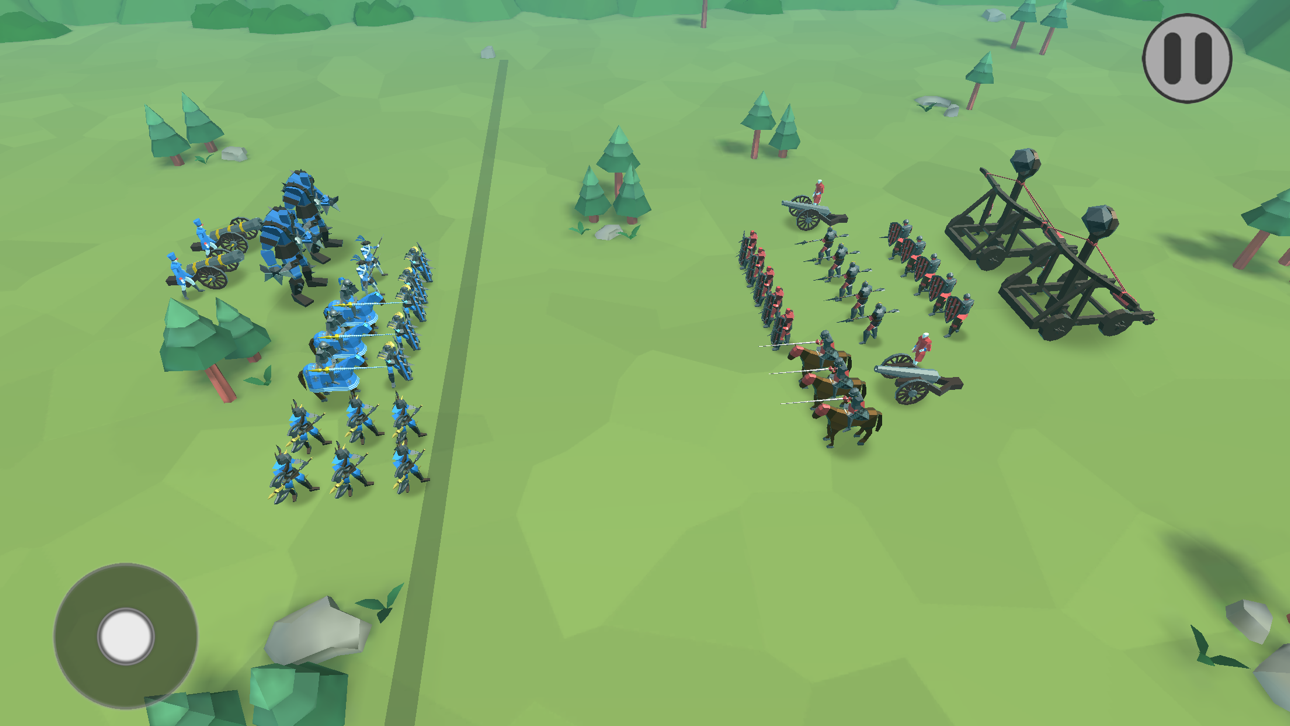
From the creators of Epic Battle Simulator, comes Epic Battle Simulator 2, the most accurate battle simulation game !
Form your strategies, choose your troops and place them wisely on the battlefield and beat every opponent !
Play against levels, custom and real-time multiplayer !
You can now totally improve your army, watch ragdoll effects and play multiplayer mode, created just for you with advanced matchmaking algorithms.
With the improved graphics and the enhanced intelligence of the bots, you can now experience ultimate battle simulations !
Features:
- Ragdoll and physics effects !
- Advanced army placement !
- Army upgrade up to three levels, with awesome gear and stats improvements !
- Advanced multiplayer ranking system for better matchmaking and custom leader-board !
- Well-made, improved graphics to make the battle cooler that ever !
- Smarter troops to achieve the most accurate battle simulation !
- Awesome sounds and music variety !
New troops added every week! Got a suggestion? Send us a message and maybe the new troop will be yours!!
VIP Membership offers a weekly subscription, you will have a 3-days FREE trail period, after this period you will be charged for $7.99.
This price is established for United States customers. Pricing in other countries may vary and actual charges may be converted to your local currency depending on the country of residence.
After buying this subscription, you will unlock the following features: Epic Troop Wolf Rider, upgrade three troops (Guard, Giant, Hwacha) to level three, collect double rewards, gain 200 gems per day and remove pop up ads!.
Subscription Notice:
- Payment will be charged to iTunes Account at confirmation of purchase.
- Subscription automatically renews unless auto-renew is turned off at least 24 - hours before the end of the current period.
- Account will be charged for renewal within 24 - hours prior to the end of the current period, and identify the cost of the renewal.
- Subscriptions may be managed by the user and auto - renewal may be turned off by going to the user’s Account Settings after purchase.
- Any unused portion of a free trial period, if offered, will be forfeited when the user purchases a subscription to that publication, where applicable.
Ekran görüntüleri © ilgili sahipleri · App Store


iOSGods; Apple Inc., Google LLC veya burada listelenen uygulamaların geliştiricileriyle bağlantılı değildir, onlar tarafından onaylanmamış ve desteklenmemiştir. Apple, iOS ve App Store, Apple Inc. şirketinin ticari markalarıdır. Android ve Google Play, Google LLC şirketinin ticari markalarıdır. Diğer tüm uygulama adları, simgeler, görseller ve ticari markalar ilgili sahiplerine aittir.
- Jailbreak'siz/normal ya da jailbreak'li iPhone veya iPad.
- Sideloadly veya alternatifleri.
- iTunes yüklü Windows/macOS/Linux çalıştıran bir bilgisayar.
ADIM 1: Yukarıdaki bağlantıdan önceden hacklenmiş .IPA dosyasını bilgisayarınıza indirin. iOSGods App üzerinden indirmek için video örneği de içeren iOSGods App IPA İndirme Kılavuzu bölümümüze göz atın.
ADIM 2: Sideloadly indirin ve Windows veya Mac'inize kurun.
ADIM 3: Bilgisayarınızda Sideloadly'yi açın, iOS cihazınızı bağlayın ve cihaz adınız Sideloadly'de görünene kadar bekleyin.
ADIM 4: iCihazınız tanındıktan sonra, indirdiğiniz modlu .IPA dosyasını sürükleyip Sideloadly uygulamasına bırakın.
ADIM 5: Apple Account e-posta adresinizi girin ve ardından "Start" düğmesine basın. Sonrasında sizden şifreniz istenecektir. Gerekli bilgileri girin.
ADIM 6: Sideloadly'nin hacklenmiş IPA'yı sideload edip yüklemesini bekleyin. Yükleme sırasında bir sorun olursa lütfen aşağıdaki notu okuyun.
ADIM 7: Yükleme tamamlandıktan ve uygulamayı Ana Ekranınızda gördükten sonra Ayarlar → Genel → Profiller / VPN ve Cihaz Yönetimi bölümüne gitmelisiniz. Burada 6. adımda girdiğiniz e-postaya dokunun ve ardından "[email protected]'a Güven" seçeneğine dokunun.
ADIM 8: Şimdi Ana Ekranınıza gidin ve yeni yüklediğiniz uygulamayı açın; her şey sorunsuz çalışmalıdır. Oyun içindeki hack açılır penceresinde uygulamaya özel ek talimatları takip etmeniz gerekebilir.
NOT: iOS/iPadOS 16 ve sonrasında Geliştirici Modu'nu etkinleştirmeniz gerekir. Ücretsiz Apple Developer hesapları için bu işlemi her 7 günde bir tekrarlamanız gerekir. Sorularınız veya sorunlarınız varsa konunun Sideloadly SSS bölümünü okuyun.
Hack Features:
- Inf Coins (Spend)
App Installation Instructions:
---------------------------------------------------------
----------------------------------------------------------
If you require more information or help, please read our Frequently Asked Questions topic on iOSGods.com.
----------------------------------------------------------
--------------------------------------------------