Inicio de sesión requerido
Inicia sesión con tu cuenta de iOSGods para continuar.
Inicia sesión con tu cuenta de iOSGods para continuar.
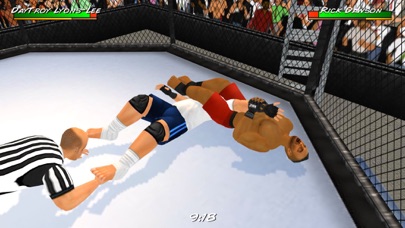
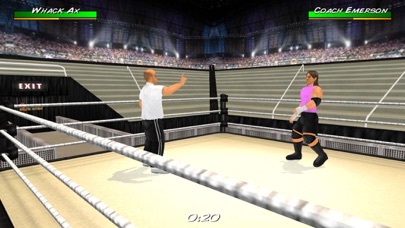
Wrestling Revolution 3D es un juego de simulación de lucha libre donde puedes seguir una carrera en el ring o tomar decisiones como promotor, y este Mod IPA desbloquea funciones premium sin barreras de pago. Experimenta ambos lados del negocio de la lucha libre en un universo compartido, con la libertad de actualizar a modo Pro y eliminar anuncios y limitaciones.
- Compras integradas gratuitas (In-App Purchases) → desbloquea contenido premium sin pago
Esta app también incluye iGameGod, que te ofrece acceso a Auto Touch para automatizar tareas repetitivas, App Speed Manager para ajustar la velocidad del juego, edición de valores con Memory Engine y más potentes herramientas para juegos de iOS.
Descarga Wrestling Revolution 3D iOS Mod IPA desde los enlaces de arriba. Toca el botón de instalación y sigue las instrucciones para instalar este hack iOS en tu iPhone, iPad o Mac con Apple Silicon.
¿Necesitas más ayuda? Consulta nuestras Preguntas frecuentes de la app iOSGods para respuestas detalladas y consejos de solución de problemas.
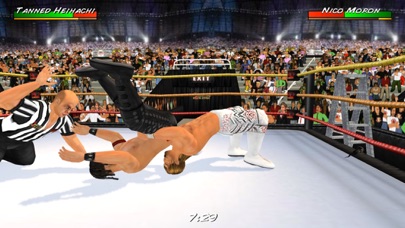
The Wrestling Revolution rumbles into the 3rd dimension - now featuring BOTH aspects of the business in ONE shared universe! A wrestling career challenges you to take shots in the ring, whereas a "booking" career allows you to call the shots backstage - promoting entertaining matches every week for ratings. Seeing each side of the curtain gives you an even better appreciation for the other, and ensures you'll never grow bored of wrestling again! Both modes are available to play for free, with the option to upgrade to enjoy the "Pro" experience with no ads or limitations.
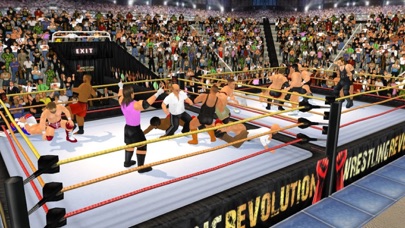
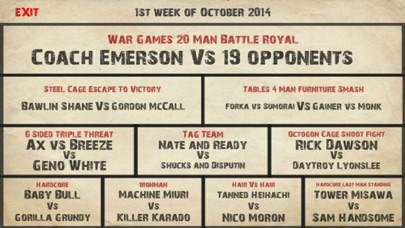
And if playing Pro isn't enough, a separate "Backstage Pass" allows you to play God by saving your changes to all 9 rosters before pitting them against each other in dream matches of your own creation! With 4 pages of rules to mix & match - including up to 20 wrestlers in rings of any shape or size - the only limit is your imagination. You can also blow off steam with no pressure by revisiting the 8 weeks of free shows from the game's promotional tour. Not to mention the interactive training process that teaches you how to lock up in the first place.
BASIC CONTROLS
The game features an interactive tutorial that you are advised to play through, but the basic controls are as follows:
CURSORS = Movement (double-tap to dash)
A = Attack (with a direction to aim high, without to aim low)
G = Grapple
R = Run
P = Pick-Up / Drop (with a direction to throw)
T = Taunt / Pin / Referee duties
EYE = Change focus / Turn opponent around
HEALTH METER = Switch character
CLOCK = Pause / Change camera angle
PERFORMANCE
Although every effort has been made to keep performance as high as possible, some devices may benefit from a visit to the Options menu to fine tune the display:
- The number of characters is perhaps the biggest factor so consider turning off referees and setting a limit on the match size.
- If you don't want to sacrifice numbers, you can sacrifice polygons instead and opt for "Basic" character models (no fingers).
- The ropes are surprisingly demanding and you may squeeze in an extra character if you make them "Static".
- Turning off shadows and reducing crowd sprites may also help.
I regret that there's more to this game than I could ever fit in an app store description, so please consult the online guides for further reading:
www.MDickie.com/guides/wr3d_booking.htm
Or join the debate on social meda:
www.facebook.com/MDickieFans
www.twitter.com/MDickieDotcom
- iPhone o iPad con o sin Jailbreak.
- Sideloadly u otras alternativas.
- Ordenador con Windows/macOS/Linux e iTunes instalado.
PASO 1: Descargue el archivo .IPA pre-modificado desde el enlace de arriba a su ordenador. Para descargarlo desde la iOSGods App, consulte nuestro Tutorial de descarga del IPA desde la iOSGods App, que incluye un ejemplo en vídeo.
PASO 2: Descargue Sideloadly e instálelo en su Windows o Mac.
PASO 3: Abra Sideloadly en su ordenador, conecte su dispositivo iOS y espere hasta que el nombre del dispositivo aparezca en Sideloadly.
PASO 4: Una vez que su iDevice sea reconocido, arrastre el archivo .IPA modificado que descargó y suéltelo en la aplicación Sideloadly.
PASO 5: Introduzca el correo electrónico de su Apple Account y, a continuación, pulse «Start». Le pedirá que introduzca su contraseña. Proporcione la información solicitada.
PASO 6: Espere a que Sideloadly termine de hacer sideload/instalar el IPA modificado. Si surgen problemas durante la instalación, por favor lea la nota a continuación.
PASO 7: Una vez completada la instalación y al ver la app en la pantalla de inicio, deberá ir a Ajustes → General → Perfiles / VPN y Gestión de Dispositivos. Una vez allí, toque el correo electrónico que introdujo en el paso 6 y, después, toque en «Confiar en [email protected]».
PASO 8: Ahora vaya a la pantalla de inicio y abra la app recién instalada; todo debería funcionar correctamente. Es posible que tenga que seguir instrucciones adicionales específicas de cada app dentro del popup del hack en el juego.
NOTA: En iOS/iPadOS 16 y posteriores, debe activar el Modo Desarrollador. Para cuentas gratuitas de Apple Developer, deberá repetir este proceso cada 7 días. Si tiene alguna pregunta o problema, lea nuestra sección de Preguntas Frecuentes de Sideloadly del tema.


![[The Battle Cats JP] にゃんこ大戦争 iOS Mod IPA](https://is1-ssl.mzstatic.com/image/thumb/Purple221/v4/d5/5d/5e/d55d5ecc-9bbd-3446-2092-56eef81db097/AppIcon-0-0-1x_U007epad-0-1-85-220.png/100x100bb.jpg)