Inicio de sesión requerido
Inicia sesión con tu cuenta de iOSGods para continuar.
Inicia sesión con tu cuenta de iOSGods para continuar.

La moneda ilimitada y el prestigio en Zombies Clicker Hack te permiten mejorar armas al instante y dominar oleadas de zombis sin necesidad de hacer grinding. Este mod IPA transforma la experiencia de supervivencia eliminando la barrera de tiempo entre tú y el arsenal definitivo.
Ya sea que busques puntuaciones altas, pruebes combinaciones de armas o simplemente quieras sentirte imparable contra los no-muertos, este hack elimina la espera de progresión y te pone en control desde el primer toque.
- Añadir Moneda → gasta libremente en mejoras y armas
- Añadir Prestigio → desbloquea recompensas de rango al instante
- Nunca Morir → sobrevive a cada encuentro con zombis
- Golpe Único Letal → elimina cualquier zombi de un solo toque
Esta app también incluye iGameGod, que te ofrece acceso a Auto Touch para automatizar tareas repetitivas, App Speed Manager para ajustar la velocidad del juego, edición de valores con Memory Engine y más potentes herramientas para juegos de iOS.
Descarga Zombies Clicker Hack modded IPA desde los enlaces de arriba. Toca el botón de instalación y sigue las instrucciones para instalar este hack iOS en tu iPhone, iPad o Mac con Apple Silicon.
¿Necesitas más ayuda? Consulta nuestras Preguntas frecuentes de la app iOSGods para respuestas detalladas y consejos de solución de problemas.
Imagina un mundo donde los zombis se han apoderado de todo... ¡pero TÚ eres uno de los últimos humanos que quedan! En este increíble juego lleno de acción, te pondrás en las botas de un valiente sobreviviente, luchando contra oleadas de zombis súper aterradores y súper agresivos que tienen hambre de una sola cosa: ¡CEREBROS! (¡Qué asco, ¿no?!)
Pero no te preocupes, ¡no estás corriendo por ahí con un simple palo! ¡Para nada! Podrás mejorar tus armas, desbloquear otras completamente locas y crear el mejor equipo aplasta-zombis. Ya sea un rayo láser, una pistola congelante o un lanzacohetes gigante, ¡vas a necesitar mucho poder de fuego para sobrevivir!
Y esto no es solo un nivel pequeñito. ¡No! Vas a moverte por un enorme mapa lleno de lugares peligrosos, secretos ocultos y guaridas zombis. Supera niveles para desbloquear nuevas zonas como bosques tenebrosos, ciudades embrujadas, laboratorios espeluznantes ¡y mucho más! Cada área trae nuevos desafíos... y zombis más grandes y aterradores.
Y aquí viene la parte genial: ¡no solo eres un luchador, también eres un estratega! Usa los puntos y piezas que recojas para investigar nuevas armas y herramientas. Tal vez desbloquees un lanzallamas o incluso una armadura robótica para enfrentarte a esos jefes zombis.
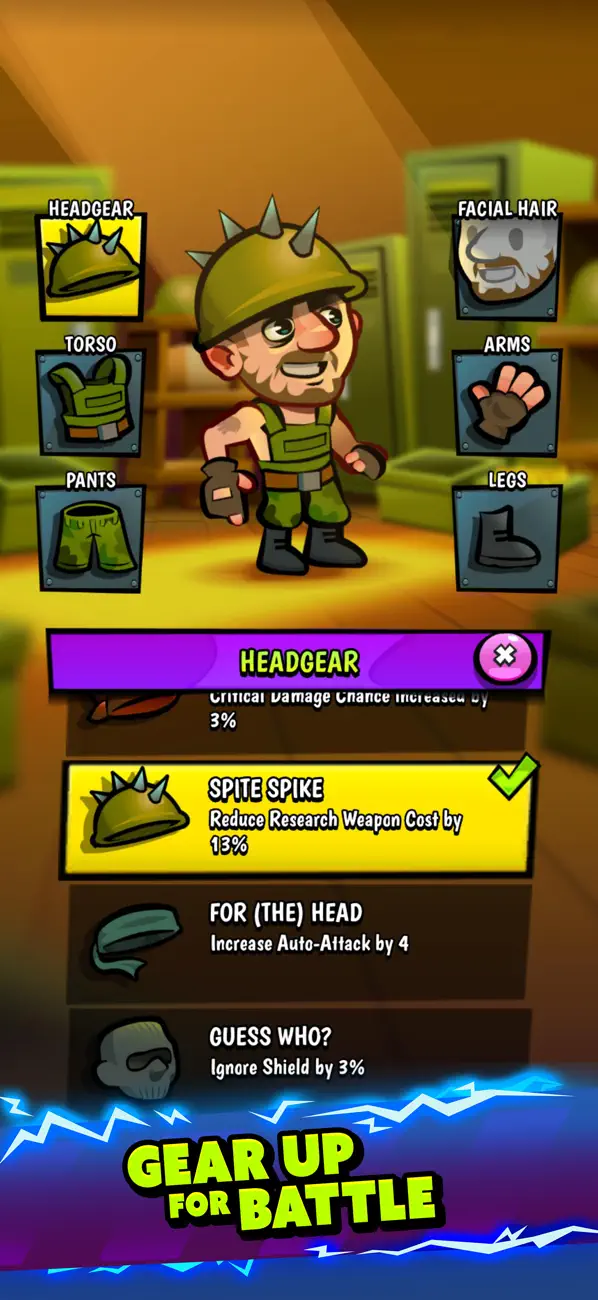
Tu humano no va a la batalla en pijama. Puedes equiparle con equipo en la cabeza, torso, brazos, piernas, pies y manos. ¿Quieres un casco que te dé más defensa? ¿O unos guantes que te hagan recargar más rápido? ¿Qué tal unas botas súper veloces o una armadura que electrocutan a los enemigos cuando te golpean? Puedes combinar piezas y crear el atuendo perfecto para luchar contra los zombis.
Cada batalla está llena de acción: tendrás que esquivar ataques zombis, abrirte paso entre hordas de monstruos y recolectar botín en el camino. Abre cajas, encuentra monedas, descubre objetos raros ¡y potencia a tu sobreviviente al máximo!
¡Enfréntate a jefes zombis locos!
No todos los zombis son iguales. Algunos son rápidos. Otros enormes. Algunos escupen baba (¡puaj!). Y luego están... los jefes zombis. Estos monstruos gigantes tienen ataques poderosos y habilidades rarísimas, pero si logras vencerlos, ¡conseguirás recompensas increíbles!
No te preocupes si nunca has jugado algo así antes: ¡los controles son simples y divertidos! Pero cuanto más juegues, más astuto serás. Crea tu estrategia, elige el equipo adecuado ¡y conviértete en el héroe definitivo que destruye zombis!
¿Estás listo para salvar al mundo? ¡Agarra tu equipo, mejora tus armas y únete a la lucha contra la invasión zombi!
El mundo necesita un héroe… ¡y ese héroe eres TÚ!
- iPhone o iPad con o sin Jailbreak.
- Sideloadly u otras alternativas.
- Ordenador con Windows/macOS/Linux e iTunes instalado.
PASO 1: Descargue el archivo .IPA pre-modificado desde el enlace de arriba a su ordenador. Para descargarlo desde la iOSGods App, consulte nuestro Tutorial de descarga del IPA desde la iOSGods App, que incluye un ejemplo en vídeo.
PASO 2: Descargue Sideloadly e instálelo en su Windows o Mac.
PASO 3: Abra Sideloadly en su ordenador, conecte su dispositivo iOS y espere hasta que el nombre del dispositivo aparezca en Sideloadly.
PASO 4: Una vez que su iDevice sea reconocido, arrastre el archivo .IPA modificado que descargó y suéltelo en la aplicación Sideloadly.
PASO 5: Introduzca el correo electrónico de su Apple Account y, a continuación, pulse «Start». Le pedirá que introduzca su contraseña. Proporcione la información solicitada.
PASO 6: Espere a que Sideloadly termine de hacer sideload/instalar el IPA modificado. Si surgen problemas durante la instalación, por favor lea la nota a continuación.
PASO 7: Una vez completada la instalación y al ver la app en la pantalla de inicio, deberá ir a Ajustes → General → Perfiles / VPN y Gestión de Dispositivos. Una vez allí, toque el correo electrónico que introdujo en el paso 6 y, después, toque en «Confiar en [email protected]».
PASO 8: Ahora vaya a la pantalla de inicio y abra la app recién instalada; todo debería funcionar correctamente. Es posible que tenga que seguir instrucciones adicionales específicas de cada app dentro del popup del hack en el juego.
NOTA: En iOS/iPadOS 16 y posteriores, debe activar el Modo Desarrollador. Para cuentas gratuitas de Apple Developer, deberá repetir este proceso cada 7 días. Si tiene alguna pregunta o problema, lea nuestra sección de Preguntas Frecuentes de Sideloadly del tema.