تسجيل الدخول مطلوب
سجّل الدخول بحساب iOSGods للمتابعة.
سجّل الدخول بحساب iOSGods للمتابعة.
العملات غير المحدودة والمكانة في Zombies Clicker Hack تتيح لك ترقية الأسلحة فوراً والهيمنة على موجات الزومبي دون الحاجة للعب المتكرر. يحول هذا Mod IPA تجربة البقاء بإزالة التأخير الزمني بينك وبين الترسانة النهائية.
سواء كنت تسعى لتحقيق أعلى الدرجات أو اختبار مزيج الأسلحة أو تريد فقط الشعور بأنك لا يقهر ضد الموتى الأحياء، فإن هذا التعديل يزيل انتظار التقدم ويضعك في السيطرة من أول نقرة.
- إضافة عملات → أنفق بحرية على الترقيات والأسلحة
- إضافة مكانة → افتح مكافآت الرتبة فوراً
- عدم الموت → نجح في كل مواجهة زومبي
- قتل بضربة واحدة → القضاء على أي زومبي بنقرة واحدة
يأتي هذا التطبيق أيضًا مع iGameGod، مما يتيح لك الوصول إلى Auto Touch لأتمتة المهام المتكررة، وApp Speed Manager لضبط سرعة اللعب، وتعديل القيم عبر Memory Engine، والمزيد من أدوات ألعاب iOS القوية.
قم بتنزيل Zombies Clicker Hack modded IPA من الروابط أعلاه. اضغط على زر التثبيت واتبع التعليمات لتثبيت هذا التعديل لـ iOS على iPhone أو iPad أو Apple Silicon.
هل تحتاج إلى مزيد من المساعدة؟ راجع الأسئلة الشائعة لتطبيق iOSGods للحصول على إجابات مفصلة ونصائح لاستكشاف الأخطاء.
Imagine a world where the zombies have taken over... but YOU are one of the last humans left! In this awesome action-packed game, you step into the boots of a brave survivor, fighting back against waves of super scary, super aggressive zombies who are hungry for one thing: BRAINS! (Ew, right?!)
But don’t worry - you’re not just running around with a stick. No way! You’ll get to upgrade your weapons, unlock crazy new ones, and build the ultimate zombie-smashing gear! Whether it’s a lightning blaster, freeze gun, or mega rocket launcher - you’re gonna need some serious firepower to stay alive!
This isn’t just one tiny level. Nope! You’ll move across a giant map filled with dangerous places, hidden secrets, and zombie hideouts. Beat levels to unlock new zones - like spooky forests, haunted cities, creepy labs, and more! Every area brings new challenges... and even bigger, badder zombies.
Here’s the cool part: you’re not just a fighter - you’re a thinker, too! Use points and parts you collect to research new weapons and tools. Maybe you’ll unlock a flamethrower, or even some robotic armor to help you take on those zombie bosses!
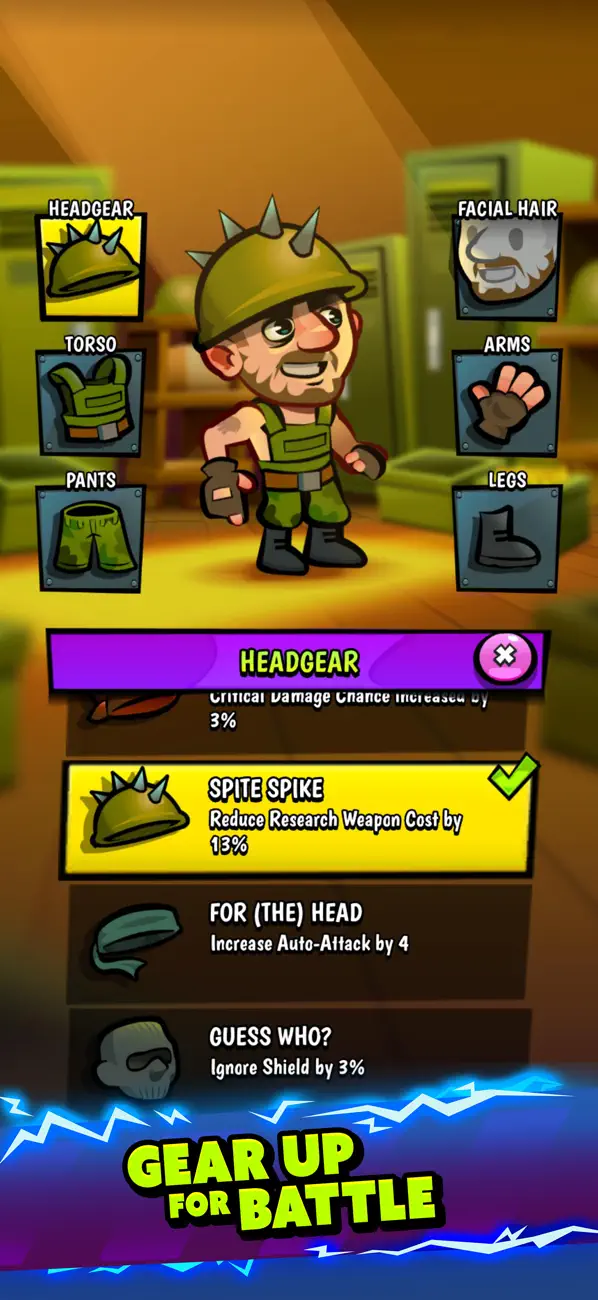
Your human isn’t just going into battle in PJs. You get to equip gear for your head, torso, arms, legs, feet, and hands. Want a helmet that gives you more defense? Or gloves that make you reload faster? What about super speedy boots or armor that shocks enemies when they hit you? You can mix and match gear to build your perfect zombie-fighting outfit!
Each battle is full of action - you’ll need to dodge zombie attacks, blast your way through hordes of monsters, and collect loot along the way. Open crates, find coins, discover rare items, and power up your survivor to the max!
Face Crazy Zombie Bosses!
Not all zombies are the same. Some are fast. Some are huge. Some spit goo (gross!). And then... there are the boss zombies. These giant monsters have powerful attacks and weird powers, but if you beat them, you’ll get awesome rewards!
Don’t worry if you’ve never played a game like this before - the controls are simple and fun! But the more you play, the smarter you’ll get. Build your strategy, pick the right gear, and become the ultimate zombie-destroying hero!
Are you ready to save the world? Grab your gear, power up your weapons, and join the fight against the zombie invasion!
The world needs a hero… and it’s YOU!

- iPhone أو iPad بجيلبريك أو بدون جيلبريك.
- Sideloadly أو بدائلها.
- كمبيوتر يعمل بنظام Windows/macOS/Linux مع تثبيت iTunes.
الخطوة 1: قم بتنزيل ملف .IPA المعدّل مسبقًا من الرابط أعلاه إلى الكمبيوتر الخاص بك. للتنزيل من تطبيق iOSGods App، اطلع على دليل تنزيل IPA من تطبيق iOSGods App الذي يتضمن مثالًا بالفيديو.
الخطوة 2: قم بتنزيل Sideloadly وتثبيته على جهاز Windows أو Mac.
الخطوة 3: افتح Sideloadly على الكمبيوتر، ووصّل جهاز iOS الخاص بك، وانتظر حتى يظهر اسم جهازك داخل Sideloadly.
الخطوة 4: بمجرد التعرّف على جهاز iDevice الخاص بك، اسحب ملف .IPA المعدّل الذي قمت بتنزيله وأفلِته داخل تطبيق Sideloadly.
الخطوة 5: أدخل البريد الإلكتروني لحساب Apple Account الخاص بك، ثم اضغط على «Start». سيُطلب منك بعد ذلك إدخال كلمة المرور. تابع وأدخل المعلومات المطلوبة.
الخطوة 6: انتظر حتى ينتهي Sideloadly من تحميل/تثبيت ملف IPA المعدّل. في حال واجهت أي مشاكل أثناء التثبيت، يرجى قراءة الملاحظة أدناه.
الخطوة 7: بعد اكتمال التثبيت ورؤية التطبيق على الشاشة الرئيسية، انتقل إلى Settings → General → Profiles / VPN & Device Management. ثم اضغط على البريد الإلكتروني الذي أدخلته في الخطوة 6، ثم اضغط على «الوثوق بـ [email protected]».
الخطوة 8: الآن انتقل إلى الشاشة الرئيسية وافتح التطبيق الذي تم تثبيته للتو وسيعمل كل شيء بشكل صحيح. قد تحتاج إلى اتباع تعليمات إضافية خاصة بكل تطبيق داخل النافذة المنبثقة للتعديل أثناء اللعب.
ملاحظة: بدءًا من iOS/iPadOS 16 وما بعده، يجب تفعيل وضع المطور (Developer Mode). بالنسبة لحسابات Apple Developer المجانية، ستحتاج إلى تكرار هذه العملية كل 7 أيام. إذا كانت لديك أي أسئلة أو مشاكل، يرجى قراءة قسم الأسئلة الشائعة حول Sideloadly في الموضوع.