Inicio de sesión requerido
Inicia sesión con tu cuenta de iOSGods para continuar.
Inicia sesión con tu cuenta de iOSGods para continuar.

- Damage Multiplier
- Defense Multiplier
Esta app también incluye iGameGod, que te ofrece acceso a Auto Touch para automatizar tareas repetitivas, App Speed Manager para ajustar la velocidad del juego, edición de valores con Memory Engine y más potentes herramientas para juegos de iOS.
Descarga Age of Three Kingdoms:Battles Hack modded IPA desde los enlaces de arriba. Toca el botón de instalación y sigue las instrucciones para instalar este hack iOS en tu iPhone, iPad o Mac con Apple Silicon.
¿Necesitas más ayuda? Consulta nuestras Preguntas frecuentes de la app iOSGods para respuestas detalladas y consejos de solución de problemas.
"Era de los Tres Reinos: Batallas" es un juego móvil de estrategia para un jugador con el tema de la Guerra de los Tres Reinos.
En el juego, debes construir diferentes mazos de cartas, de acuerdo con diferentes tipos de batallas, combinar cartas y desplegar tropas, ¡cada batalla es una competencia de estrategia e inteligencia!
¡Aquí experimentarás la historia de las tres fuerzas de Wei, Shu y Wu, compitiendo en las Llanuras Centrales y ganando el mundo!
【Características del juego】
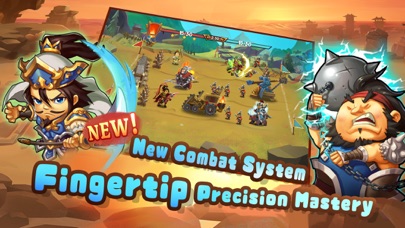
1) Nuevo sistema de combate
Asedio, defensa, ataque y emocionante sistema de combate, modo de operación simple y emocionante, te brindan una experiencia de combate sin precedentes.
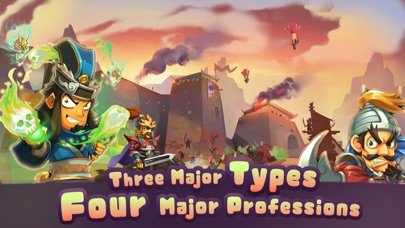
2) Tres tipos de tarjetas:
Cartas militares, cartas de equipo, cartas tácticas, cooperan entre sí, se controlan entre sí y el campo de batalla cambia rápidamente, todo bajo control.
3) Cuatro ocupaciones principales:
Paso, paseo, reverencia, texto, las características son obvias y la jugabilidad se puede cambiar.
4) ¡Trama de tres líneas!
Las fuerzas de Wei, Shu y Wu tienen sus propias tramas, lo que te brinda una experiencia diferente de la historia de los Tres Reinos. Sigue el linaje histórico de tres dinastías.
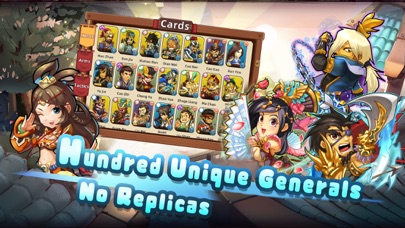
5) ¡100 generales!
Se incluyen más de 100 generales conocidos de una sola vez, y hay una introducción detallada, ¡y el juego no está mal!
4) ¡Cuatro modos!
Historia, Libertad, Desafío y Unificación son cuatro modos innovadores que te esperan para luchar.
6) ¡Tesoros exclusivos!
Exclusivo para héroes, con un poderoso sistema de tesoros, ¡haz que tus batallas sean más flexibles!
7) ¡Juego en pantalla completa!
La interfaz general del juego es ordenada y limpia, y está meticulosamente diseñada, lo que te permite volver a la experiencia de juego más original.
###¡Recuerda cargar tus partidas guardadas en el menú de configuración para evitar perder el progreso!
【Contáctenos】
correo electrónico: [email protected]
Facebook:https://www.facebook.com/groups/460771319627011
- iPhone o iPad con o sin Jailbreak.
- Sideloadly u otras alternativas.
- Ordenador con Windows/macOS/Linux e iTunes instalado.
PASO 1: Descargue el archivo .IPA pre-modificado desde el enlace de arriba a su ordenador. Para descargarlo desde la iOSGods App, consulte nuestro Tutorial de descarga del IPA desde la iOSGods App, que incluye un ejemplo en vídeo.
PASO 2: Descargue Sideloadly e instálelo en su Windows o Mac.
PASO 3: Abra Sideloadly en su ordenador, conecte su dispositivo iOS y espere hasta que el nombre del dispositivo aparezca en Sideloadly.
PASO 4: Una vez que su iDevice sea reconocido, arrastre el archivo .IPA modificado que descargó y suéltelo en la aplicación Sideloadly.
PASO 5: Introduzca el correo electrónico de su Apple Account y, a continuación, pulse «Start». Le pedirá que introduzca su contraseña. Proporcione la información solicitada.
PASO 6: Espere a que Sideloadly termine de hacer sideload/instalar el IPA modificado. Si surgen problemas durante la instalación, por favor lea la nota a continuación.
PASO 7: Una vez completada la instalación y al ver la app en la pantalla de inicio, deberá ir a Ajustes → General → Perfiles / VPN y Gestión de Dispositivos. Una vez allí, toque el correo electrónico que introdujo en el paso 6 y, después, toque en «Confiar en [email protected]».
PASO 8: Ahora vaya a la pantalla de inicio y abra la app recién instalada; todo debería funcionar correctamente. Es posible que tenga que seguir instrucciones adicionales específicas de cada app dentro del popup del hack en el juego.
NOTA: En iOS/iPadOS 16 y posteriores, debe activar el Modo Desarrollador. Para cuentas gratuitas de Apple Developer, deberá repetir este proceso cada 7 días. Si tiene alguna pregunta o problema, lea nuestra sección de Preguntas Frecuentes de Sideloadly del tema.