Accesso richiesto
Accedi con il tuo account iOSGods per continuare.
Accedi con il tuo account iOSGods per continuare.
Sblocca le funzioni premium di studio biblico in questo Mod IPA gratuito di Olive Tree, l'app Bibbia di fiducia scaricata oltre 8 milioni di volte in tutto il mondo. Accedi a commentari, strumenti di lingua originale e risorse di esperti insieme al testo delle Scritture per una comprensione più profonda, il tutto offline, in qualsiasi momento. Nota: alcuni contenuti premium potrebbero avere protezione DRM e potrebbero non essere accessibili in questo hack.
- Premium → alcuni contenuti con protezione DRM potrebbero non essere accessibili
Questa app include anche iGameGod, che ti offre accesso ad Auto Touch per automatizzare attività ripetitive, App Speed Manager per regolare la velocità di gioco, modifica dei valori con Memory Engine e altri potenti strumenti per giochi iOS.
Scarica Bible App - Read & Study Daily iOS Mod IPA dai link sopra. Tocca il pulsante di installazione e segui le istruzioni per installare questo hack iOS sul tuo iPhone, iPad o Mac con Apple Silicon.
Hai bisogno di altro aiuto? Consulta le nostre Domande frequenti sull'app iOSGods per risposte dettagliate e consigli per la risoluzione dei problemi.
What if your Bible app actually helped you understand what you're reading?
Downloaded over 8M times around the world with over 400,000 5 star reviews, Olive Tree is the free Bible study app that puts trusted commentaries, original language tools, and expert resources right alongside your Bible text — giving you the clarity to study Scripture with real confidence. Everything downloads to your device so you can study offline, anytime.
Most Bible apps just give you the text and leave you on your own. Olive Tree is different. Our unique Study Center tracks with what you're reading and automatically syncs to show you relevant information from the resources in your personal library — no searching required. Whether you're studying for yourself, leading a group, or preparing to teach, you need tools that go as deep as you want to.
UNDERSTAND WHAT YOU'RE READING
- Use the Resource Guide to reference relevant commentary and study notes.
- Compare translations side by side with the parallel feature.
- View cross-references and see thematic connections throughout the Bible.
- Use Greek and Hebrew tools to study the Scripture’s original languages.
BUILD A CONSISTENT BIBLE STUDY HABIT
- Choose from dozens of reading plans — short devotionals to year-long Bible journeys.
- Set daily reminders and track your progress.
- Pick up where you left off on any device.
- 5 free major Bible translations including ESV, NIV, KJV, NKJV, CSB and more.
TAKE YOUR STUDY ANYWHERE
- Offline Bibles: Download Bibles and study resources for full offline access
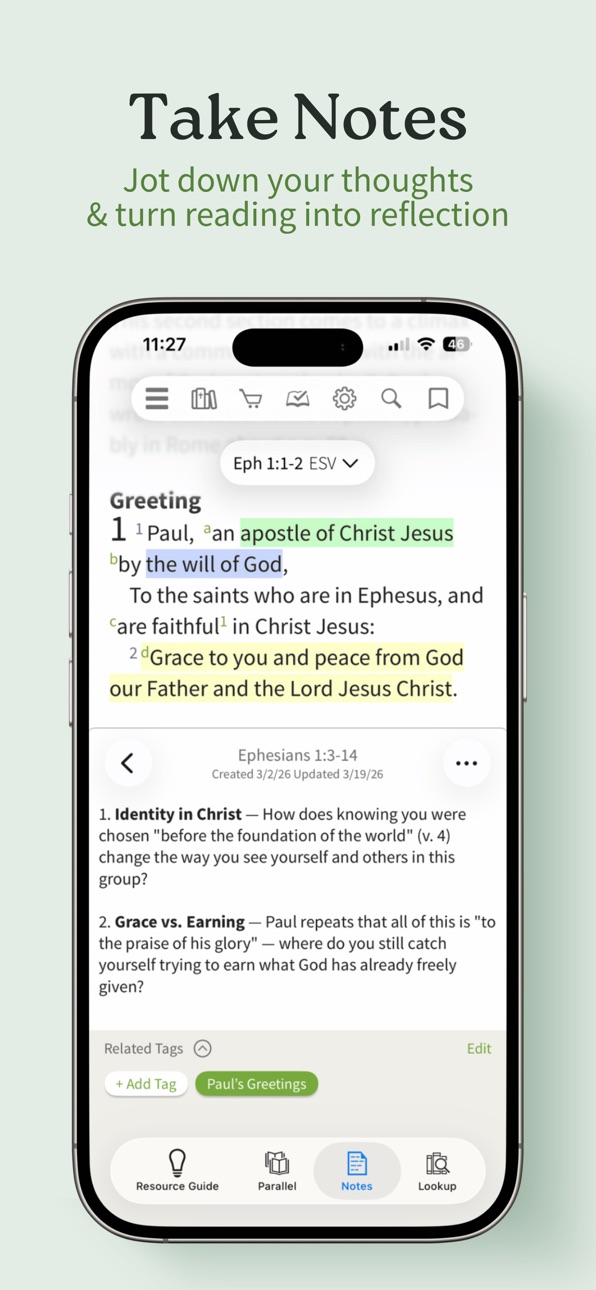
- Highlight, bookmark, and take notes as you study.
- Syncs seamlessly across iPhone, iPad, Mac, and more.
LISTEN AND LEARN ON THE GO
- Listen to Audio Bibles in popular translations — narrated or dramatized
- Follow along in the text while you listen.
- Free BibleProject videos for every book of the Bible.
GET STARTED WITH GUIDANCE
- Not sure where to start? Get one of our Bible Study Pack subscriptions with hand-picked tools and step-by-step training.
- Thousands of commentaries, study Bibles, devotionals, and more in the Olive Tree store.
- Buy individual resources or subscribe — affordable options to fit your style.
Whether you're a first-time reader, a small group leader, or a pastor preparing a message, Olive Tree meets you where you are and helps you go further.
SUBSCRIPTION PAYMENT INFORMATION
Olive Tree subscriptions will be charged to your Apple ID account at the confirmation of purchase and/or completion of a free trial. Subscription automatically renews unless it is canceled at least 24 hours before the end of the free trial or current period. Your account will be charged for renewal within 24 hours prior to the end of the current period. You can manage and cancel your subscriptions by going to your account settings on the App Store after purchase.
End-user license agreement: https://www.olivetree.com/press/privacy.php#eula
Terms of use: https://www.olivetree.com/press/privacy.php#terms
Privacy policy: https://www.olivetree.com/press/privacy.php
Screenshot © rispettivi proprietari · App Store


iOSGods non è affiliata, approvata né sponsorizzata da Apple Inc., Google LLC o dagli sviluppatori delle app elencate qui. Apple, iOS e App Store sono marchi di Apple Inc. Android e Google Play sono marchi di Google LLC. Tutti gli altri nomi delle app, icone, immagini e marchi appartengono ai rispettivi proprietari.

- iPhone o iPad non jailbroken/jailed oppure jailbroken.
- Sideloadly o alternative.
- Computer con Windows/macOS/Linux con iTunes installato.
PASSO 1: Scarica il file .IPA pre-modificato dal link sopra sul tuo computer. Per scaricarlo dall'iOSGods App, consulta il nostro Tutorial download IPA dell'iOSGods App, che include un esempio video.
PASSO 2: Scarica Sideloadly e installalo sul tuo Windows o Mac.
PASSO 3: Apri Sideloadly sul tuo computer, collega il tuo dispositivo iOS e attendi finché il nome del dispositivo non appare in Sideloadly.
PASSO 4: Una volta riconosciuto il tuo iDevice, trascina il file .IPA moddato che hai scaricato e rilascialo nell'applicazione Sideloadly.
PASSO 5: Inserisci l'email del tuo Apple Account, poi premi “Start”. Ti verrà quindi chiesto di inserire la password. Procedi e fornisci le informazioni richieste.
PASSO 6: Attendi che Sideloadly completi il sideload/installazione dell'IPA modificata. Se ci sono problemi durante l'installazione, leggi la nota qui sotto.
PASSO 7: Una volta completata l'installazione e vista l'app sulla schermata Home, dovrai andare in Impostazioni → Generali → Profili / Gestione VPN e dispositivi. Una volta lì, tocca l'email inserita al passo 6 e poi tocca “Autorizza [email protected]”.
PASSO 8: Ora vai sulla schermata Home e apri l'app appena installata: tutto dovrebbe funzionare correttamente. Potrebbe essere necessario seguire ulteriori istruzioni specifiche all'interno del popup dell'hack nel gioco.
NOTA: Per iOS/iPadOS 16 e versioni successive, devi attivare la Modalità sviluppatore. Per gli account Apple Developer gratuiti, dovrai ripetere questa procedura ogni 7 giorni. Se hai domande o problemi, leggi la nostra sezione FAQ Sideloadly del topic.
Game Name iOS Mod IPA is an action adventure game enhanced with powerful gameplay boosts and quality-of-life improvements. Win battles faster, earn rewards quicker, and enjoy uninterrupted play without ads.
- Unlimited Gold - spend freely to unlock premium content
- Damage Multiplier - deal significantly more damage in combat
- Defense Multiplier - take less damage and survive longer
- Reward Multiplier - earn more loot from every battle
- Max Level - instantly reach the highest player rank
- No Ads - play without interruptions or advertisements
This app also comes with iGameGod, giving you access to Auto Touch to automate repetitive tasks, App Speed Manager for adjustable gameplay speed, Memory Engine value editing, and more powerful iOS game tools.
Scarica Game Name Mod IPA dai link sopra. Tocca il pulsante di installazione e segui le istruzioni per installare questo hack iOS sul tuo iPhone, iPad o Mac con Apple Silicon.
Hai bisogno di altro aiuto Consulta le nostre Domande frequenti sull'app iOSGods per risposte dettagliate e consigli per la risoluzione dei problemi.
----------------------------------------------------------
--------------------------------------------------