تسجيل الدخول مطلوب
سجّل الدخول بحساب iOSGods للمتابعة.
سجّل الدخول بحساب iOSGods للمتابعة.
افتح تلميحات غير محدودة وعمليات شراء داخل التطبيق المجانية باستخدام Shadowmatic Hack Mod IPA، مما يتيح لك الانتقال بسهولة عبر كل لغز ظل دون إنفاق أموال حقيقية. تتحدى لعبة الألغاز الحائزة على جائزة Apple Design Award هذه قدرتك على تدوير الأشياء المجردة لمطابقة الظلال، والآن يمكنك الاستمتاع بكل محتوياتها مجانًا عبر بيئات العوالم القديمة والموسيقى والفضاء.
- تلميحات غير محدودة → حل الألغاز بالسرعة التي تناسبك
- عمليات شراء داخل التطبيق مجانية → الوصول إلى جميع عمليات الشراء داخل التطبيق بدون دفع
يأتي هذا التطبيق أيضًا مع iGameGod، مما يتيح لك الوصول إلى Auto Touch لأتمتة المهام المتكررة، وApp Speed Manager لضبط سرعة اللعب، وتعديل القيم عبر Memory Engine، والمزيد من أدوات ألعاب iOS القوية.
قم بتنزيل Shadowmatic Hack modded IPA من الروابط أعلاه. اضغط على زر التثبيت واتبع التعليمات لتثبيت هذا التعديل لـ iOS على iPhone أو iPad أو Apple Silicon.
هل تحتاج إلى مزيد من المساعدة؟ راجع الأسئلة الشائعة لتطبيق iOSGods للحصول على إجابات مفصلة ونصائح لاستكشاف الأخطاء.
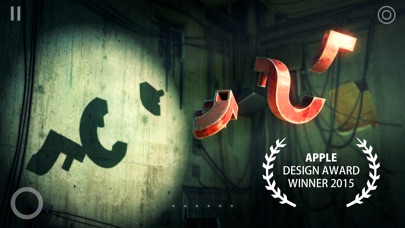
** Apple Design Award Winner **
** App Store Best of 2015 **
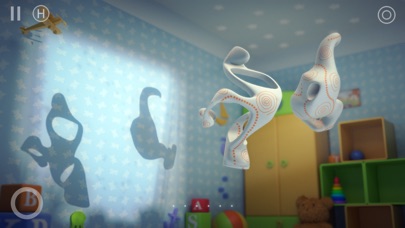
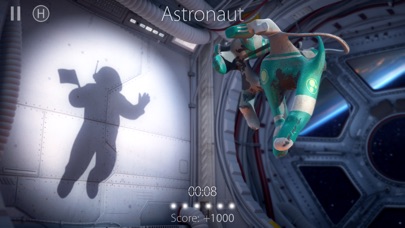
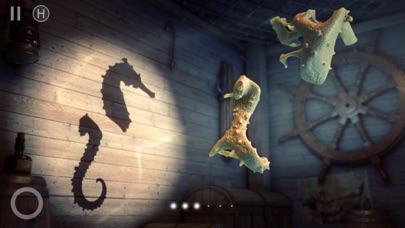
Shadowmatic is an imagination-stirring puzzle where you rotate abstract objects in a spotlight to find recognizable silhouettes in projected shadows, relevant to the surrounding environment.
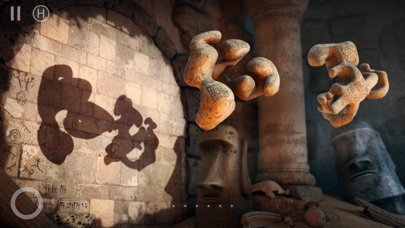
“Other Worlds” is a chapter of Shadowmatic with over 30 levels in 3 unique thematic environments: Ancient Worlds, Music and Space. The chapter is available as a separate purchase.
The game combines stunning visuals with relaxing and captivating gameplay.
On your journey to discover the right solution you will stumble upon many unexpected and infinitely varied silhouettes.
The game features 15 rooms, each flavored with unique concept, atmosphere, and music.
- - - - - - - - - -
“Simple to the point of beauty, and beautiful to the point of becoming a work of art, this is a game you won't want to win, because you won't want the experience to end” - Pocket Gamer
“It's fun, it's unique, and it's the perfect type of game to show off to people who typically don't play video games, as it's almost like an interactive piece of art” - Touch Arcade
“It’s always awesome to see a breathtaking, unique, and thoroughly innovative puzzle game pop up on the App Store” - Macworld
“Full of whimsical puzzles and thoughtful designs, Shadowmatic is a delightful and captivating iOS game” - CNET
“'Fantastically original': Shadowmatic works modern-day wonders with the ancient Chinese art of shadow puppetry” - The Guardian
“It’s like a mind-bending shadow-puppet spectacle” - TIME
“This game requires you to look at things a little differently” - Washington Post
- - - - - - - - - -
Hints.
The game includes a system of hints. To enjoy the game to its fullest, however, we recommend resorting to them on rare occasions only.
Assistant Button.
The Assistant button in the upper right corner will help you solve the puzzle by gradually rotating the objects in the correct direction. When you press the button, Hint-Points are used
Music.
Every room in the game features its own music arrangement, adding up to the distinctive atmosphere and feel in each. The music is best experienced with headphones, and is available separately on iTunes.
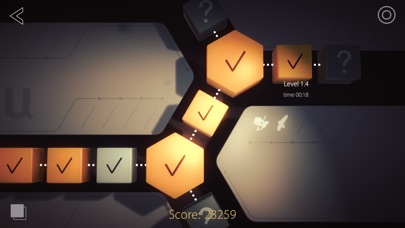
-- More than 130 levels in 15 unique environments
-- Gorgeous graphics
-- Secondary objectives
-- Assistant Button
-- Nonlinear level progression
-- 3D parallax view
-- Achievements
-- Arcade Mode
-- Synchronization with Apple TV
** The game is optimized for every iOS device separately (starting from iPhone 5s and newer), however it's best experienced on the latest devices.
Follow us on Twitter: @ShadowmaticGame
Join us on Facebook: @Shadowmatic
Follow us on Instagram: @Shadowmatic
Questions? Shoot us an email: [email protected]
-----------------------------------------------------
Triada Studio is a computer graphics and animation studio with over 20 years of industry experience. Shadowmatic is the company’s first project that bridges its vast computer graphics experience with an experimental in-house 3D engine.
- iPhone أو iPad بجيلبريك أو بدون جيلبريك.
- Sideloadly أو بدائلها.
- كمبيوتر يعمل بنظام Windows/macOS/Linux مع تثبيت iTunes.
الخطوة 1: قم بتنزيل ملف .IPA المعدّل مسبقًا من الرابط أعلاه إلى الكمبيوتر الخاص بك. للتنزيل من تطبيق iOSGods App، اطلع على دليل تنزيل IPA من تطبيق iOSGods App الذي يتضمن مثالًا بالفيديو.
الخطوة 2: قم بتنزيل Sideloadly وتثبيته على جهاز Windows أو Mac.
الخطوة 3: افتح Sideloadly على الكمبيوتر، ووصّل جهاز iOS الخاص بك، وانتظر حتى يظهر اسم جهازك داخل Sideloadly.
الخطوة 4: بمجرد التعرّف على جهاز iDevice الخاص بك، اسحب ملف .IPA المعدّل الذي قمت بتنزيله وأفلِته داخل تطبيق Sideloadly.
الخطوة 5: أدخل البريد الإلكتروني لحساب Apple Account الخاص بك، ثم اضغط على «Start». سيُطلب منك بعد ذلك إدخال كلمة المرور. تابع وأدخل المعلومات المطلوبة.
الخطوة 6: انتظر حتى ينتهي Sideloadly من تحميل/تثبيت ملف IPA المعدّل. في حال واجهت أي مشاكل أثناء التثبيت، يرجى قراءة الملاحظة أدناه.
الخطوة 7: بعد اكتمال التثبيت ورؤية التطبيق على الشاشة الرئيسية، انتقل إلى Settings → General → Profiles / VPN & Device Management. ثم اضغط على البريد الإلكتروني الذي أدخلته في الخطوة 6، ثم اضغط على «الوثوق بـ [email protected]».
الخطوة 8: الآن انتقل إلى الشاشة الرئيسية وافتح التطبيق الذي تم تثبيته للتو وسيعمل كل شيء بشكل صحيح. قد تحتاج إلى اتباع تعليمات إضافية خاصة بكل تطبيق داخل النافذة المنبثقة للتعديل أثناء اللعب.
ملاحظة: بدءًا من iOS/iPadOS 16 وما بعده، يجب تفعيل وضع المطور (Developer Mode). بالنسبة لحسابات Apple Developer المجانية، ستحتاج إلى تكرار هذه العملية كل 7 أيام. إذا كانت لديك أي أسئلة أو مشاكل، يرجى قراءة قسم الأسئلة الشائعة حول Sideloadly في الموضوع.