ต้องเข้าสู่ระบบ
เข้าสู่ระบบด้วยบัญชี iOSGods เพื่อดำเนินการต่อ
Free Game
Hacked version can be found here: https://app.iosgods.com/store/appdetails/1080-grand-theft-auto-san-andreas-hack
แอปนี้มาพร้อมกับ iGameGod ซึ่งช่วยให้คุณเข้าถึง Auto Touch สำหรับการทำงานซ้ำ ๆ โดยอัตโนมัติ, App Speed Manager สำหรับปรับความเร็วของเกม, การแก้ไขค่าด้วย Memory Engine และเครื่องมือสำหรับเกม iOS ที่ทรงพลังอื่น ๆ อีกมากมาย
ดาวน์โหลด Grand Theft Auto: San Andreas modded IPA จากลิงก์ด้านบน แตะปุ่มติดตั้งและทำตามคำแนะนำบนหน้าจอเพื่อติดตั้งแฮ็กแอป iOS นี้บน iPhone, iPad หรือ Apple Silicon
ต้องการความช่วยเหลือเพิ่มเติม? ดู คำถามที่พบบ่อยของแอป iOSGods สำหรับคำตอบโดยละเอียดและเคล็ดลับการแก้ไขปัญหา
***PLEASE NOTE: This game is officially supported on the following devices only: iPhone 4s, 5, 5s, 5c, 6, 6s, 6 Plus, SE, 7, 7 Plus, iPod Touch 6th Gen, iPad Mini 1, 2, 3 & 4, iPad 2, 3rd Gen, 4th Gen, iPad Air 1 & 2, and iPad Pro.***
Five years ago, Carl Johnson escaped from the pressures of life in Los Santos, San Andreas, a city tearing itself apart with gang trouble, drugs and corruption. Where filmstars and millionaires do their best to avoid the dealers and gangbangers.
Now, it’s the early 90’s. Carl’s got to go home. His mother has been murdered, his family has fallen apart and his childhood friends are all heading towards disaster.
On his return to the neighborhood, a couple of corrupt cops frame him for homicide. CJ is forced on a journey that takes him across the entire state of San Andreas, to save his family and to take control of the streets.
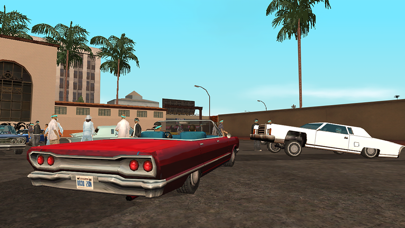
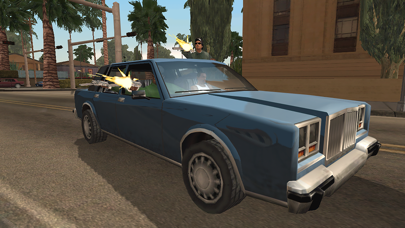
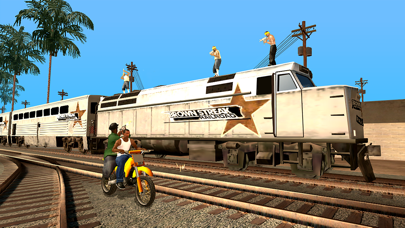
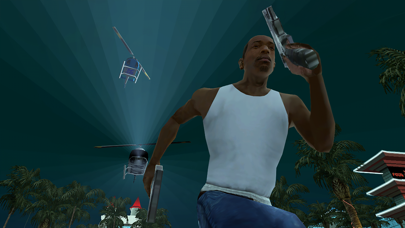
Rockstar Games brings its biggest release to mobile yet with a vast open-world covering the state of San Andreas and its three major cities – Los Santos, San Fierro and Las Venturas – with enhanced visual fidelity and over 70 hours of gameplay.
Grand Theft Auto: San Andreas features:
• Remastered, high-resolution graphics built specifically for mobile including lighting enhancements, an enriched color palette and improved character models.
• Enhanced for the iPhone 5 series and iPad 4th Gen and above with dynamic detailed shadows and real-time environmental reflections.
• Physical controller support for all Made for iOS controllers.
• Cloud save support for playing across all your iOS devices for Rockstar Social Club Members.
• Dual analog stick controls for full camera and movement control.
• Three different control schemes and customizable controls with contextual options to display buttons only when you need them.
Languages Supported: English, French, Italian, German, Spanish, Russian and Japanese.
*To listen to your custom playlist, simply create a playlist titled “GTASA”, launch the game, and select the radio station “MIXTAPE”.
Mobile Version developed by War Drum Studios
www.wardrumstudios.com
Find out more:
www.rockstargames.com
See videos:
www.youtube.com/rockstargames
Follow us:
www.facebook.com/rockstargames
www.twitter.com/rockstargames
- iPhone หรือ iPad ที่ไม่ได้เจลเบรก/ไม่ได้เจลเบรก หรือเจลเบรกแล้ว
- Sideloadly หรือทางเลือกอื่น
- คอมพิวเตอร์ที่ใช้ Windows/macOS/Linux และติดตั้ง iTunes ไว้
ขั้นตอนที่ 1: ดาวน์โหลดไฟล์ .IPA ที่แฮกไว้ล่วงหน้าจากลิงก์ด้านบนลงในคอมพิวเตอร์ของคุณ หากต้องการดาวน์โหลดจากแอป iOSGods โปรดดู วิธีดาวน์โหลด IPA ในแอป iOSGods ซึ่งมีตัวอย่างวิดีโอประกอบ
ขั้นตอนที่ 2: ดาวน์โหลด Sideloadly แล้วติดตั้งบน Windows หรือ Mac ของคุณ
ขั้นตอนที่ 3: เปิด Sideloadly บนคอมพิวเตอร์ เชื่อมต่ออุปกรณ์ iOS แล้วรอจนกว่าชื่ออุปกรณ์ของคุณจะปรากฏใน Sideloadly
ขั้นตอนที่ 4: เมื่อ iDevice ของคุณถูกตรวจพบแล้ว ให้ลากไฟล์ .IPA ที่ม็อดมาวางลงในโปรแกรม Sideloadly
ขั้นตอนที่ 5: กรอกอีเมล Apple Account ของคุณ จากนั้นกด "Start" ระบบจะถามรหัสผ่าน กรอกข้อมูลที่จำเป็นให้เรียบร้อย
ขั้นตอนที่ 6: รอจนกว่า Sideloadly จะ sideload/ติดตั้งไฟล์ IPA ที่แฮกเสร็จ หากเกิดปัญหาระหว่างติดตั้ง โปรดอ่านหมายเหตุด้านล่าง
ขั้นตอนที่ 7: เมื่อการติดตั้งเสร็จสิ้นและเห็นแอปบนหน้าจอหลักแล้ว ให้ไปที่ การตั้งค่า → ทั่วไป → โปรไฟล์ / VPN และการจัดการอุปกรณ์ จากนั้นแตะที่อีเมลที่คุณกรอกในขั้นตอนที่ 6 แล้วแตะ "เชื่อถือ [email protected]"
ขั้นตอนที่ 8: จากนั้นไปที่หน้าจอหลักและเปิดแอปที่ติดตั้งใหม่ ทุกอย่างควรทำงานได้ปกติ คุณอาจต้องทำตามคำแนะนำเพิ่มเติมเฉพาะแอปในป๊อปอัปของม็อดในเกม
หมายเหตุ: สำหรับ iOS/iPadOS 16 ขึ้นไป คุณต้อง เปิดโหมดนักพัฒนา (Developer Mode) สำหรับบัญชี Apple Developer แบบฟรี คุณต้องทำขั้นตอนนี้ซ้ำทุก 7 วัน หากมีคำถามหรือพบปัญหา โปรดอ่าน หัวข้อ FAQ ของ Sideloadly ในกระทู้